
-
Yep, I had no problems with this -- once I figured out enabling POP3

- set up
forum@yourdiscoursedomain.comas a mailbox - enable pop3
- set the app as the owner of this mailbox
Want unique addresses for categories? Set up aliases for
forum@yourdiscoursedomain.comlikemyothercategory@yourdiscoursedomain.comIn Discourse, you'll need to enable
email in
For initial Discourse setup, I also have better instructions:
Rather than resetting the email address, you can / should reset the password -- which you need to do right away. Run the
rake admin:createtask from the Terminal for the root / admin account.Hit "Y" to reset password and change the password.
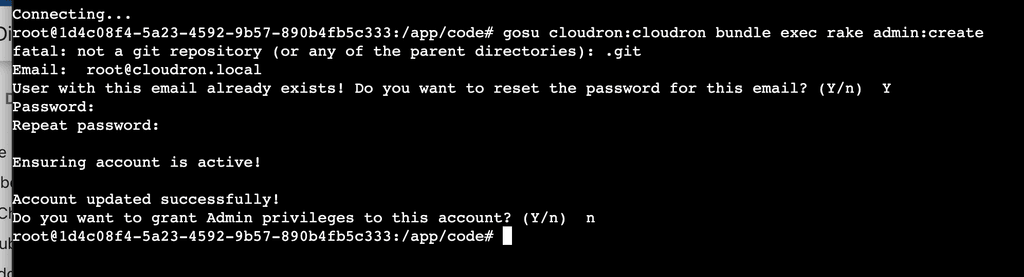
The account already is an admin, and I didn't bother changing the email because I really only see it as a backup account.
Once I logged in with OIDC with my Cloudron account, I followed this same process to make my account an admin account -- same
rake admin:createcommand, say "Y" to making it an Admin, but don't change password.I don't know how to contribute better setup instructions -- are they in git so I can send a PR?
- set up
-
Yep, I had no problems with this -- once I figured out enabling POP3
- set up
forum@yourdiscoursedomain.comas a mailbox - enable pop3
- set the app as the owner of this mailbox
Want unique addresses for categories? Set up aliases for
forum@yourdiscoursedomain.comlikemyothercategory@yourdiscoursedomain.comIn Discourse, you'll need to enable
email inFor initial Discourse setup, I also have better instructions:
Rather than resetting the email address, you can / should reset the password -- which you need to do right away. Run the
rake admin:createtask from the Terminal for the root / admin account.Hit "Y" to reset password and change the password.
The account already is an admin, and I didn't bother changing the email because I really only see it as a backup account.
Once I logged in with OIDC with my Cloudron account, I followed this same process to make my account an admin account -- same
rake admin:createcommand, say "Y" to making it an Admin, but don't change password.I don't know how to contribute better setup instructions -- are they in git so I can send a PR?
@bmann you can submit PRs here - https://git.cloudron.io/cloudron/docs/
Discourse docs are at https://git.cloudron.io/cloudron/docs/-/blob/master/knowledgebase/docs/apps/discourse.md?ref_type=heads
- set up
-
Yep, I had no problems with this -- once I figured out enabling POP3
- set up
forum@yourdiscoursedomain.comas a mailbox - enable pop3
- set the app as the owner of this mailbox
Want unique addresses for categories? Set up aliases for
forum@yourdiscoursedomain.comlikemyothercategory@yourdiscoursedomain.comIn Discourse, you'll need to enable
email inFor initial Discourse setup, I also have better instructions:
Rather than resetting the email address, you can / should reset the password -- which you need to do right away. Run the
rake admin:createtask from the Terminal for the root / admin account.Hit "Y" to reset password and change the password.
The account already is an admin, and I didn't bother changing the email because I really only see it as a backup account.
Once I logged in with OIDC with my Cloudron account, I followed this same process to make my account an admin account -- same
rake admin:createcommand, say "Y" to making it an Admin, but don't change password.I don't know how to contribute better setup instructions -- are they in git so I can send a PR?
@bmann thanks for your input on this, very helpful! I think I'm correct that you never got around to submitting a PR to improve the docs around this?


- set up




Hello! It looks like you're interested in this conversation, but you don't have an account yet.
Getting fed up of having to scroll through the same posts each visit? When you register for an account, you'll always come back to exactly where you were before, and choose to be notified of new replies (either via email, or push notification). You'll also be able to save bookmarks and upvote posts to show your appreciation to other community members.
With your input, this post could be even better 💗
Register Login