Cloudron makes it easy to run web apps like WordPress, Nextcloud, GitLab on your server. Find out more or install now.


Skip to content
  • Categories
  • Recent
  • Tags
  • Popular
  • Bookmarks
  • Search
Skins
  • Light
  • Brite
  • Cerulean
  • Cosmo
  • Flatly
  • Journal
  • Litera
  • Lumen
  • Lux
  • Materia
  • Minty
  • Morph
  • Pulse
  • Sandstone
  • Simplex
  • Sketchy
  • Spacelab
  • United
  • Yeti
  • Zephyr
  • Dark
  • Cyborg
  • Darkly
  • Quartz
  • Slate
  • Solar
  • Superhero
  • Vapor

  • Default (No Skin)
  • No Skin
Collapse
Brand Logo

Cloudron Forum

Apps - Status | Demo | Docs | Install
  1. Cloudron Forum
  2. Support
  3. Unable to change avatar

Unable to change avatar

Scheduled Pinned Locked Moved Solved Support
avatar
5 Posts 2 Posters 2.1k Views 2 Watching
  • Oldest to Newest
  • Newest to Oldest
  • Most Votes
Reply
  • Reply as topic
Log in to reply
This topic has been deleted. Only users with topic management privileges can see it.
  • klawitterbK Offline
    klawitterbK Offline
    klawitterb
    wrote on last edited by girish
    #1

    Hi,

    I'm trying to update my profile avatar but on save the following JS error is thrown:

    7f36c4d3-da6c-455c-98ef-6578bf60ff46-image.png

    Anything I can do about this?

    Thanks!

    girishG 1 Reply Last reply
    0
    • klawitterbK klawitterb

      Hi,

      I'm trying to update my profile avatar but on save the following JS error is thrown:
      7f36c4d3-da6c-455c-98ef-6578bf60ff46-image.png

      Anything I can do about this?

      Thanks!

      girishG Offline
      girishG Offline
      girish
      Staff
      wrote on last edited by
      #2

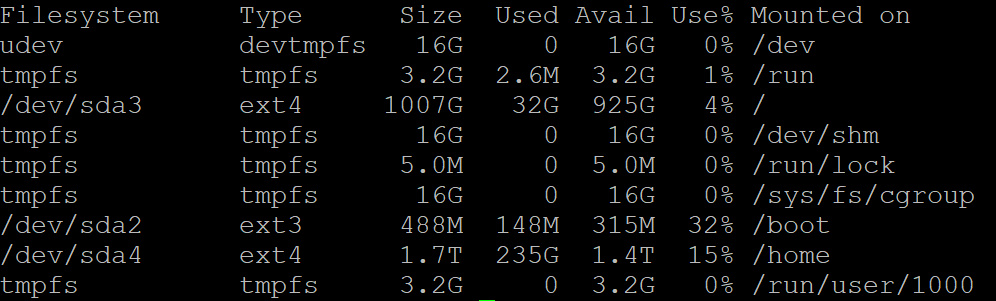
      @klawitterb It seems rename() is not allowed on your filesystem/server. Is there anything special about your setup? What file system are you using? Maybe you can give us df -h output.

      What's happening is the avatar gets uploaded to /tmp. And then it gets renamed from there to profile. But the rename system call is failing.

      klawitterbK 1 Reply Last reply
      0
      • girishG girish

        @klawitterb It seems rename() is not allowed on your filesystem/server. Is there anything special about your setup? What file system are you using? Maybe you can give us df -h output.

        What's happening is the avatar gets uploaded to /tmp. And then it gets renamed from there to profile. But the rename system call is failing.

        klawitterbK Offline
        klawitterbK Offline
        klawitterb
        wrote on last edited by
        #3

        @girish hope this helps:
        61c9405f-7c46-4ea7-ad49-caee24da7291-image.png

        girishG 1 Reply Last reply
        0
        • klawitterbK klawitterb

          @girish hope this helps:
          61c9405f-7c46-4ea7-ad49-caee24da7291-image.png

          girishG Offline
          girishG Offline
          girish
          Staff
          wrote on last edited by girish
          #4

          @klawitterb Ah, I see. /tmp (as part of /) and /home are in different partitions.

          I have made a fix for the next release (https://git.cloudron.io/cloudron/box/-/commit/370485eee668a08c4b63642c5afe6a1905cae3ee). You can fix it like so:

          • Edit /home/yellowtent/box/src/users.js. In line 828 or so, inside setAvatar function, there is a fs.rename. Just change it to fs.copyFile. The actual patch also removes the temp file but you can ignore the unlink stuff.
          • systemctl restart box
          klawitterbK 1 Reply Last reply
          0
          • girishG girish

            @klawitterb Ah, I see. /tmp (as part of /) and /home are in different partitions.

            I have made a fix for the next release (https://git.cloudron.io/cloudron/box/-/commit/370485eee668a08c4b63642c5afe6a1905cae3ee). You can fix it like so:

            • Edit /home/yellowtent/box/src/users.js. In line 828 or so, inside setAvatar function, there is a fs.rename. Just change it to fs.copyFile. The actual patch also removes the temp file but you can ignore the unlink stuff.
            • systemctl restart box
            klawitterbK Offline
            klawitterbK Offline
            klawitterb
            wrote on last edited by
            #5

            @girish makes sense 🙂

            Your workaround worked like a charm, thanks!

            1 Reply Last reply
            0

            Hello! It looks like you're interested in this conversation, but you don't have an account yet.

            Getting fed up of having to scroll through the same posts each visit? When you register for an account, you'll always come back to exactly where you were before, and choose to be notified of new replies (either via email, or push notification). You'll also be able to save bookmarks and upvote posts to show your appreciation to other community members.

            With your input, this post could be even better 💗

            Register Login
            Reply
            • Reply as topic
            Log in to reply
            • Oldest to Newest
            • Newest to Oldest
            • Most Votes


            • Login

            • Don't have an account? Register

            • Login or register to search.
            • First post
              Last post
            0
            • Categories
            • Recent
            • Tags
            • Popular
            • Bookmarks
            • Search