Cloudron makes it easy to run web apps like WordPress, Nextcloud, GitLab on your server. Find out more or install now.


Skip to content
  • Categories
  • Recent
  • Tags
  • Popular
  • Bookmarks
  • Search
Skins
  • Light
  • Brite
  • Cerulean
  • Cosmo
  • Flatly
  • Journal
  • Litera
  • Lumen
  • Lux
  • Materia
  • Minty
  • Morph
  • Pulse
  • Sandstone
  • Simplex
  • Sketchy
  • Spacelab
  • United
  • Yeti
  • Zephyr
  • Dark
  • Cyborg
  • Darkly
  • Quartz
  • Slate
  • Solar
  • Superhero
  • Vapor

  • Default (No Skin)
  • No Skin
Collapse
Brand Logo

Cloudron Forum

Apps - Status | Demo | Docs | Install
  1. Cloudron Forum
  2. Jirafeau
  3. Jirafeau admin password instructions are ambiguous

Jirafeau admin password instructions are ambiguous

Scheduled Pinned Locked Moved Jirafeau
6 Posts 4 Posters 2.4k Views 4 Watching
  • Oldest to Newest
  • Newest to Oldest
  • Most Votes
Reply
  • Reply as topic
Log in to reply
This topic has been deleted. Only users with topic management privileges can see it.
  • L Offline
    L Offline
    LoudLemur
    wrote on last edited by
    #1

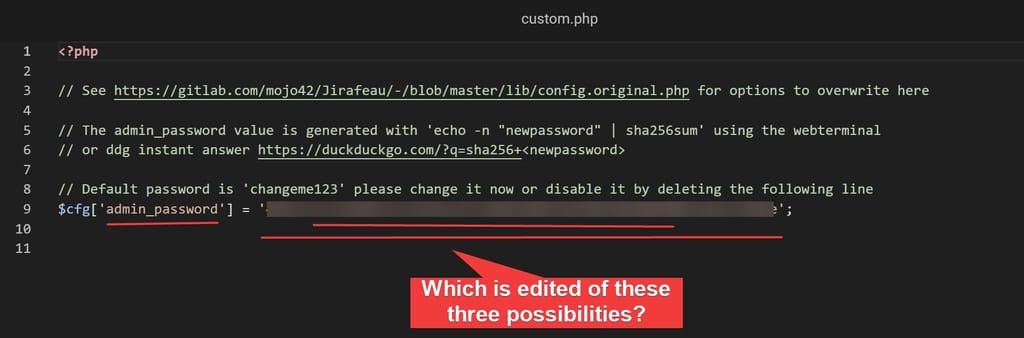
    Please make it more clear which part of the config files needs to be edited by providing a worked example in the first time run section.

    It should be a policy to include a worked example for instructions.

    y0vutCVvFI.jpg

    1 Reply Last reply
    0
    • nebulonN Offline
      nebulonN Offline
      nebulon
      Staff
      wrote on last edited by
      #2

      Unfortunately I don't quite understand your question here.
      The string as in 494a715f7e9b4071aca61bac42ca858a309524e5864f0920030862a4ae7589be is the password changme123 only hashed as described in the other lines of that file.

      1 Reply Last reply
      0
      • jdaviescoatesJ Offline
        jdaviescoatesJ Offline
        jdaviescoates
        wrote on last edited by jdaviescoates
        #3

        I'd agree that @LoudLemur isn't being particularly clear, but I think the point is it isn't at all clear how to update the admin password.

        @LoudLemur basically, what you need to do is:

        1. Chose a new password

        2. Create a sha256 hash of your new password.

        There are a couple of ways to do this.

        You can either use the web terminal (or any terminal) and do:

        echo -n "newpassword" | sha256sum

        OR you could use e.g. DuckDuckGo search like this:

        https://duckduckgo.com/?q=sha256+newpassword

        1. Then, you use the File Manager to edit line 9 in custom.php and change the sha256 hash of changeme123 that is there to the sha256 hash of your new password that you generated in 2.
        $cfg['admin_password'] = '<new sha256 hash of your new password goes here>';
        

        Update: @staff I've added a merge request to add these instructions to the docs https://git.cloudron.io/cloudron/docs/-/merge_requests/42 🙂

        I use Cloudron with Gandi & Hetzner

        nebulonN 1 Reply Last reply
        1
        • jdaviescoatesJ jdaviescoates

          I'd agree that @LoudLemur isn't being particularly clear, but I think the point is it isn't at all clear how to update the admin password.

          @LoudLemur basically, what you need to do is:

          1. Chose a new password

          2. Create a sha256 hash of your new password.

          There are a couple of ways to do this.

          You can either use the web terminal (or any terminal) and do:

          echo -n "newpassword" | sha256sum

          OR you could use e.g. DuckDuckGo search like this:

          https://duckduckgo.com/?q=sha256+newpassword

          1. Then, you use the File Manager to edit line 9 in custom.php and change the sha256 hash of changeme123 that is there to the sha256 hash of your new password that you generated in 2.
          $cfg['admin_password'] = '<new sha256 hash of your new password goes here>';
          

          Update: @staff I've added a merge request to add these instructions to the docs https://git.cloudron.io/cloudron/docs/-/merge_requests/42 🙂

          nebulonN Offline
          nebulonN Offline
          nebulon
          Staff
          wrote on last edited by
          #4

          @jdaviescoates thanks, i have merged your suggestions.

          jdaviescoatesJ 1 Reply Last reply
          2
          • nebulonN nebulon

            @jdaviescoates thanks, i have merged your suggestions.

            jdaviescoatesJ Offline
            jdaviescoatesJ Offline
            jdaviescoates
            wrote on last edited by jdaviescoates
            #5

            @nebulon said in Jirafeau admin password instructions are ambiguous:

            @jdaviescoates thanks, i have merged your suggestions.

            Thanks. I got some failed pipeline email. I've no idea what that means (but I guess it might explain why my suggestions are not yet on https://docs.cloudron.io/apps/jirafeau/ )

            I use Cloudron with Gandi & Hetzner

            girishG 1 Reply Last reply
            0
            • jdaviescoatesJ jdaviescoates

              @nebulon said in Jirafeau admin password instructions are ambiguous:

              @jdaviescoates thanks, i have merged your suggestions.

              Thanks. I got some failed pipeline email. I've no idea what that means (but I guess it might explain why my suggestions are not yet on https://docs.cloudron.io/apps/jirafeau/ )

              girishG Offline
              girishG Offline
              girish
              Staff
              wrote on last edited by
              #6

              @jdaviescoates https://docs.cloudron.io/apps/jirafeau/#change-admin-password

              I removed the DDG suggestion from both the code and also the docs. I don't know how wise it is to send raw password to search engine...

              1 Reply Last reply
              1

              Hello! It looks like you're interested in this conversation, but you don't have an account yet.

              Getting fed up of having to scroll through the same posts each visit? When you register for an account, you'll always come back to exactly where you were before, and choose to be notified of new replies (either via email, or push notification). You'll also be able to save bookmarks and upvote posts to show your appreciation to other community members.

              With your input, this post could be even better 💗

              Register Login
              Reply
              • Reply as topic
              Log in to reply
              • Oldest to Newest
              • Newest to Oldest
              • Most Votes


              • Login

              • Don't have an account? Register

              • Login or register to search.
              • First post
                Last post
              0
              • Categories
              • Recent
              • Tags
              • Popular
              • Bookmarks
              • Search
