Cloudron makes it easy to run web apps like WordPress, Nextcloud, GitLab on your server. Find out more or install now.


Skip to content
  • Categories
  • Recent
  • Tags
  • Popular
  • Bookmarks
  • Search
Skins
  • Light
  • Brite
  • Cerulean
  • Cosmo
  • Flatly
  • Journal
  • Litera
  • Lumen
  • Lux
  • Materia
  • Minty
  • Morph
  • Pulse
  • Sandstone
  • Simplex
  • Sketchy
  • Spacelab
  • United
  • Yeti
  • Zephyr
  • Dark
  • Cyborg
  • Darkly
  • Quartz
  • Slate
  • Solar
  • Superhero
  • Vapor

  • Default (No Skin)
  • No Skin
Collapse
Brand Logo

Cloudron Forum

Apps - Status | Demo | Docs | Install
  1. Cloudron Forum
  2. Uptime Kuma
  3. How to setup email notifications?

How to setup email notifications?

Scheduled Pinned Locked Moved Solved Uptime Kuma
3 Posts 2 Posters 2.0k Views 2 Watching
  • Oldest to Newest
  • Newest to Oldest
  • Most Votes
Reply
  • Reply as topic
Log in to reply
This topic has been deleted. Only users with topic management privileges can see it.
  • H Offline
    H Offline
    hcj-online
    wrote on last edited by
    #1

    Hi there!

    I would like to receive email notifications from Uptime Kuma. However, I have to provide SMTP information and credentials to set them up. What do I need to enter to have cloudron handle these notification emails?

    Thanks,
    Hans

    jdaviescoatesJ 1 Reply Last reply
    1
    • H hcj-online

      Hi there!

      I would like to receive email notifications from Uptime Kuma. However, I have to provide SMTP information and credentials to set them up. What do I need to enter to have cloudron handle these notification emails?

      Thanks,
      Hans

      jdaviescoatesJ Offline
      jdaviescoatesJ Offline
      jdaviescoates
      wrote on last edited by
      #2

      @hcj-online I've not tried this yet, but presumably what you want can be found by

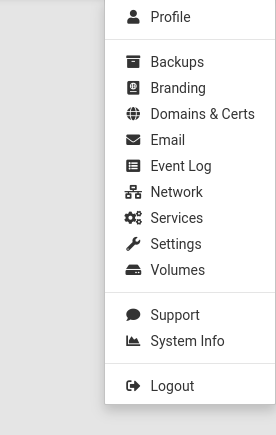
      1. Go to https://my.yourdomain.coop/#/email Email in the menu
      1ddded0a-3ba4-44cc-b0ed-00cf71fbed71-image.png

      1. Click on the little pencil edit icon alongside the domain you want to use

      44ea589a-4fe0-4722-a249-3af61a6338c1-image.png

      1. Click on the little book documentation icon up at the top and choose Configuring Email Clients

      fcd4e877-9b0f-4148-8df5-869aa3561a68-image.png

      See also https://docs.cloudron.io/email/#email-client-configuration

      I use Cloudron with Gandi & Hetzner

      jdaviescoatesJ 1 Reply Last reply
      0
      • jdaviescoatesJ jdaviescoates

        @hcj-online I've not tried this yet, but presumably what you want can be found by

        1. Go to https://my.yourdomain.coop/#/email Email in the menu

        1ddded0a-3ba4-44cc-b0ed-00cf71fbed71-image.png

        1. Click on the little pencil edit icon alongside the domain you want to use

        44ea589a-4fe0-4722-a249-3af61a6338c1-image.png

        1. Click on the little book documentation icon up at the top and choose Configuring Email Clients

        fcd4e877-9b0f-4148-8df5-869aa3561a68-image.png

        See also https://docs.cloudron.io/email/#email-client-configuration

        jdaviescoatesJ Offline
        jdaviescoatesJ Offline
        jdaviescoates
        wrote on last edited by jdaviescoates
        #3

        @jdaviescoates said in How to setup email notifications?:

        @hcj-online I've not tried this yet,

        Just tested it, and yep, that works.

        Note: Hostname = your Outgoing Mail (SMTP) server address (which will be your my. domain unless you've changed it in the settings at the bottom of Email settings at https://my.yourdomain.coop/#/email)

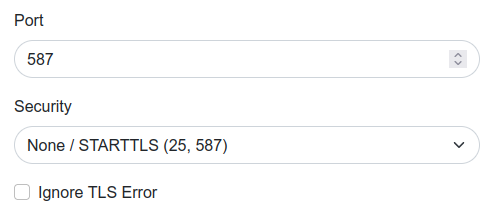
        I put 587 for port and left the security as None / STARTTLS
        7fb6fe6d-9663-4caf-b2ac-01e81fade89a-image.png

        Also, when I tried using e.g. {{STATUS}} etc in the Custom Subject settings it didn't actually work, I just got subjects like this coming through:

        f7226dc4-21c8-495c-99b7-1beba6d6d32e-image.png

        So I recommend leaving that blank to keep the defaults.

        I use Cloudron with Gandi & Hetzner

        1 Reply Last reply
        2
        • nebulonN nebulon marked this topic as a question on
        • nebulonN nebulon has marked this topic as solved on

        Hello! It looks like you're interested in this conversation, but you don't have an account yet.

        Getting fed up of having to scroll through the same posts each visit? When you register for an account, you'll always come back to exactly where you were before, and choose to be notified of new replies (either via email, or push notification). You'll also be able to save bookmarks and upvote posts to show your appreciation to other community members.

        With your input, this post could be even better 💗

        Register Login
        Reply
        • Reply as topic
        Log in to reply
        • Oldest to Newest
        • Newest to Oldest
        • Most Votes


        • Login

        • Don't have an account? Register

        • Login or register to search.
        • First post
          Last post
        0
        • Categories
        • Recent
        • Tags
        • Popular
        • Bookmarks
        • Search
