
@james hi james apparently extension are not working again
J
jcalag
@jcalag
Posts
-
Bitwarden clients no longer working with Vaultwarden -
After updating a specific website credentials and database of the site was missing and it shows that errorJul 28, 2026, 06:47 PM jc Backup integrity check failed { "status": "failed", "taskId": "15551", "backupId": "app_24cdf909-2ab0-4248-8515-ff5682a11fd0_v1.16.20_c57b5c82" }Additional details about the backups
System Cloudron version 9.1.3 Ubuntu version Ubuntu 22.04.5 LTS Linux 5.15.0-186-generic Vendor Linode Product Compute Instance CPU 16 Core "AMD EPYC 7542 32-Core Processor" Memory 33.65 GB RAM & 4.29 GB Swap Uptime 3 hours Cloudron creation time unknown -
After updating a specific website credentials and database of the site was missing and it shows that errorError code when restoring a specific backup:
710/app_helpdesk.gosafersecurity.com_v1.16.17/data/Modules/AdamSmartSearchUI/.git/hooks/sendemail-validate.sample to /home/yellowtent/appsdata/24cdf909-2ab0-4248-8515-ff5682a11fd0/data/Modules/AdamSmartSearchUI/.git/hooks/sendemail-validate.sample"} Jul 28 15:20:32 box:tasks updating task 15456 with: {"percent":65,"message":"Downloading 2026-07-26-160002-710/app_helpdesk.gosafersecurity.com_v1.16.17/data/Modules/AdamSmartSearchUI/.git/hooks/update.sample to /home/yellowtent/appsdata/24cdf909-2ab0-4248-8515-ff5682a11fd0/data/Modules/AdamSmartSearchUI/.git/hooks/update.sample"} Jul 28 15:20:32 box:tasks updating task 15456 with: {"percent":65,"message":"Download finished 2026-07-26-160002-710/app_helpdesk.gosafersecurity.com_v1.16.17/data/Modules/AdamSmartSearchUI/.git/hooks/prepare-commit-msg.sample to /home/yellowtent/appsdata/24cdf909-2ab0-4248-8515-ff5682a11fd0/data/Modules/AdamSmartSearchUI/.git/hooks/prepare-commit-msg.sample"} Jul 28 15:20:32 box:tasks updating task 15456 with: {"percent":65,"message":"Download finished 2026-07-26-160002-710/app_helpdesk.gosafersecurity.com_v1.16.17/data/Modules/AdamSmartSearchUI/.git/hooks/push-to-checkout.sample to /home/yellowtent/appsdata/24cdf909-2ab0-4248-8515-ff5682a11fd0/data/Modules/AdamSmartSearchUI/.git/hooks/push-to-checkout.sample"} Jul 28 15:20:32 box:backupformat/rsync Recreating empty directories in {"localRoot":"/home/yellowtent/appsdata/24cdf909-2ab0-4248-8515-ff5682a11fd0","layout":[]} Jul 28 15:20:32 box:tasks updating task 15456 with: {"percent":65,"message":"Download finished 2026-07-26-160002-710/app_helpdesk.gosafersecurity.com_v1.16.17/data/Modules/AdamSmartSearchUI/.git/hooks/sendemail-validate.sample to /home/yellowtent/appsdata/24cdf909-2ab0-4248-8515-ff5682a11fd0/data/Modules/AdamSmartSearchUI/.git/hooks/sendemail-validate.sample"} Jul 28 15:20:32 box:tasks updating task 15456 with: {"percent":65,"message":"Download finished 2026-07-26-160002-710/app_helpdesk.gosafersecurity.com_v1.16.17/data/Modules/AdamSmartSearchUI/.git/hooks/update.sample to /home/yellowtent/appsdata/24cdf909-2ab0-4248-8515-ff5682a11fd0/data/Modules/AdamSmartSearchUI/.git/hooks/update.sample"} Jul 28 15:20:32 box:apptask run: app error for state pending_restore: BoxError: unable to chmod: ENOENT: no such file or directory, chmod '/home/yellowtent/appsdata/24cdf909-2ab0-4248-8515-ff5682a11fd0/data/storage/framework/sessions/.gitignore' at restoreFsMetadata (file:///home/yellowtent/box/src/backupformat/rsync.js:126:31) at async Object.download (file:///home/yellowtent/box/src/backupformat/rsync.js:297:5) at async download (file:///home/yellowtent/box/src/backuptask.js:117:5) at async Object.downloadApp (file:///home/yellowtent/box/src/backuptask.js:157:5) at async installCommand (file:///home/yellowtent/box/src/apptask.js:476:9) { reason: 'FileSystem Error', details: {} } Jul 28 15:20:32 box:tasks setCompleted - 15456: {"result":null,"error":{"message":"unable to chmod: ENOENT: no such file or directory, chmod '/home/yellowtent/appsdata/24cdf909-2ab0-4248-8515-ff5682a11fd0/data/storage/framework/sessions/.gitignore'","reason":"FileSystem Error"},"percent":100} Jul 28 15:20:32 box:tasks updating task 15456 with: {"completed":true,"result":null,"error":{"message":"unable to chmod: ENOENT: no such file or directory, chmod '/home/yellowtent/appsdata/24cdf909-2ab0-4248-8515-ff5682a11fd0/data/storage/framework/sessions/.gitignore'","reason":"FileSystem Error"},"percent":100} Jul 28 15:20:32 Exiting with code 0 Jul 28 15:20:32 box:taskworker Task took 21.346 seconds Jul 28 15:20:32 BoxError: unable to chmod: ENOENT: no such file or directory, chmod '/home/yellowtent/appsdata/24cdf909-2ab0-4248-8515-ff5682a11fd0/data/storage/framework/sessions/.gitignore' -
After updating a specific website credentials and database of the site was missing and it shows that errorAt the moment, we're experiencing issues with both the WordPress site and the Helpdesk app.
We have confirmed that all application data is present in /app/data, and it was restored from the Cloudron backup. Before we performing the clone or restore, both the WordPress site and the Helpdesk app were working correctly without any issues.
However, right now the clone/restore process, both WordPress started experiencing problems & for Helpdesk is having issue of missing database no credential is working. Since the data has been restored successfully, we're currently investigating what may have changed during the restore process that is causing these issues. -
After updating a specific website credentials and database of the site was missing and it shows that errorWe face the issue in migration website and restoring backup on cloudron. I migrate staging to Live on same cloudron server but it shows plugin missing and app show not response. and after i tried to restore it didn't restore for website and just stuck app on starting and after few hours it shows no response. Also for the helpdesk we updated helpdesk app and after the update it break the helpdesk and when i restore the backup for helpdesk it shows "An error occurred during the restore operation: FileSystem Error: unable to chmod: ENOENT: no such file or directory, chmod '/home/yellowtent/appsdata/24cdf909-2ab0-4248-8515-ff5682a11fd0/data/storage/framework/sessions/.gitignore" and my when i fixed it from repair it start working but the database was template and no access for login. my old helpdesk size was 1.27GB but after restore it was shows just 756MB.
-
Bitwarden clients no longer working with Vaultwarden@james has the update been released?
-
Bitwarden clients no longer working with VaultwardenYou saved us with this @christophermag
-
SQL error -
SQL error@james Hello james we can only do troubleshooting in weekends if you got time in weekend maybe I can give you access to the server.
But I just saw this blog https://forum.cloudron.io/topic/14045/services-and-all-apps-down-due-to-cgroups-error/7?_=1771850781969 it has the same issue with us and you guys fixed it maybe you can give me some details on how it was fixed maybe I can do it if you guys are not available in weekend.
-
SQL error -
SQL error@james Yeah, for now we can only do it in weekend because if we fcked up restoration it's gonna take around 17 hours like last time,
Also maybe you got something we can test or any article we can try to use in the weekend that would be helpful;
Last time we tried updating ubuntu to 22 but these are the error's
"When we update the ubuntu to 22 it shows these error and we tried to update it to 24 to see if it might fix but it still shows the same error."
Errors were encountered while processing:
nginx-core
nginx-common[OK] node version is correct
Docker is down. Trying to restart docker ...
[OK] docker is running
[OK] MySQL is running
[OK] nginx is running
[FAIL] Could not load dashboard website with loopback check -
uninstalled app not deletedWhen we update the ubuntu to 22 it shows these error and we tried to update it to 24 to see if it might fix but it still shows the same error.
Errors were encountered while processing:
nginx-core
nginx-common[OK] node version is correct
Docker is down. Trying to restart docker ...
[OK] docker is running
[OK] MySQL is running
[OK] nginx is running
[FAIL] Could not load dashboard website with loopback check -
uninstalled app not deletedbtw can we jump an update fron 7.7.1 to cloudron 8?
-
uninstalled app not deletedHello guys not an expert of these but we got some leftovers on the server and we notice that when you uninstalled the app it does not actually delete the files so is there a way to delete uninstalled app data?
Platform Versionv7.7.1 (Ubuntu 20.04.5 LTS)
VendorLinode
ProductCompute Instance
CPU16 Core "AMD EPYC 7542 32-Core Processor"
Memory33.66 GB RAM & 4.29 GB SwapRunning Apps: 39
Uninstalled Apps: 21
Total Entries Listed: 68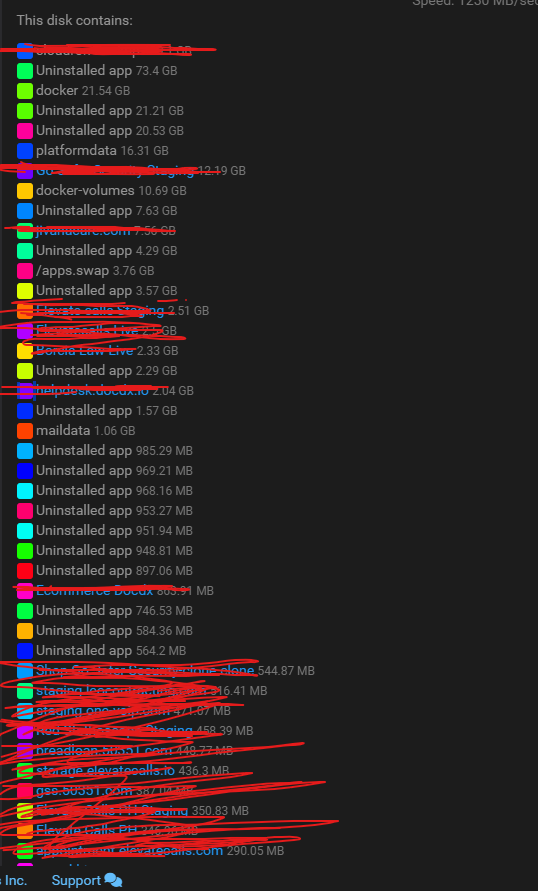
-
SQL erroralso just to add, the last time this cloudron was updated was on july 2024
-
SQL errorI’d like to inform everyone that our current backup takes approximately 3 hours and 45 minutes to complete.
In the event that the server goes down, the full restoration process could take 8–9 hours or possibly longer, depending on the situation.
With this in mind, I would like to ask for your recommendation on how we should proceed. Would it be better to schedule this activity over the weekend to minimize disruption to our employees and clients in case a restore is required?
If we are confident that this will not cause any issues or downtime, we can proceed today.
Please advise on the best course of action.
-
SQL error -
SQL error@james sorry of the late response I tried it, and it shows these data
root@CloudronMain:~# cloudron-support --troubleshoot
[OK] node version is correct
[OK] docker is running
[OK] MySQL is running
[OK] nginx is running
[OK] box is running
[OK] unbound is running
[OK] Dashboard is reachable via domain name
[OK] Domain elevatecalls.io is valid and has not expired
root@CloudronMain:~# -
SQL errorTried updating cloudron and we got this error
SQL is not runinng:(HTTP code 500) server error - Cannot restart container mysql: failed to create shim task: OCI runtime create failed: runc create failed: unable to start container process: error during container init: error mounting "/home/yellowtent/platformdata/mysql" to rootfs at "/var/lib/mysql": mount /home/yellowtent/platformdata/mysql:/var/lib/mysql (via /proc/self/fd/6), flags: 0x5000: not a directory: unknown: Are you trying to mount a directory onto a file (or vice-versa)? Check if the specified host path exists and is the expected type
Our version:
v7.7.2 (Ubuntu 20.04.5 LTS)
VendorLinode
ProductCompute Instance
CPU16 Core "AMD EPYC 7542 32-Core Processor"
Memory33.66 GB RAM & 4.29 GB Swap
storage 600+
storage used: 400+
Kernel: We tried 5.4, 5.10 and 5.15