
Cloudron makes it easy to run web apps like WordPress, Nextcloud, GitLab on your server. Find out more or install now.


Skip to content
  • Categories
  • Recent
  • Tags
  • Popular
  • Bookmarks
  • Search
Skins
  • Light
  • Brite
  • Cerulean
  • Cosmo
  • Flatly
  • Journal
  • Litera
  • Lumen
  • Lux
  • Materia
  • Minty
  • Morph
  • Pulse
  • Sandstone
  • Simplex
  • Sketchy
  • Spacelab
  • United
  • Yeti
  • Zephyr
  • Dark
  • Cyborg
  • Darkly
  • Quartz
  • Slate
  • Solar
  • Superhero
  • Vapor

  • Default (No Skin)
  • No Skin
Collapse
Brand Logo

Cloudron Forum

Apps - Status | Demo | Docs | Install
J

jcalag

@jcalag
About
Posts
16
Topics
4
Shares
0
Groups
0
Followers
0
Following
0

Posts

Recent Best Controversial

  • SQL error
    J jcalag

    Tried updating cloudron and we got this error
    SQL is not runinng:

    (HTTP code 500) server error - Cannot restart container mysql: failed to create shim task: OCI runtime create failed: runc create failed: unable to start container process: error during container init: error mounting "/home/yellowtent/platformdata/mysql" to rootfs at "/var/lib/mysql": mount /home/yellowtent/platformdata/mysql:/var/lib/mysql (via /proc/self/fd/6), flags: 0x5000: not a directory: unknown: Are you trying to mount a directory onto a file (or vice-versa)? Check if the specified host path exists and is the expected type

    Our version:

    v7.7.2 (Ubuntu 20.04.5 LTS)
    VendorLinode
    ProductCompute Instance
    CPU16 Core "AMD EPYC 7542 32-Core Processor"
    Memory33.66 GB RAM & 4.29 GB Swap
    storage 600+
    storage used: 400+
    Kernel: We tried 5.4, 5.10 and 5.15
    Support ubuntu 20.04 mysql

  • freescout module update questions
    J jcalag

    Hi everyone,

    Our main goal is to update FreeScout to the latest version, because we currently have several FreeScout modules that cannot be used or activated due to the core FreeScout version being outdated.

    Current FreeScout environment:

    Version: 1.8.169

    Timezone (.env): America/New_York (GMT-0500)

    Protocol: HTTPS

    Database: MySQL 8.0.34-0ubuntu0.22.04.1

    Web Server: Apache/2.4.58 (Ubuntu)

    PHP Version: 8.3.6

    Current Cloudron environment:

    Version: v7.7.1

    OS: Ubuntu 20.04.5 LTS

    Number of apps/websites: ~10–15 apps running on this instance

    Problem:

    The update button is missing in the FreeScout web UI

    There is no available update shown in the Cloudron dashboard for FreeScout

    We suspect that the outdated Cloudron version may be preventing us from updating FreeScout and enabling the required modules.

    We would like guidance on:

    Is it safe to upgrade Cloudron from v7.7.1 to the latest version?

    Will a Cloudron upgrade affect or cause downtime for our 10–15 existing apps?

    How long does a Cloudron upgrade usually take in an environment with multiple apps?

    Is upgrading Cloudron the recommended path to unlock newer FreeScout versions and module compatibility?

    Our priority is to enable the required FreeScout modules while minimizing downtime and risk.

    Any guidance, experiences, or best practices would be greatly appreciated.

    Thank you!

    FreeScout

  • uninstalled app not deleted
    J jcalag

    btw can we jump an update fron 7.7.1 to cloudron 8?

    Support disk usage

  • uninstalled app not deleted
    J jcalag

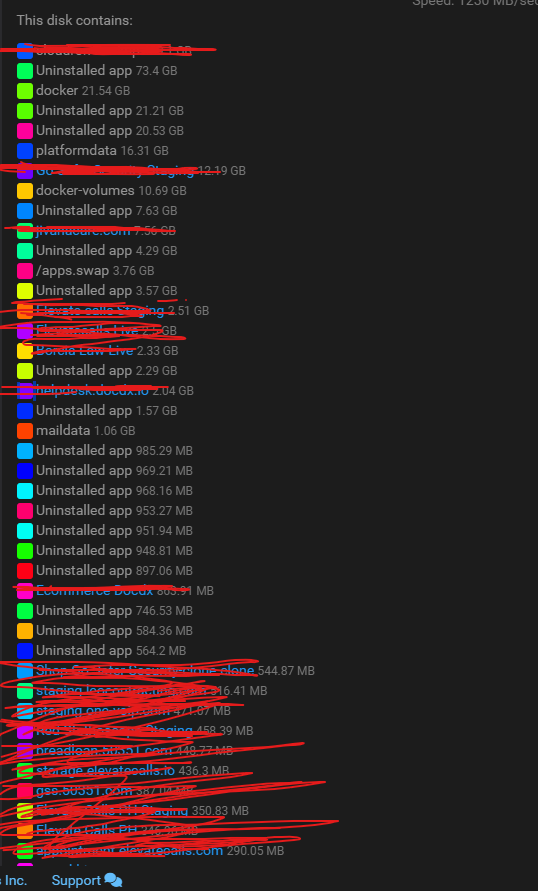
    Hello guys not an expert of these but we got some leftovers on the server and we notice that when you uninstalled the app it does not actually delete the files so is there a way to delete uninstalled app data?

    Platform Versionv7.7.1 (Ubuntu 20.04.5 LTS)
    VendorLinode
    ProductCompute Instance
    CPU16 Core "AMD EPYC 7542 32-Core Processor"
    Memory33.66 GB RAM & 4.29 GB Swap

    Running Apps: 39
    Uninstalled Apps: 21
    Total Entries Listed: 68

    b342a5e0-d16d-434a-9873-b62969578627-image.png

    Support disk usage

  • SQL error
    J jcalag

    also just to add, the last time this cloudron was updated was on july 2024

    Support ubuntu 20.04 mysql

  • SQL error
    J jcalag

    @joseph

    I’d like to inform everyone that our current backup takes approximately 3 hours and 45 minutes to complete.

    In the event that the server goes down, the full restoration process could take 8–9 hours or possibly longer, depending on the situation.

    With this in mind, I would like to ask for your recommendation on how we should proceed. Would it be better to schedule this activity over the weekend to minimize disruption to our employees and clients in case a restore is required?

    If we are confident that this will not cause any issues or downtime, we can proceed today.

    Please advise on the best course of action.

    Support ubuntu 20.04 mysql

  • SQL error
    J jcalag

    @girish yeah did found a solution,

    I only did recreate container before updating and it fixed the mysql issue.

    Support ubuntu 20.04 mysql
  • Login

  • Don't have an account? Register

  • Login or register to search.
  • First post
    Last post
0
  • Categories
  • Recent
  • Tags
  • Popular
  • Bookmarks
  • Search