
Redmine Theme Update Problem.
-
Hello,
I have encountered a problem while updating the theme for Redmine 6.
The issue is that I am unable to follow the instructions for updating the theme.I am using the Boostmine 1.6 theme. However, due to major changes in Redmine 6, the theme does not work correctly in some areas (icons are missing in certain places).
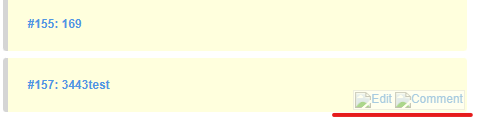
The developer's website provides a guide for fixing this issue:
https://bestredminetheme.com/kb/installing-the-theme-in-your-redmine-application/#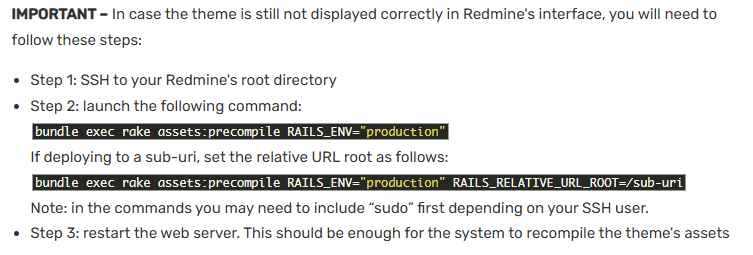
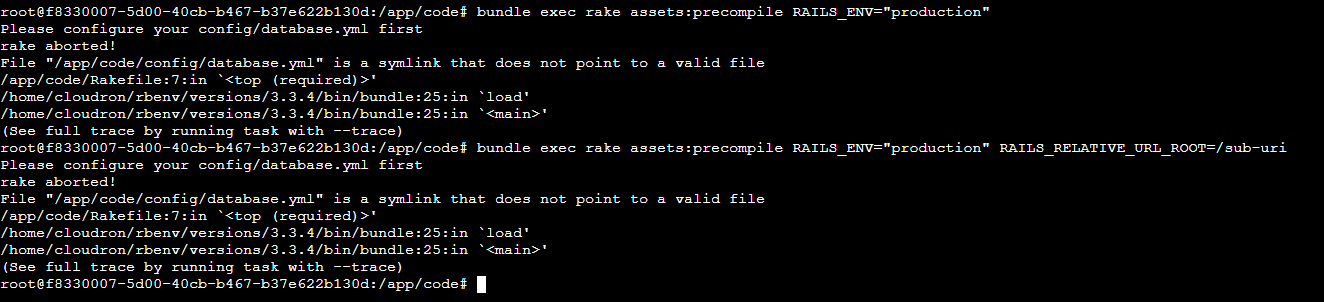
Unfortunately, when I enter the command, I get an error.
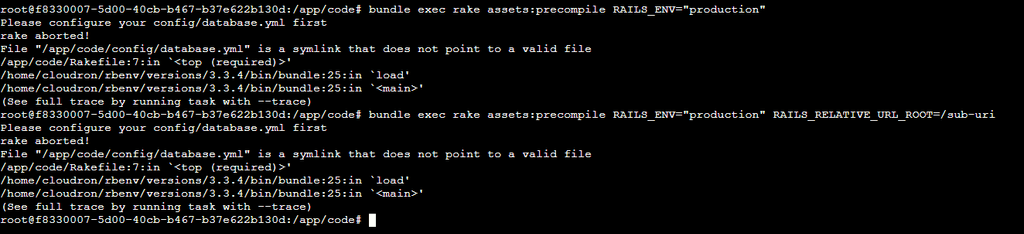
Is there any way to bypass or fix this issue?
Thank you. -
Did you try the documented steps?
https://docs.cloudron.io/apps/redmine/#installing-themes -
Just a guess, it seems maybe your app is in recovery mode? Since it says database.yml not found which is generated on app start up.
If so, run
/app/pkg/start.sh. This generates the config file. After that, try the plugin installation commands.You were right—the app was indeed in recovery mode. However, even in the normal mode, I am still getting an error.
root@f8330007-5d00-40cb-b467-b37e622b130d:/app/code# bundle exec rake redmine:plugins NAME=redmine_checklists RAILS_ENV=production rake aborted! ArgumentError: Missing `secret_key_base` for 'production' environment, set this string with `bin/rails credentials:edit` (ArgumentError) raise ArgumentError, "Missing `secret_key_base` for '#{Rails.env}' environment, set this string with `bin/rails credentials:edit`" ^^^^^^^^^^^^^^^^^^^^^^^^^^^^^^^^^^^^^^^^^^^^^^^^^^^^^^^^^^^^^^^^^^^^^^^^^^^^^^^^^^^^^^^^^^^^^^^^^^^^^^^^^^^^^^^^^^^^^^^^^^^^ /run/redmine/vendor/ruby/3.3.0/gems/railties-7.2.2.1/lib/rails/application/configuration.rb:519:in `secret_key_base=' /run/redmine/vendor/ruby/3.3.0/gems/railties-7.2.2.1/lib/rails/application/configuration.rb:503:in `secret_key_base' /run/redmine/vendor/ruby/3.3.0/gems/railties-7.2.2.1/lib/rails/application.rb:470:in `secret_key_base' /run/redmine/vendor/ruby/3.3.0/gems/railties-7.2.2.1/lib/rails/application.rb:205:in `block in message_verifiers' /run/redmine/vendor/ruby/3.3.0/gems/activesupport-7.2.2.1/lib/active_support/message_verifiers.rb:132:in `build' /run/redmine/vendor/ruby/3.3.0/gems/activesupport-7.2.2.1/lib/active_support/messages/rotation_coordinator.rb:85:in `block in build_with_rotations' /run/redmine/vendor/ruby/3.3.0/gems/activesupport-7.2.2.1/lib/active_support/messages/rotation_coordinator.rb:85:in `map' /run/redmine/vendor/ruby/3.3.0/gems/activesupport-7.2.2.1/lib/active_support/messages/rotation_coordinator.rb:85:in `build_with_rotations' /run/redmine/vendor/ruby/3.3.0/gems/activesupport-7.2.2.1/lib/active_support/messages/rotation_coordinator.rb:19:in `[]' /run/redmine/vendor/ruby/3.3.0/gems/railties-7.2.2.1/lib/rails/application.rb:232:in `message_verifier' /run/redmine/vendor/ruby/3.3.0/gems/activerecord-7.2.2.1/lib/active_record/railtie.rb:355:in `block (3 levels) in <class:Railtie>' /run/redmine/vendor/ruby/3.3.0/gems/activesupport-7.2.2.1/lib/active_support/lazy_load_hooks.rb:97:in `class_eval' /run/redmine/vendor/ruby/3.3.0/gems/activesupport-7.2.2.1/lib/active_support/lazy_load_hooks.rb:97:in `block in execute_hook' /run/redmine/vendor/ruby/3.3.0/gems/activesupport-7.2.2.1/lib/active_support/lazy_load_hooks.rb:87:in `with_execution_control' /run/redmine/vendor/ruby/3.3.0/gems/activesupport-7.2.2.1/lib/active_support/lazy_load_hooks.rb:92:in `execute_hook' /run/redmine/vendor/ruby/3.3.0/gems/activesupport-7.2.2.1/lib/active_support/lazy_load_hooks.rb:62:in `block in on_load' /run/redmine/vendor/ruby/3.3.0/gems/activesupport-7.2.2.1/lib/active_support/lazy_load_hooks.rb:61:in `each' /run/redmine/vendor/ruby/3.3.0/gems/activesupport-7.2.2.1/lib/active_support/lazy_load_hooks.rb:61:in `on_load' /run/redmine/vendor/ruby/3.3.0/gems/activerecord-7.2.2.1/lib/active_record/railtie.rb:354:in `block (2 levels) in <class:Railtie>' /run/redmine/vendor/ruby/3.3.0/gems/activesupport-7.2.2.1/lib/active_support/lazy_load_hooks.rb:94:in `block in execute_hook' /run/redmine/vendor/ruby/3.3.0/gems/activesupport-7.2.2.1/lib/active_support/lazy_load_hooks.rb:87:in `with_execution_control' /run/redmine/vendor/ruby/3.3.0/gems/activesupport-7.2.2.1/lib/active_support/lazy_load_hooks.rb:92:in `execute_hook' /run/redmine/vendor/ruby/3.3.0/gems/activesupport-7.2.2.1/lib/active_support/lazy_load_hooks.rb:78:in `block in run_load_hooks' /run/redmine/vendor/ruby/3.3.0/gems/activesupport-7.2.2.1/lib/active_support/lazy_load_hooks.rb:77:in `each' /run/redmine/vendor/ruby/3.3.0/gems/activesupport-7.2.2.1/lib/active_support/lazy_load_hooks.rb:77:in `run_load_hooks' /run/redmine/vendor/ruby/3.3.0/gems/railties-7.2.2.1/lib/rails/application/finisher.rb:94:in `block in <module:Finisher>' /run/redmine/vendor/ruby/3.3.0/gems/railties-7.2.2.1/lib/rails/initializable.rb:32:in `instance_exec' /run/redmine/vendor/ruby/3.3.0/gems/railties-7.2.2.1/lib/rails/initializable.rb:32:in `run' /run/redmine/vendor/ruby/3.3.0/gems/railties-7.2.2.1/lib/rails/initializable.rb:61:in `block in run_initializers' /run/redmine/vendor/ruby/3.3.0/gems/railties-7.2.2.1/lib/rails/initializable.rb:60:in `run_initializers' /run/redmine/vendor/ruby/3.3.0/gems/railties-7.2.2.1/lib/rails/application.rb:435:in `initialize!' /app/code/config/environment.rb:16:in `<top (required)>' /run/redmine/vendor/ruby/3.3.0/gems/zeitwerk-2.7.1/lib/zeitwerk/core_ext/kernel.rb:34:in `require' /run/redmine/vendor/ruby/3.3.0/gems/railties-7.2.2.1/lib/rails/application.rb:411:in `require_environment!' /run/redmine/vendor/ruby/3.3.0/gems/railties-7.2.2.1/lib/rails/application.rb:559:in `block in run_tasks_blocks' /app/code/lib/tasks/redmine.rake:73:in `block (2 levels) in <top (required)>' /run/redmine/vendor/ruby/3.3.0/gems/rake-13.2.1/exe/rake:27:in `<top (required)>' /home/cloudron/rbenv/versions/3.3.4/bin/bundle:25:in `load' /home/cloudron/rbenv/versions/3.3.4/bin/bundle:25:in `<main>' Tasks: TOP => redmine:plugins:migrate => environment (See full trace by running task with --trace) root@f8330007-5d00-40cb-b467-b37e622b130d:/app/code# -
Did you try the documented steps?
https://docs.cloudron.io/apps/redmine/#installing-themes@BrutalBirdie
Hello.
Yes, but I was getting errors there as well. -
Did you read and followed what @joseph wrote?
-
N Neluser referenced this topic on

Hello! It looks like you're interested in this conversation, but you don't have an account yet.
Getting fed up of having to scroll through the same posts each visit? When you register for an account, you'll always come back to exactly where you were before, and choose to be notified of new replies (either via email, or push notification). You'll also be able to save bookmarks and upvote posts to show your appreciation to other community members.
With your input, this post could be even better 💗
Register Login