
Retention policy - 1 day possible?
-
Using Cloudron version 9, under
Configure Backup Schedule & Retentionis it possible to get an option for 1 day?I store my backups on a ZFS pool, so I automatically get daily, weekly, and monthly snapshots of my data. Having this as 2 days causes me to spend 2x the storage space (and bandwidth) on backups.
-
 J james marked this topic as a regular topic on
-
J james moved this topic from Support on
-
Hello @djxx
The API Documentation is still outdated.
But I can guide you.
Create yourself a Cloudron API Token, see https://docs.cloudron.io/profile#api-tokensGet your backup site ID
export CLOUDRON_ACCESS_TOKEN="YOUR_TOKEN_GOES_HERE"
curl "https://my.cloudron.dev/api/v1/backup_sites?page=1&per_page=1000&access_token=${CLOUDRON_ACCESS_TOKEN}"
Example Output:
{
  "backupSites": [
    {
      "id": "3db47cce-dab7-46b6-9db3-1892ab14cd21",
      "name": "default",
      "provider": "filesystem",
      "schedule": "00 00 23 * * *",
      "format": "tgz",
      "enableForUpdates": true,
      "creationTime": "2025-10-10T08:12:57.000Z",
      "ts": "2025-11-10T11:22:44.000Z",
      "config": {
        "backupDir": "/var/backups"
      },
      "limits": {
        "memoryLimit": 1073741824,
        "uploadPartSize": 10485760,
        "syncConcurrency": 10,
        "downloadConcurrency": 10,
        "copyConcurrency": 10
      },
      "retention": {
        "keepWithinSecs": 172800
      },
      "integrityKeyPair": {
        "publicKey": "-----BEGIN PUBLIC KEY-----\nMCowBQYDK2VwAyEAZ18PRnLfQIf08IKl9bf9YkIHL7zT2eeeRJ8XuCx1+C0=\n-----END PUBLIC KEY-----\n"
      },
      "contents": null,
      "encrypted": false,
      "encryptedFilenames": false,
      "encryptionPasswordHint": null
    }
  ]
}
So the backup site ID is
3db47cce-dab7-46b6-9db3-1892ab14cd21.Set the retention time in seconds:
export BACKUPSITE_ID="3db47cce-dab7-46b6-9db3-1892ab14cd21"
curl "https://my.cloudron.dev/api/v1/backup_sites/${BACKUPSITE_ID}/configure/retention?access_token=${CLOUDRON_ACCESS_TOKEN}" \
  -H 'content-type: application/json' \
  --data-raw '{"retention":{"keepWithinSecs":86400}}'
This will lead to a little buggy looking dashboard since there is no display option for values outside of the avaiable selections.
Normal 2 Days:
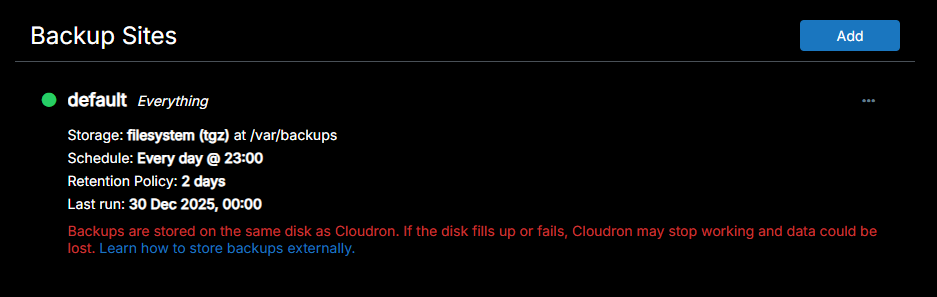
Set to
86400seconds = 1 Day:
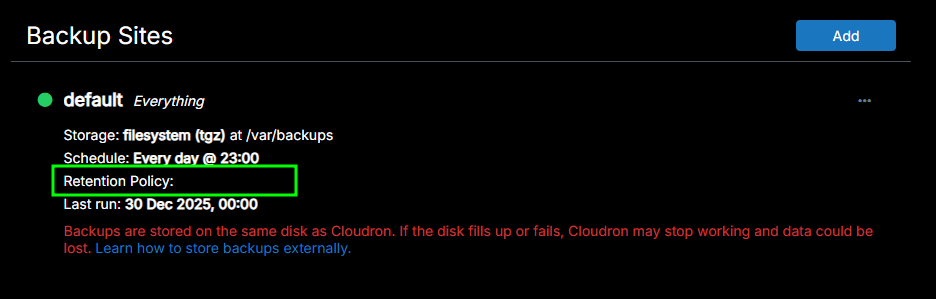
-
Hello @djxx
The API Documentation is still outdated.
But I can guide you.
Create yourself a Cloudron API Token, see https://docs.cloudron.io/profile#api-tokensGet your backup site ID
export CLOUDRON_ACCESS_TOKEN="YOUR_TOKEN_GOES_HERE"
curl "https://my.cloudron.dev/api/v1/backup_sites?page=1&per_page=1000&access_token=${CLOUDRON_ACCESS_TOKEN}"
Example Output:
{
  "backupSites": [
    {
      "id": "3db47cce-dab7-46b6-9db3-1892ab14cd21",
      "name": "default",
      "provider": "filesystem",
      "schedule": "00 00 23 * * *",
      "format": "tgz",
      "enableForUpdates": true,
      "creationTime": "2025-10-10T08:12:57.000Z",
      "ts": "2025-11-10T11:22:44.000Z",
      "config": {
        "backupDir": "/var/backups"
      },
      "limits": {
        "memoryLimit": 1073741824,
        "uploadPartSize": 10485760,
        "syncConcurrency": 10,
        "downloadConcurrency": 10,
        "copyConcurrency": 10
      },
      "retention": {
        "keepWithinSecs": 172800
      },
      "integrityKeyPair": {
        "publicKey": "-----BEGIN PUBLIC KEY-----\nMCowBQYDK2VwAyEAZ18PRnLfQIf08IKl9bf9YkIHL7zT2eeeRJ8XuCx1+C0=\n-----END PUBLIC KEY-----\n"
      },
      "contents": null,
      "encrypted": false,
      "encryptedFilenames": false,
      "encryptionPasswordHint": null
    }
  ]
}
So the backup site ID is
3db47cce-dab7-46b6-9db3-1892ab14cd21.Set the retention time in seconds:
export BACKUPSITE_ID="3db47cce-dab7-46b6-9db3-1892ab14cd21"
curl "https://my.cloudron.dev/api/v1/backup_sites/${BACKUPSITE_ID}/configure/retention?access_token=${CLOUDRON_ACCESS_TOKEN}" \
  -H 'content-type: application/json' \
  --data-raw '{"retention":{"keepWithinSecs":86400}}'
This will lead to a little buggy looking dashboard since there is no display option for values outside of the avaiable selections.
Normal 2 Days:
Set to
86400seconds = 1 Day:
-
@nebulon Thanks for checking! The UI change did take effect, and I do see a reduction of backup size - but it's not down to 1x the size of the backup. It's still 2x the size of the backup.
Inside the remote storage folder, I see:
- storage
- 2026-01-03-150000-664
- all other backups before
It looks like the latest backup also has a copy in "storage", which is still resulting in 2x the backup space for each snapshot being taken - because each day "storage" will change, and there will be a new folder added.
-
This is a guess, but do you mean "snapshot" instead of "storage" ? If so yes the snapshot contains the first snapshot of the app and then the data is rotated (copied) over from there to the final destination. This does add one extra storage on disk of the same data.
To avoid having this extra copy on disk, you can use the rsync storage format with hardlinks.


Hello! It looks like you're interested in this conversation, but you don't have an account yet.
Getting fed up of having to scroll through the same posts each visit? When you register for an account, you'll always come back to exactly where you were before, and choose to be notified of new replies (either via email, or push notification). You'll also be able to save bookmarks and upvote posts to show your appreciation to other community members.
With your input, this post could be even better 💗
Register Login