
How to backup and delete plugins?
-
I saw on previous posts that I simply need to delete the plugin folder in
/app/code/plugins.- Could this be added to the docs please?
- I would like to backup the plugins directory before proceeding. For this I'm trying to
mv plugins plugins.backupbut even withgosu cloudron:cloudronbefore, it fails as parent folder is read-only.
What is the standard way to proceed? - Cloudron is not a Discourse-supported way of self-hosting so docs is scarce. Is there an app.yml somewhere (couldn't find one with
find) that lists the plugins or has this been removed?
(I'm on Discourse 2.8.14 if that matters)
-
Referenced Topic: https://forum.cloudron.io/post/55243
Agreed, how to uninstall plugins should be added to the docs. I can't find theapp.ymlfile in my app. -
I'd just do a full Cloudron back-up of the Discourse app before deleting that folder. Give it a suitable label, and make it as one not to delete. See https://docs.cloudron.io/backups#backup-labels
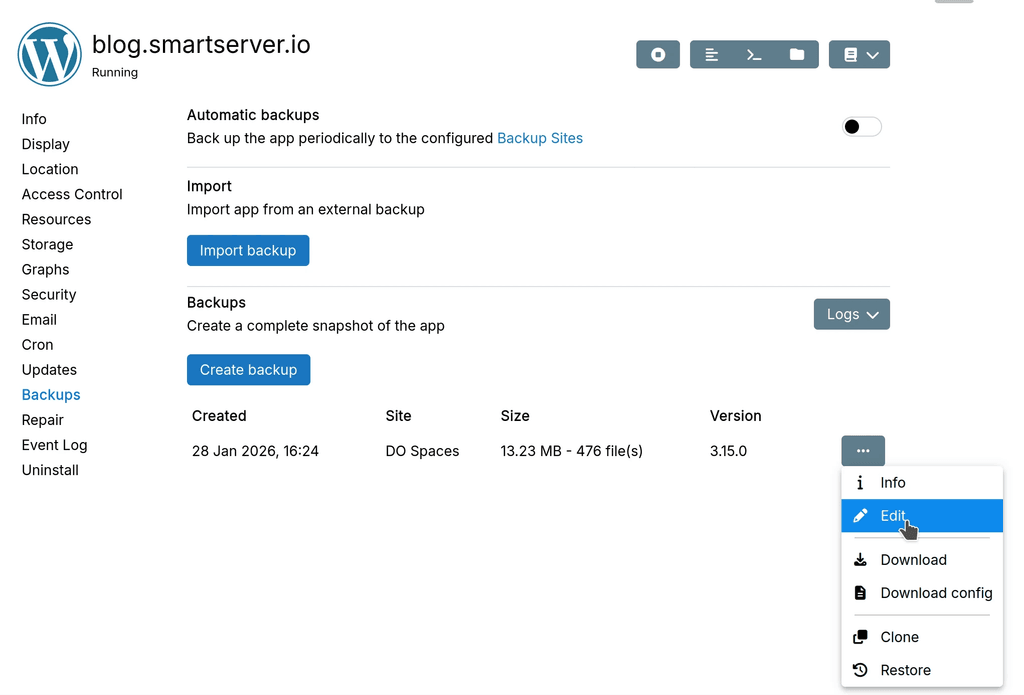
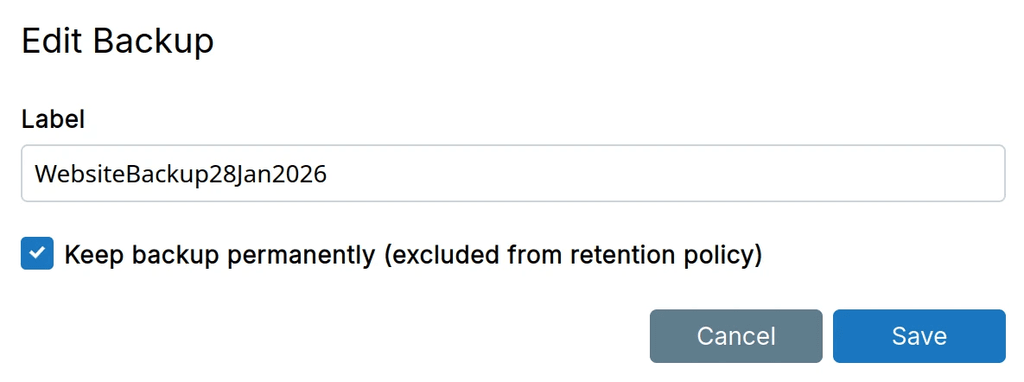
-
I saw on previous posts that I simply need to delete the plugin folder in
/app/code/plugins.- Could this be added to the docs please?
- I would like to backup the plugins directory before proceeding. For this I'm trying to
mv plugins plugins.backupbut even withgosu cloudron:cloudronbefore, it fails as parent folder is read-only.
What is the standard way to proceed? - Cloudron is not a Discourse-supported way of self-hosting so docs is scarce. Is there an app.yml somewhere (couldn't find one with
find) that lists the plugins or has this been removed?
(I'm on Discourse 2.8.14 if that matters)
Hello @pHneutre
Everything that is included in the backup and read-write is located in
/app/data/.
So thepluginsfolder is located in/app/data/plugins.
When you open the Web Terminal of a Cloudron app you are by default in the/app/code/path which is read-only.
By runningls -lahyou can see the folder/app/code/pluginsis a symbolic link to/app/data/plugins.
Thus, you can runrm -rf /app/data/pluginsormv /app/data/plugins /app/data/plugins_backupand then restart the app to uninstall plugins.Regarding the
app.ymlyou have mentioned.
This file is automatically generated by Cloudron on each app startup.
So there is no need to edit this file in any way.I will add a documentation section for plugin uninstallation.
-
 J james marked this topic as a question on
-
J james has marked this topic as solved on

Hello! It looks like you're interested in this conversation, but you don't have an account yet.
Getting fed up of having to scroll through the same posts each visit? When you register for an account, you'll always come back to exactly where you were before, and choose to be notified of new replies (either via email, or push notification). You'll also be able to save bookmarks and upvote posts to show your appreciation to other community members.
With your input, this post could be even better 💗
Register Login