Cloudron makes it easy to run web apps like WordPress, Nextcloud, GitLab on your server. Find out more or install now.


Skip to content
  • Categories
  • Recent
  • Tags
  • Popular
  • Bookmarks
  • Search
Skins
  • Light
  • Brite
  • Cerulean
  • Cosmo
  • Flatly
  • Journal
  • Litera
  • Lumen
  • Lux
  • Materia
  • Minty
  • Morph
  • Pulse
  • Sandstone
  • Simplex
  • Sketchy
  • Spacelab
  • United
  • Yeti
  • Zephyr
  • Dark
  • Cyborg
  • Darkly
  • Quartz
  • Slate
  • Solar
  • Superhero
  • Vapor

  • Default (No Skin)
  • No Skin
Collapse
Brand Logo

Cloudron Forum

Apps - Status | Demo | Docs | Install
  1. Cloudron Forum
  2. Vikunja
  3. Can't list users in Vikunja with Cloudron access control

Can't list users in Vikunja with Cloudron access control

Scheduled Pinned Locked Moved Vikunja
11 Posts 4 Posters 245 Views 4 Watching
  • Oldest to Newest
  • Newest to Oldest
  • Most Votes
Reply
  • Reply as topic
Log in to reply
This topic has been deleted. Only users with topic management privileges can see it.
  • I Offline
    I Offline
    ikalou
    wrote last edited by
    #1

    Hi,

    I've just installed Vikunja and noticed that I can't find any other user in the app (when creating a new team), if I install Vikunja and let cloudron manage users.
    If I reinstall it and tick "Leave user management to the app", then it works and I can see the other users who created an account in vikunja.
    Is that normal?

    I thought it would be possible to use the cloudron access control and be able to work on projects with other cloudron users who are granted access to vikunja.

    Thanks

    1 Reply Last reply
    1
    • jamesJ Offline
      jamesJ Offline
      james
      Staff
      wrote last edited by
      #2

      Hello @ikalou
      That should be possible.
      It can be that the cloudron users in vikunja only get created when they login for the first time.
      Thus the list of users can look empty at first.
      This is what I assume. I will have to take a look tomorrow

      1 Reply Last reply
      1
      • I Offline
        I Offline
        ikalou
        wrote last edited by
        #3

        Hi @james thanks for your reply, I tried creating a dummy user before/after installing vikunja, but I can't see any user when I log in (same from my normal account).
        Thanks for having a look at it!

        1 Reply Last reply
        0
        • nebulonN Offline
          nebulonN Offline
          nebulon
          Staff
          wrote last edited by
          #4

          Haven't tried it yet myself but I just saw https://vikunja.io/docs/openid/#users-must-log-in-before-they-can-be-assigned-to-tasks

          1 Reply Last reply
          1
          • I Offline
            I Offline
            ikalou
            wrote last edited by
            #5

            Hi @james and @nebulon, I tried again and confirm that it is not possible to find any user within Vikunja when installing the app with cloudron access control.
            Steps to reproduce I just did:

            • install vikunja
            • log in using cloudron
            • in another browser container or browser, log into cloudron as another user
            • log into vikunja using cloudron as well
            • create a team and try adding the other user: the list remains empty

            Thanks

            jdaviescoatesJ 1 Reply Last reply
            0
            • I ikalou

              Hi @james and @nebulon, I tried again and confirm that it is not possible to find any user within Vikunja when installing the app with cloudron access control.
              Steps to reproduce I just did:

              • install vikunja
              • log in using cloudron
              • in another browser container or browser, log into cloudron as another user
              • log into vikunja using cloudron as well
              • create a team and try adding the other user: the list remains empty

              Thanks

              jdaviescoatesJ Offline
              jdaviescoatesJ Offline
              jdaviescoates
              wrote last edited by
              #6
              This post is deleted!
              1 Reply Last reply
              0
              • nebulonN Offline
                nebulonN Offline
                nebulon
                Staff
                wrote last edited by
                #7

                I did a test run now and after the second user has logged in, I am able to add that user to a team. However the UI is a bit strange to say the least, one has to start typing the username in the input field to add it, only then users which match get listed.

                1 Reply Last reply
                2
                • I Offline
                  I Offline
                  ikalou
                  wrote last edited by
                  #8

                  Yes, it works if the app is installed independently from cloudron user SSO.

                  1 Reply Last reply
                  0
                  • nebulonN Offline
                    nebulonN Offline
                    nebulon
                    Staff
                    wrote last edited by
                    #9

                    In my case it works in both with and without Coudron user management.

                    1 Reply Last reply
                    1
                    • I Offline
                      I Offline
                      ikalou
                      wrote last edited by ikalou
                      #10

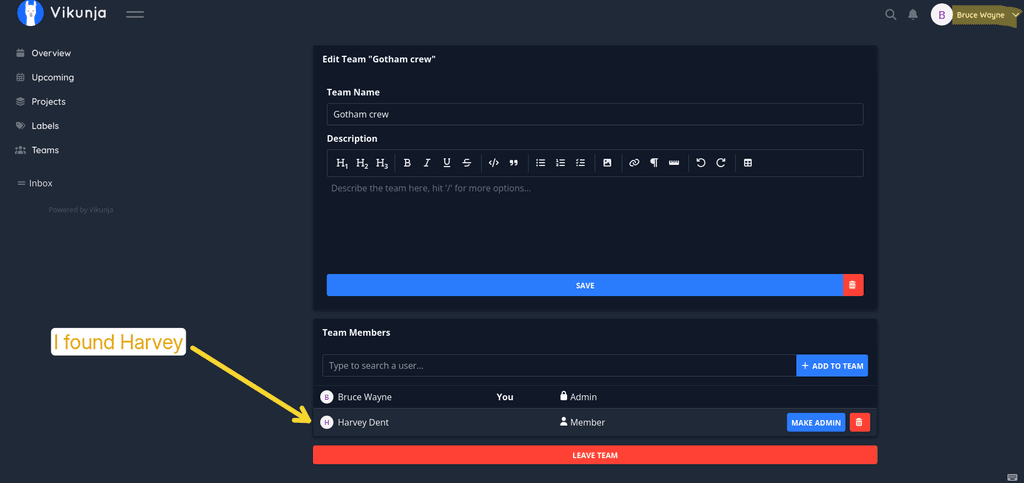
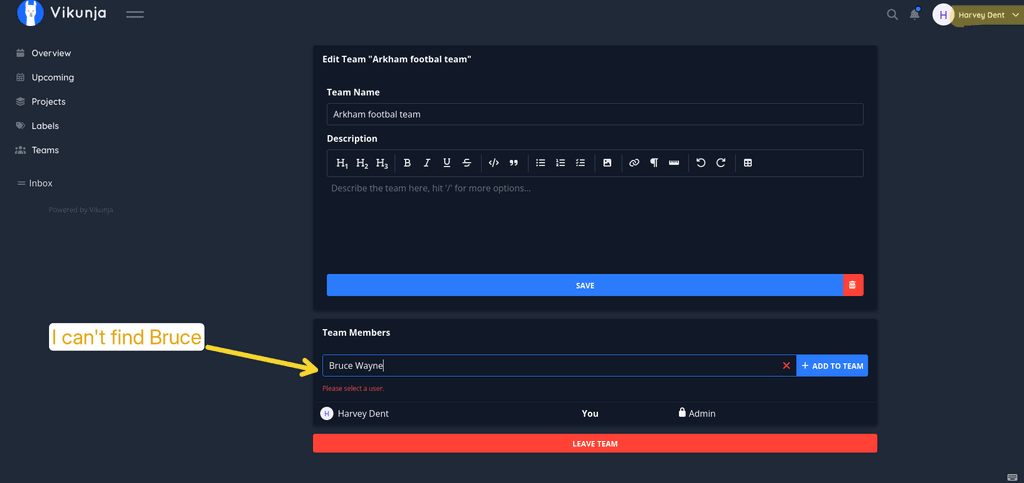
                      Hi, I gave it another try, it is very weird on my side:

                      • I can add the other user from one account but not the other way around (with another team of course)
                      • Sometimes I can't find the user by entering its name, or I have to enter it completely, or even have to enter the username instead of the display name to find it
                      • I tried with 3 accounts in total, I manage to find the 2 other accounts only with one of those test accounts, for the others I can only find 1
                      • Also, when I find the user to add, clicking on it doesn't work, I have to press Enter
                      vikunja-team-bug01.png

                      vikunja-team-bug02.png

                      1 Reply Last reply
                      0
                      • nebulonN Offline
                        nebulonN Offline
                        nebulon
                        Staff
                        wrote last edited by
                        #11

                        yes that might be worth asking upstream at the app to maybe improve this UI for better usability and predictability.

                        1 Reply Last reply
                        1

                        Hello! It looks like you're interested in this conversation, but you don't have an account yet.

                        Getting fed up of having to scroll through the same posts each visit? When you register for an account, you'll always come back to exactly where you were before, and choose to be notified of new replies (either via email, or push notification). You'll also be able to save bookmarks and upvote posts to show your appreciation to other community members.

                        With your input, this post could be even better 💗

                        Register Login
                        Reply
                        • Reply as topic
                        Log in to reply
                        • Oldest to Newest
                        • Newest to Oldest
                        • Most Votes


                        • Login

                        • Don't have an account? Register

                        • Login or register to search.
                        • First post
                          Last post
                        0
                        • Categories
                        • Recent
                        • Tags
                        • Popular
                        • Bookmarks
                        • Search