
MiroTalk WEB: hosted video meetings
-
If you’re looking for a browser-based video conferencing solution without the hassle of hosting, maintenance, or updates, MiroTalk WEB is now available as a hosted SaaS service.
From one workspace, you can manage your meetings with:
 Your own workspace — manage everything from one place
 Room scheduler — create, schedule, and manage meeting rooms
 ️ Email invitations — invite participants directly
 Reminders — help participants stay on schedule
 Multiple MiroTalk meeting modes — from 1-to-1 calls and small groups to large meetings and broadcasting
 Click-to-Call — quickly start a call when you need it
 Browser-based meetings — no downloads required
 Privacy-focused — keep your meetings private and secure
 ️ Fully hosted — hosting, maintenance, and updates are handled for you
The idea is simple: one workspace for all your MiroTalk meeting needs, while we take care of the infrastructure.
Available with monthly or lifetime plans.
 Get started: https://webrtc.mirotalk.com
If you're looking for a simple, flexible, privacy-focused video conferencing solution, give MiroTalk WEB a try.
-
If you’re looking for a browser-based video conferencing solution without the hassle of hosting, maintenance, or updates, MiroTalk WEB is now available as a hosted SaaS service.
From one workspace, you can manage your meetings with:
- Your own workspace — manage everything from one place
- Room scheduler — create, schedule, and manage meeting rooms
- ️ Email invitations — invite participants directly
- Reminders — help participants stay on schedule
- Multiple MiroTalk meeting modes — from 1-to-1 calls and small groups to large meetings and broadcasting
- Click-to-Call — quickly start a call when you need it
- Browser-based meetings — no downloads required
- Privacy-focused — keep your meetings private and secure
- ️ Fully hosted — hosting, maintenance, and updates are handled for you
The idea is simple: one workspace for all your MiroTalk meeting needs, while we take care of the infrastructure.
Available with monthly or lifetime plans.
Get started: https://webrtc.mirotalk.comIf you're looking for a simple, flexible, privacy-focused video conferencing solution, give MiroTalk WEB a try.
@MiroTalk I love what you're doing but honestly I have the feeling you're cannibalizing your own products too much. It's getting increasingly difficult to explain the difference between these programs. You may want to consider merging some projects or otherwise differentiating them more clearly.
-
@andreasdueren Thanks so much for the honest feedback! I completely understand where you’re coming from. As MiroTalk has grown, the boundaries between the different projects can definitely feel less clear than they should.
We’re aware of this and it’s something we’re thinking about. In the meantime, the MiroTalk Overview can hopefully help clarify the differences between the editions and what each one is designed for.
And if you’re curious about why there are several projects in the first place, I also shared the story behind MiroTalk. It started as a pandemic side project driven by privacy and open source, and the different editions evolved largely from real user needs and requests.
That said, your point about potentially consolidating or differentiating the projects more clearly is very valid. We definitely don’t want the ecosystem to become confusing.
 ️
️If you have a moment, it would be really helpful to know which parts are unclear to you and what you would expect to see improved in the explanation of each project. For example, is it the purpose of each edition, the target audience, the feature differences, or something else? That kind of concrete feedback would help us make the documentation and positioning much clearer.
-
By the way, I’ve made a small improvement to the MiroTalk Overview page and added a
Choose by goalsection. Hopefully this makes it easier to understand which project is best suited for each use case. -
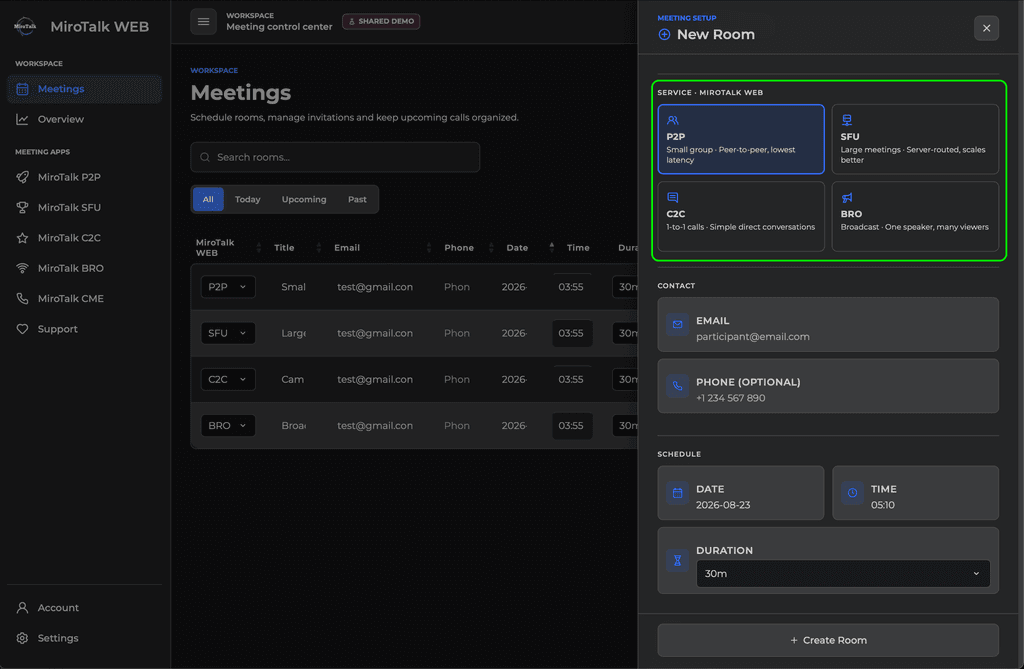
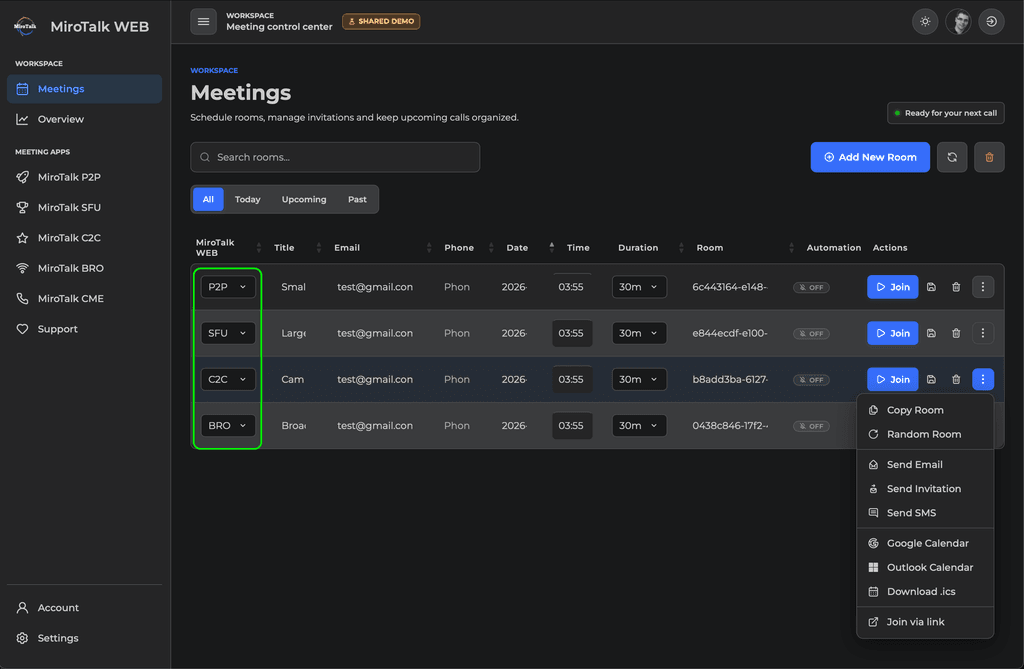
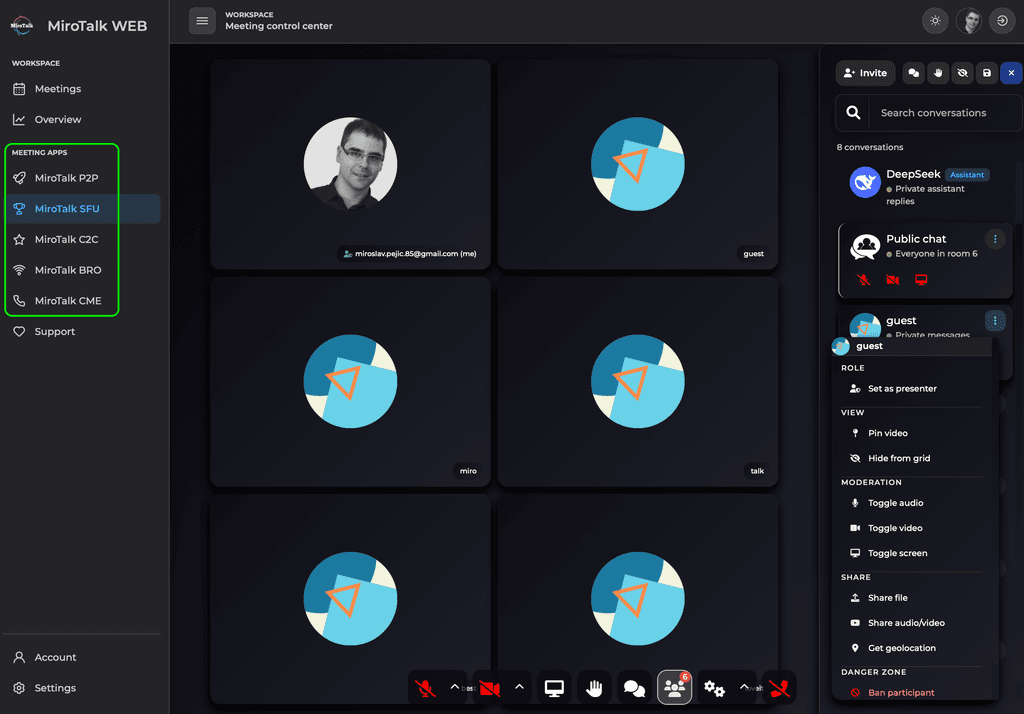
All MiroTalk meeting apps are available directly in MiroTalk WEB, so you can choose which one to use based on your needs.
When scheduling a meeting from the dashboard, you can also select which MiroTalk version you want to use. You can then send invitations by email, with reminder support, and even add the meeting to Google Calendar, Outlook, and more.
Hopefully this makes the overall ecosystem a bit clearer and shows how the different apps can work together depending on your use case.

-
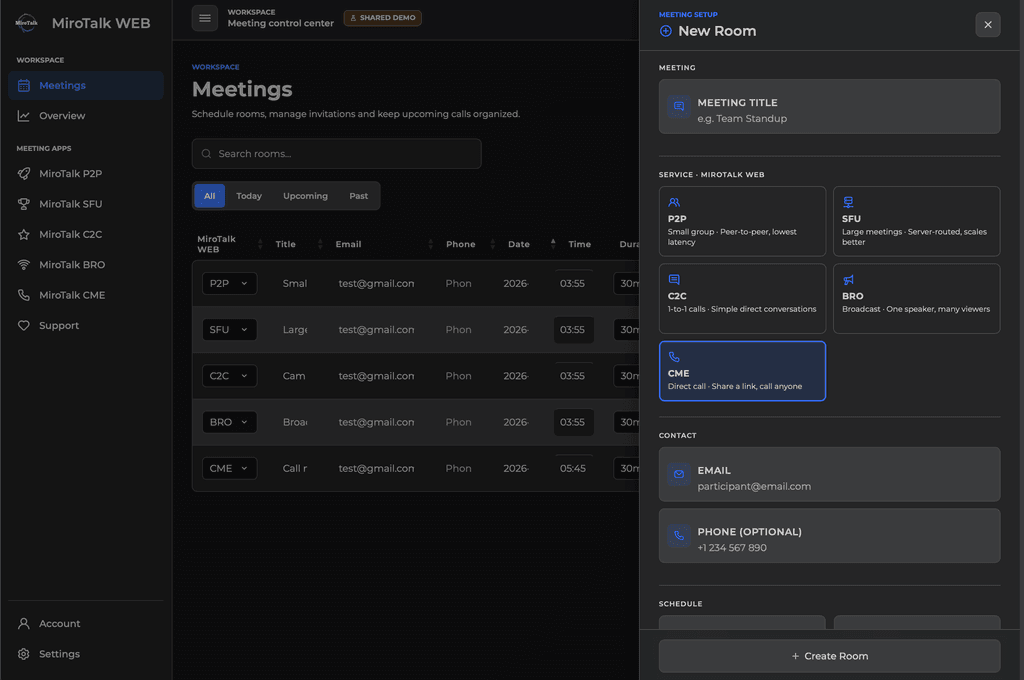
Feature: Add MiroTalk CME as a Bookable Room Type
Since MiroTalk CME (Call-Me) now supports multiple rooms, I’ve added the option to book CME rooms directly from MiroTalk WEB.
When creating a new booking, you can now select MiroTalk CME as the room type and schedule it just like the other supported MiroTalk meeting apps.
As always, any suggestions or feedback are very welcome. I’m always here to help!
Thank you!
️
-
@mirotalk do you think it'd be possible host MiroTalk WEB on Cloudron to manage the other MiroTalk Apps installed on a given Cloudron instance? And if so do you think you could point app devs on how to do it?
@mirotalk do you think it'd be possible host MiroTalk WEB on Cloudron to manage the other MiroTalk Apps installed on a given Cloudron instance?
Yes, MiroTalk WEB can also be deployed on Cloudron alongside MiroTalk P2P, SFU, and BRO, allowing Cloudron users to run the complete MiroTalk stack on their own infrastructure.
Our main goal, however, is to keep MiroTalk WEB SaaS as our managed offering, where users can subscribe to additional BRO(SFU mode enabled) and C2C/CME services while we take care of the infrastructure, updates, maintenance, and scaling.
Self-hosting is also available for users who prefer to manage everything themselves. Each deployed instance requires the appropriate license. For example, if you rebrand MiroTalk through the
.envconfiguration and provide the service without charging users, a Regular License is required. If you generate revenue from the service, an Extended License is required.The same principle applies to Cloudron deployments. Cloudron maintains the MiroTalk applications and keeps them up to date as part of its platform, but any rebranding or commercial use still needs to comply with the appropriate MiroTalk license. Cloudron hosting or maintaining the application does not replace the required license.
In short, if you deploy MiroTalk on Cloudron without modifying or rebranding it, you can use the standard MiroTalk application. If you want to rebrand or white-label it, you need the appropriate MiroTalk license depending on whether the resulting service is monetized.
The license is a one-time fee, with no recurring licensing cost. This also helps us keep MiroTalk alive and actively maintained, continue improving the platform, provide support to our clients, and cover the ongoing costs of servers and infrastructure.
More details about the available licensing options can be found here:
https://docs.mirotalk.com/license
And if so do you think you could point app devs on how to do it?
-
For example, if MiroTalk WEB becomes available on Cloudron, using it as-is without rebranding does not require a separate MiroTalk license. If you want to rebrand it as a single end product, there are two licensing options:
1. Regular License — No charges to end users
You need a Regular License for MiroTalk WEB, plus a Regular License for each MiroTalk service you want to include in it:
- MiroTalk P2P
- MiroTalk SFU
- MiroTalk BRO
You can include all three services or only the ones you need, but you must not charge your end users for access to or usage of these services.
2. Extended License — Charging end users
You need an Extended License for MiroTalk WEB, plus an Extended License for each MiroTalk service you want to include:
- MiroTalk P2P
- MiroTalk SFU
- MiroTalk BRO
You can include all three services or only one or two. The Extended License is required when you charge your end users for access to or usage of the MiroTalk services.
In short:
- Use MiroTalk as-is, without rebranding → No MiroTalk license required.
- Rebrand + don't charge end users → Regular License.
- Rebrand + charge end users → Extended License.
All licenses are one-time fees. Your license purchases help us keep MiroTalk alive, maintain the infrastructure and servers, provide support, and continue developing and improving the platform.
If you use MiroTalk without rebranding and would still like to support the project, you can also support us through GitHub Sponsors:
-
By the way
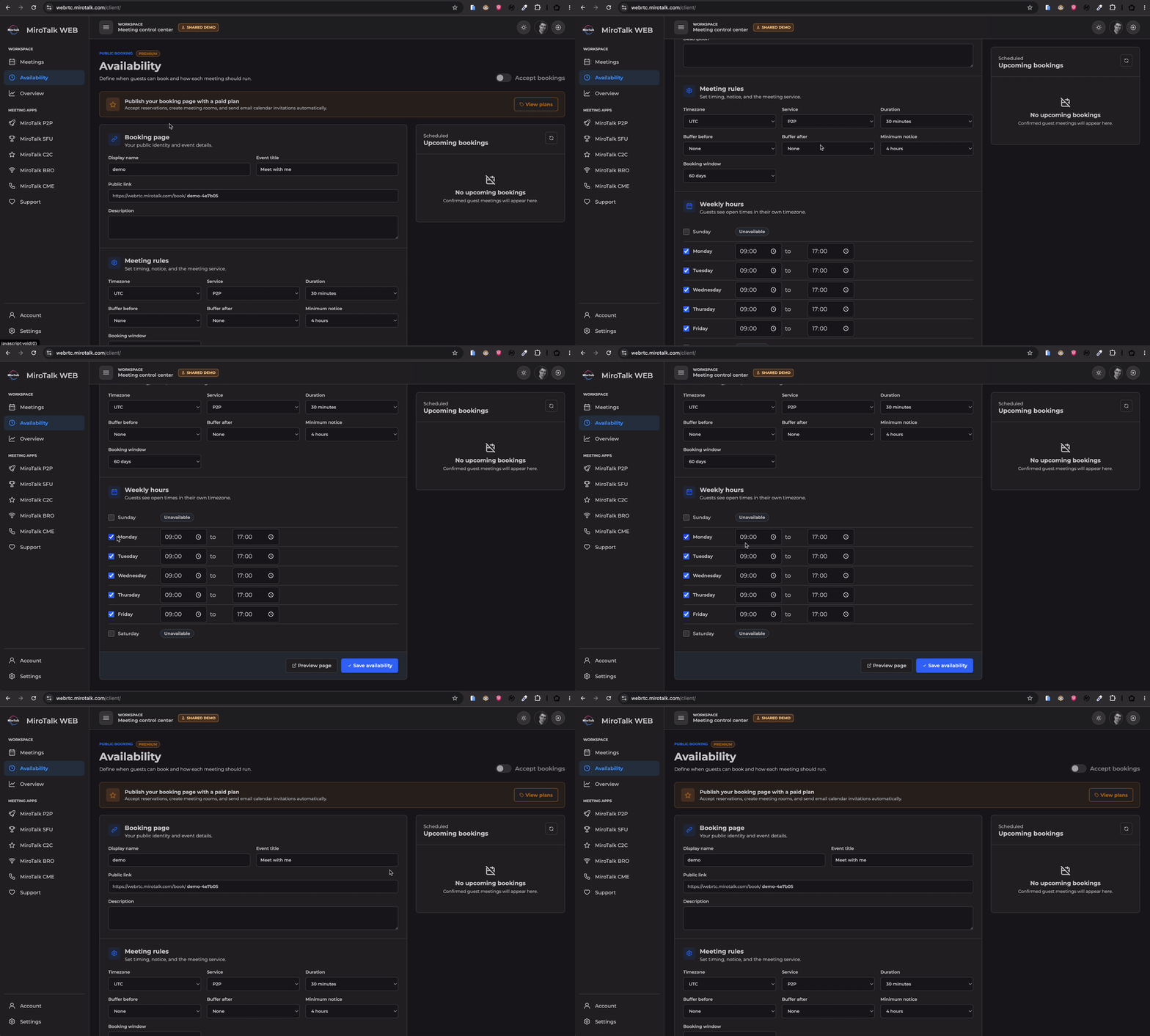
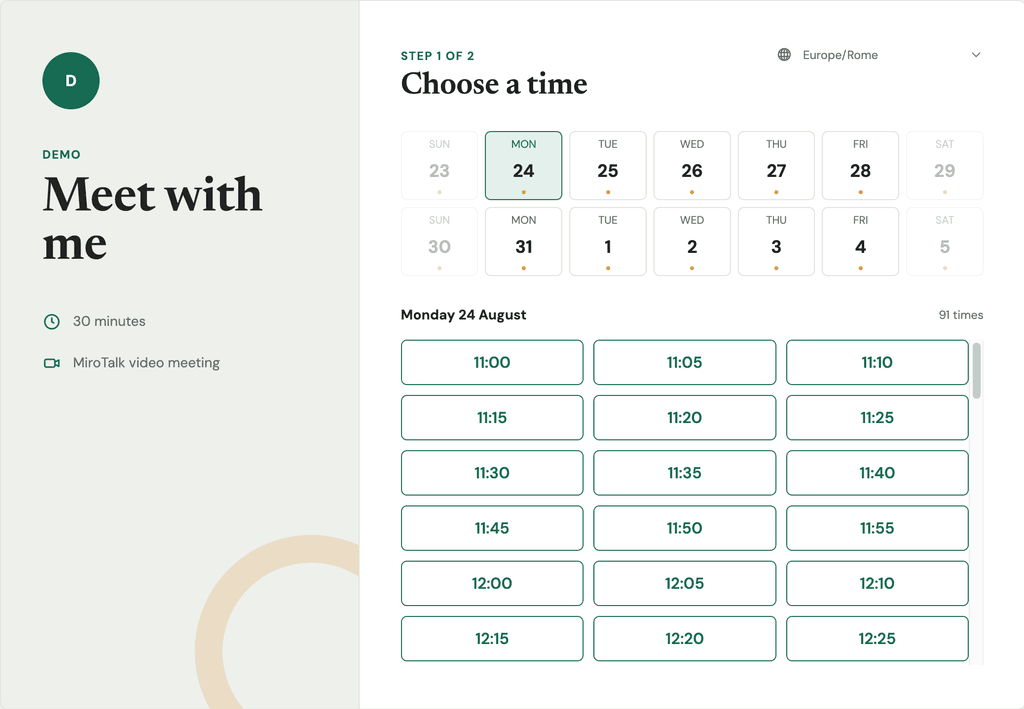
MiroTalk WEB v.1.5.10 Public Booking & Availability Is Here!MiroTalk now includes a complete public scheduling experience designed to make booking video meetings simple and automatic.
 What’s New
 Create a personalized public booking page
- Define weekly availability and unavailable days
- Configure meeting duration, notice periods, and booking limits
- Add preparation and follow-up buffers
- Automatically prevent conflicting reservations
- Create secure MiroTalk rooms for every booking
- Send email and calendar invitations automatically
- Manage upcoming reservations from the dashboard
- Allow guests to cancel their bookings
- Handle time zones and daylight-saving changes correctly
- Preview and publish your booking page directly from the dashboard
 Premium Feature
Public booking is available with an active paid plan. Administrators and self-hosted installations retain unrestricted access.
 MiroTalk WEB can now handle the complete scheduling workflow, from availability selection to room creation and calendar delivery.
Try now: https://webrtc.mirotalk.com
Thank you so much for supporting us through your subscriptions!
Your support means the world to us and helps us keep doing what we love. We truly appreciate you! 
-
To stay up to date with all MiroTalk projects, announcements, new features, and other news, feel free to join our community forum as well:
We’d love to have anyone there too!
️ -
@andreasdueren Thanks so much for the honest feedback! I completely understand where you’re coming from. As MiroTalk has grown, the boundaries between the different projects can definitely feel less clear than they should.
We’re aware of this and it’s something we’re thinking about. In the meantime, the MiroTalk Overview can hopefully help clarify the differences between the editions and what each one is designed for.
And if you’re curious about why there are several projects in the first place, I also shared the story behind MiroTalk. It started as a pandemic side project driven by privacy and open source, and the different editions evolved largely from real user needs and requests.
That said, your point about potentially consolidating or differentiating the projects more clearly is very valid. We definitely don’t want the ecosystem to become confusing.
️If you have a moment, it would be really helpful to know which parts are unclear to you and what you would expect to see improved in the explanation of each project. For example, is it the purpose of each edition, the target audience, the feature differences, or something else? That kind of concrete feedback would help us make the documentation and positioning much clearer.
which parts are unclear to you and what you would expect to see improved in the explanation of each project
My main confusion is that several projects appear to solve almost the same problem. C2C, P2P and CME all cover one-to-one calls; P2P and SFU offer largely the same meeting experience – and their UI and used terminology are almost identical – at different scales without any end-user distinction; BRO overlaps with SFU’s webinar and broadcasting features.
The overview lists many features and architecture terms, but it does not make the choice simple. People are used to Zoom: they start a meeting and it works, regardless of participant count. I would expect one clear decision guide and clearer terminology on each homepage shipped with the application, explaining who each project is for, its practical limitations, and why I should choose it instead of the overlapping alternatives.
-
The main difference between the MiroTalk projects is not that they all solve completely different problems, but that they use different WebRTC architectures and are optimized for different use cases, participant counts, and infrastructure requirements.
If you are looking for a simple rule of thumb: MiroTalk SFU is the closest MiroTalk equivalent to Zoom and should be the default choice for most users who want a complete video-meeting platform. The other projects exist because they optimize for simpler, smaller, more specialized, or different communication scenarios.
MiroTalk P2P - Simple, server-light meetings
MiroTalk P2P was the original project I started during the pandemic.
Its main characteristic is the WebRTC mesh/P2P architecture. The signaling server is used to help peers discover each other and establish the connection, while the media streams are exchanged directly between participants rather than being routed through a media server.
In ideal network conditions, this provides a major advantage: very low server requirements and maintenance costs. The server does not need to process and forward the audio and video traffic, making P2P attractive for lightweight and inexpensive self-hosted deployments.
However, WebRTC does not always allow two peers to establish a direct connection. Depending on the network configuration, NAT, firewalls, or restrictive corporate networks, a direct P2P connection may not be possible. In these cases, ICE/TURN can be used as a fallback: the media traffic is relayed through a TURN server when a direct connection cannot be established. This means that although P2P minimizes server usage in normal conditions, a TURN server may still be required for reliable connectivity in some network environments, and the associated bandwidth costs should be considered.
P2P works particularly well for small meetings, where direct peer-to-peer communication can provide low latency while keeping infrastructure costs very low.
The main limitation becomes apparent as the number of participants grows. In a mesh topology, each participant needs to send their media to the other participants. As the room grows, the number of connections and the required upload bandwidth and processing capacity on each user's device increase rapidly. Consequently, meeting quality can decrease as the number of participants increases.
So, in simple terms:
P2P = very low infrastructure costs and direct media communication, but scalability is limited by the participants' devices and network bandwidth. TURN provides connectivity fallback when a direct peer-to-peer connection is not possible, but introduces additional server bandwidth costs.
Pros
- Very low server CPU/RAM requirements
- Very low infrastructure and maintenance costs
- Direct peer-to-peer media communication
- Excellent for small meetings
- Very low latency in suitable network conditions
Cons
- Does not scale well to large meetings
- Quality depends heavily on each participant's device and upload bandwidth
- The number of media connections grows with the number of participants
- Not the best architecture for large meetings, webinars, or large broadcasts
In short: P2P is the lightweight and inexpensive choice for small groups.
MiroTalk SFU - The complete Zoom alternative
MiroTalk SFU was created later, largely because of the scalability limitations encountered with the P2P architecture and because users requested support for larger meetings.
SFU means Selective Forwarding Unit. Instead of participants sending their media directly to every other participant, media is sent to the SFU server. The server then selectively forwards the appropriate streams to the other participants.
This changes the scalability model significantly. Users no longer need to maintain a separate media connection to every participant, so the architecture can support much larger rooms while providing more predictable performance.
The trade-off is infrastructure: the server now has to handle the media traffic, so you need more CPU, RAM, network capacity, and bandwidth as the number of concurrent users increases.
The exact infrastructure requirements depend on the meeting configuration and workload. The scalability documentation provides more details: MiroTalk SFU scalability documentation
MiroTalk SFU also provides the broadest feature set, including regular video meetings, webinars, and broadcasting capabilities.
Pros
- Much better scalability than mesh P2P
- Server handles media forwarding instead of every participant connecting to everyone else
- Better suited to large meetings
- Suitable for webinars and broadcasting
- More predictable performance as rooms grow
- Complete meeting experience for users who want a Zoom alternative
Cons
- Requires a properly sized server
- Higher CPU, RAM, bandwidth, and infrastructure costs
- Requires more server-side administration and monitoring
- Costs increase with concurrent users and traffic
In short: if you want the MiroTalk equivalent of "start a meeting and it just works," MiroTalk SFU is the recommended choice.
MiroTalk C2C - Simple camera-to-camera calls
MiroTalk C2C overlaps technically with P2P because it also uses direct peer-to-peer communication, but it is intentionally much simpler.
C2C is designed for a very specific use case: a simple camera-to-camera video call between two participants.
It is limited to two participants per room and provides only the essential functionality required for that scenario.
The idea is not to compete with P2P as a general-purpose meeting platform, but to provide a minimal interface when users simply need to establish a one-to-one video call.
Pros
- Extremely simple user experience
- Only the essential video-call functionality
- P2P architecture means very low server requirements
- Ideal for two-person calls
Cons
- Limited to two participants
- Fewer features than P2P
- Not designed for meetings or larger groups
In short: C2C is for simple one-to-one camera-to-camera communication.
MiroTalk CME - A different calling experience
MiroTalk CME is another project that emerged from specific user requirements.
Although it also involves one-to-one or group video communication, its interaction model is different from simply entering a meeting room.
Think of it more like a "Call Me" room: participants can be associated with a room, but to establish the actual call, one participant calls the others and the video conference starts when the call is accepted.
MiroTalk CME also supports push notifications, allowing users to receive incoming call notifications even when they are not currently inside the room.
Users can also call specific users directly, without requiring them to already be present in the same room. This is possible when the recipient is known by their username and has enabled the calling/notification feature on their side.
This makes CME particularly suitable for a more traditional calling experience, where you can select or call a specific user and they can receive and accept the call before the video conference starts and is useful when the desired experience is closer to initiating and accepting a call rather than simply joining a conventional meeting.
Pros
- Different, call-oriented user experience
- Useful for scenarios where a call must be initiated and accepted
- Supports the specific workflow for which it was designed
Cons
- Not intended to be a general replacement for Zoom
- Different interaction model from a traditional meeting room
- More specialized than P2P or SFU
In short: CME is for users who specifically want a call-based experience rather than a conventional meeting experience.
MiroTalk BRO - Broadcasting
MiroTalk BRO focuses on broadcasting, rather than conventional meetings.
It supports different broadcasting approaches, including P2P and, more recently, SFU-based broadcasting. This gives the administrator or deployment a choice depending on the audience size and infrastructure requirements.
For a smaller audience, P2P can minimize server costs because the media is not centrally forwarded. For larger audiences, SFU can provide better scalability, at the cost of additional server resources.
This is an important distinction from MiroTalk SFU: broadcasting is the primary purpose of BRO, while broadcasting is one of the capabilities provided by the broader MiroTalk SFU platform.
Pros
- Designed specifically for broadcasting
- Can use P2P when the audience is small and minimizing server costs is important
- Can use SFU when scalability is more important
- Useful for broadcast-oriented scenarios
Cons
- More specialized than a normal meeting platform
- P2P broadcasting becomes less attractive as the audience grows
- SFU broadcasting requires appropriate server infrastructure
In short: BRO is for broadcasting-focused use cases where you want to choose the architecture according to audience size and infrastructure cost.
The simplest decision guide
The projects can therefore be understood like this:
Project Best for Architecture Main advantage Main limitation P2P Small meetings WebRTC Mesh/P2P Very low server cost Does not scale well with participants SFU General meetings, large rooms, webinars, broadcasting WebRTC SFU Scalability and complete feature set Requires server resources C2C Simple 1-to-1 calls WebRTC P2P Minimal and simple Only 2 participants CME Call-oriented communication Specialized calling workflow Call/accept experience Specialized use case BRO Broadcasting P2P or SFU Broadcasting-focused architecture choice Not primarily a general meeting platform The Zoom comparison
This is probably the most important point to make clear on the project homepages.
Users generally should not have to understand WebRTC architectures before choosing a video-conferencing application. They expect the experience to be simple: start a meeting, invite people, and have it work.
For that reason, if someone asks:
"I want a self-hosted Zoom alternative. Which MiroTalk project should I use?"
The answer is:
MiroTalk SFU.
It is the second major project that grew out of the experience with MiroTalk P2P and provides the most complete solution for modern video communication: meetings, larger rooms, webinars, and broadcasting.
P2P remains valuable because it solves a different problem: how to provide lightweight, inexpensive, low-latency meetings without requiring a media server.
C2C, CME, and BRO then serve more specialized requirements rather than competing directly with SFU.
The fundamental architecture trade-off
The easiest way to understand all of the projects is to start with the underlying WebRTC architecture.
MiroTalk WebRTC architectures documentation
P2P/Mesh:
Participant A
 Participant B
The participants exchange media directly. The server mainly provides signaling and coordination. This keeps infrastructure costs very low, but every participant has to handle more connections as the room grows.
SFU:
Participant A → SFU ← Participant B
The SFU receives media and selectively forwards it to the participants. This requires more server resources, but it moves much of the scaling problem away from the users' devices and networks.
So the fundamental trade-off is:
P2P = lower infrastructure cost, simpler server, better for small groups.
SFU = higher infrastructure cost, better scalability, better for larger groups and a complete meeting platform.
That distinction is ultimately more important than the project names themselves.
Hope this helps better to understand better? Thank you.
-
PS: Modern platforms such as Zoom, Google Meet, and Microsoft Teams rely on server-side media-routing architectures that are conceptually similar to WebRTC SFU rather than pure peer-to-peer mesh. Their exact implementations are proprietary and may combine multiple media-routing, relay, and distributed infrastructure technologies.
For large companies, the infrastructure, maintenance, and operational costs of these architectures are generally less of a concern because they have the resources to operate large-scale distributed systems.
MiroTalk SFU is the right choice when you want a complete, scalable video-conferencing solution similar in experience to Zoom, Meet, or Teams. However, MiroTalk is designed with a different philosophy: it is built for users who want to self-host their own communication infrastructure and choose the solution that best fits their needs and budget.
If you only need small meetings and want to minimize server costs, MiroTalk P2P may be the better choice. If you need larger meetings, webinars, broadcasting, and a more complete conferencing experience, MiroTalk SFU is the better option.
The goal is not to force everyone onto the most scalable architecture, but to let users choose the architecture that provides the best balance between features, scalability, infrastructure requirements, maintenance, and cost for their specific use case.
-
Another important reason for having multiple MiroTalk projects is that MiroTalk is open source under AGPLv3 License.
Different organizations have different requirements, and an open-source project is often not simply something you install and use as-is. It can also be a starting point for customization and further development.
If MiroTalk were limited to a single, huge, all-in-one product, a company that only needed a simple feature could still have to understand, maintain, and customize a large amount of unnecessary code. Starting from a solution that is already close to the desired use case makes customization much easier.
Imagine if Zoom were open source, but you only wanted to build a simple one-to-one video call. You could theoretically remove everything you don't need, but first you would have to understand the entire architecture, all the meeting features, scalability mechanisms, integrations, and dependencies.
 It might feel like you need 10 years of studying Zoom's codebase just to figure out what can safely be removed!
That's why having several focused MiroTalk projects is also an advantage. Each project provides a different starting point, allowing users and companies to choose the architecture and feature set that is closest to their requirements and then customize it further if needed.
So the goal is not to have multiple projects simply because they overlap. The goal is to provide different levels of complexity and different architectural starting points, while keeping each solution understandable, self-hostable, and customizable.
In other words:
Choose the project that is closest to what you need today and customize it for what you need tomorrow.


Hello! It looks like you're interested in this conversation, but you don't have an account yet.
Getting fed up of having to scroll through the same posts each visit? When you register for an account, you'll always come back to exactly where you were before, and choose to be notified of new replies (either via email, or push notification). You'll also be able to save bookmarks and upvote posts to show your appreciation to other community members.
With your input, this post could be even better 💗
Register Login