
Using Webhooks
-
Hi all! Really loving Uptime Kuma and wanted to know if anyone has tips on how to setup webhooks in there. I am running a separate Apprise API docker container on another machine (secured via Nginx and ACLs) and am thinking the only way I could pass notifications off is by using the webhook notification option in Uptime Kuma. There isn't much documentation on how to format the webhook and I was curious if anyone can offer some help.
For reference, I'm able to fire off notifications using the curl command like this:
curl -X POST -d '{"urls": "gchat://xxx/yyy/zzz", "body":"test message"}' -H "Content-Type: application/json" https://user:password@domain.tld/notifyOR
curl -X POST -d 'urls=gchat://xxx/yyy/zzz&body=test message' https://user:password@domain.tld/notify -
Hi all! Really loving Uptime Kuma and wanted to know if anyone has tips on how to setup webhooks in there. I am running a separate Apprise API docker container on another machine (secured via Nginx and ACLs) and am thinking the only way I could pass notifications off is by using the webhook notification option in Uptime Kuma. There isn't much documentation on how to format the webhook and I was curious if anyone can offer some help.
For reference, I'm able to fire off notifications using the curl command like this:
curl -X POST -d '{"urls": "gchat://xxx/yyy/zzz", "body":"test message"}' -H "Content-Type: application/json" https://user:password@domain.tld/notifyOR
curl -X POST -d 'urls=gchat://xxx/yyy/zzz&body=test message' https://user:password@domain.tld/notify@mazarian From what I can tell from https://github.com/louislam/uptime-kuma/blob/0dbecca10f5aaf53795f9f7a9568717372b9fcec/server/notification.js#L53, you just put the URL. The body of the message is always:
{ heartbeat: heartbeatJSON, monitor: monitorJSON, msg, }; -
@mazarian From what I can tell from https://github.com/louislam/uptime-kuma/blob/0dbecca10f5aaf53795f9f7a9568717372b9fcec/server/notification.js#L53, you just put the URL. The body of the message is always:
{ heartbeat: heartbeatJSON, monitor: monitorJSON, msg, }; -
Nice
 I am trying uptime via webhook to n8n to rocket.chat. In principle, it works. The next invested hour will be about the payload.
 -
Nice
I am trying uptime via webhook to n8n to rocket.chat. In principle, it works. The next invested hour will be about the payload. -
@luckow that's what I did (ish)! Uptime Kuma notifications => n8n webhook => Matrix notification.
@thetomester13 cool. That's what "worked" for me.
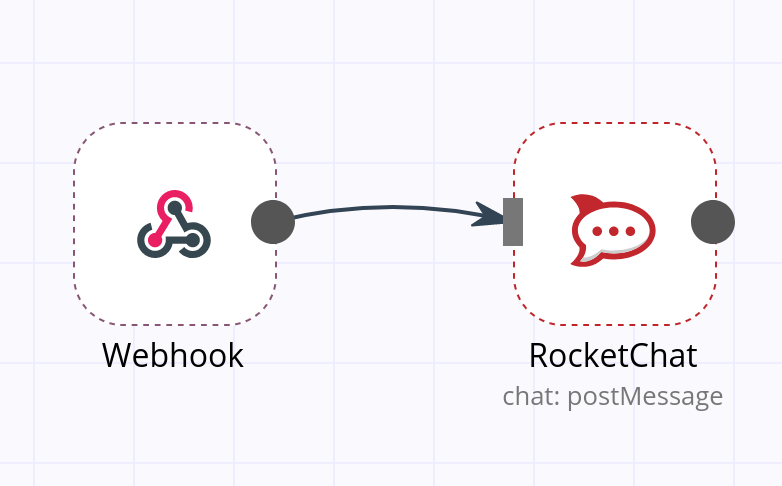
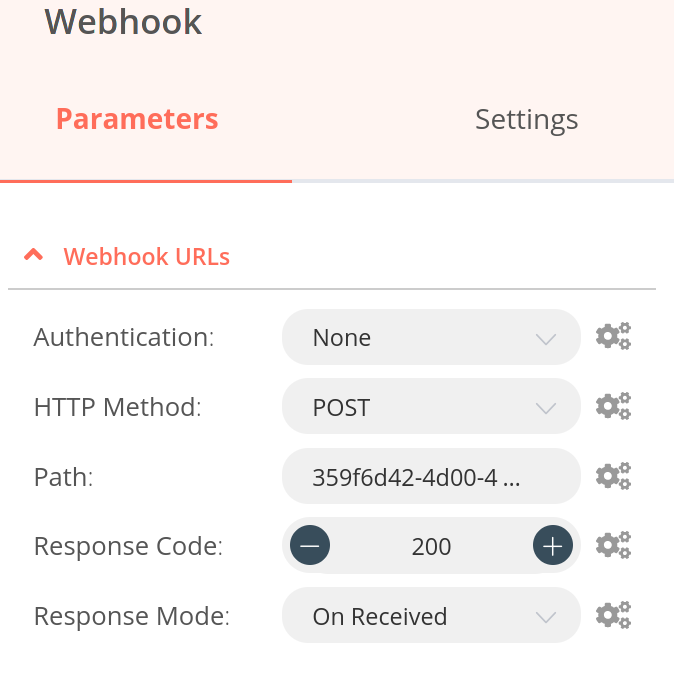
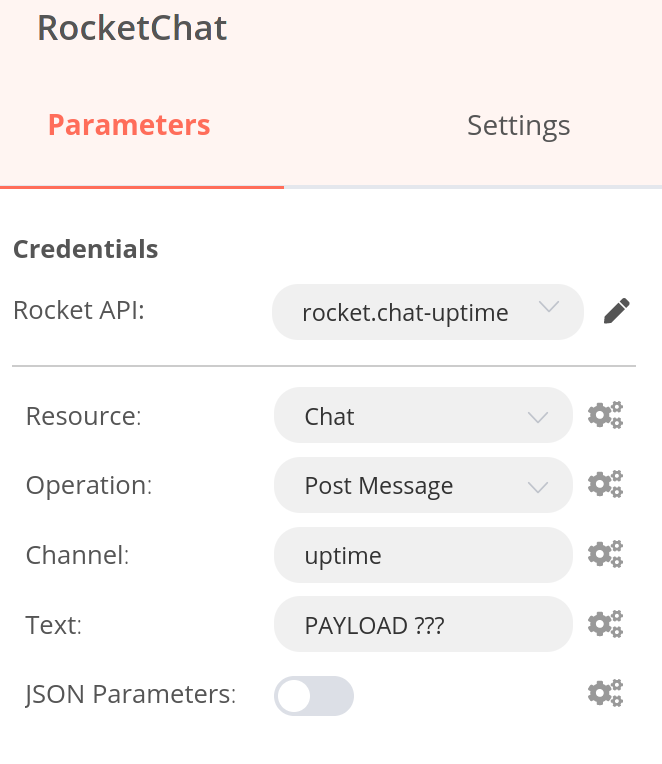
"Problem": the workflow sendsPAYLOAD ???into the rocket.chat channel. I need to read the n8n docs to solve this. But every time I click the test button in uptime, I get the message in rocket.chat. MVP done -
@thetomester13 cool. That's what "worked" for me.
"Problem": the workflow sendsPAYLOAD ???into the rocket.chat channel. I need to read the n8n docs to solve this. But every time I click the test button in uptime, I get the message in rocket.chat. MVP done@luckow for reference, this is the Expression I have in my 'text' field:
{{JSON.stringify($json["body"])}}
I output the entire JSON body stringified because I use this webhook for multiple incoming notifications and they contain different payloads. But you can try and extrapolate from here by bringing in just the fields you need, i.emsg,monitor, etc.


Hello! It looks like you're interested in this conversation, but you don't have an account yet.
Getting fed up of having to scroll through the same posts each visit? When you register for an account, you'll always come back to exactly where you were before, and choose to be notified of new replies (either via email, or push notification). You'll also be able to save bookmarks and upvote posts to show your appreciation to other community members.
With your input, this post could be even better 💗
Register Login