
Cloudron makes it easy to run web apps like WordPress, Nextcloud, GitLab on your server. Find out more or install now.


Skip to content
  • Categories
  • Recent
  • Tags
  • Popular
  • Bookmarks
  • Search
Skins
  • Light
  • Brite
  • Cerulean
  • Cosmo
  • Flatly
  • Journal
  • Litera
  • Lumen
  • Lux
  • Materia
  • Minty
  • Morph
  • Pulse
  • Sandstone
  • Simplex
  • Sketchy
  • Spacelab
  • United
  • Yeti
  • Zephyr
  • Dark
  • Cyborg
  • Darkly
  • Quartz
  • Slate
  • Solar
  • Superhero
  • Vapor

  • Default (No Skin)
  • No Skin
Collapse
Brand Logo

Cloudron Forum

Apps - Status | Demo | Docs | Install
  1. Cloudron Forum
  2. Uptime Kuma
  3. Uptime Kuma - Securing Status Pages

Uptime Kuma - Securing Status Pages

Scheduled Pinned Locked Moved Uptime Kuma
7 Posts 3 Posters 5.1k Views 3 Watching
  • Oldest to Newest
  • Newest to Oldest
  • Most Votes
Reply
  • Reply as topic
Log in to reply
This topic has been deleted. Only users with topic management privileges can see it.
  • S Offline
    S Offline
    shrey
    wrote on last edited by
    #1

    Hi all.

    Has anyone here been able to modify settings in Cloudron to enable Basic Auth for the Status pages generated by Uptime Kuma?

    Something on the lines of:
    https://github.com/louislam/uptime-kuma/issues/1756#issuecomment-1158597816

    1 Reply Last reply
    0
    • subvenS Offline
      subvenS Offline
      subven
      wrote on last edited by
      #2

      You can set up password authentication with htaccess and a .htpasswd file very easily. Just edit the .htaccess following one of the many examples for basic auth password protection.

      S 1 Reply Last reply
      1
      • subvenS subven

        You can set up password authentication with htaccess and a .htpasswd file very easily. Just edit the .htaccess following one of the many examples for basic auth password protection.

        S Offline
        S Offline
        shrey
        wrote on last edited by shrey
        #3

        @subven Thanks for your response.

        Where do i add the .htaccess and .htpasswd files in Cloudron?

        1 Reply Last reply
        0
        • subvenS Offline
          subvenS Offline
          subven
          wrote on last edited by subven
          #4

          @shrey .htaccess should already in the public root directory of the webapp. The .htpasswd should be outside the public directorys (like one above pub). Simple example.

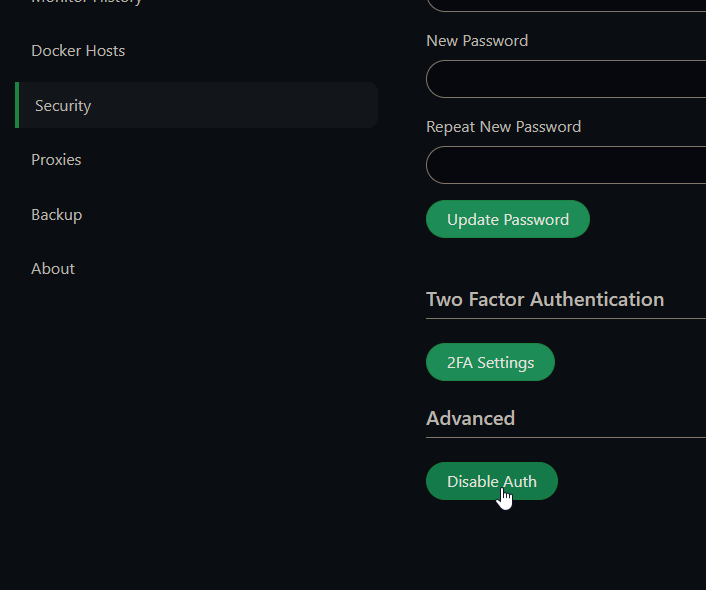
          Edit: bye the way...Uptime Kuma already has authentication in front of its dashboard and pages? You can(!) make them public by disabling Auth in your accounts security settings. Is there a downside for you to use the login method or am I wrong?
          2022-11-18 17_33_30-Uptime Kuma.png

          girishG 1 Reply Last reply
          0
          • girishG Offline
            girishG Offline
            girish
            Staff
            wrote on last edited by
            #5

            The htaccess stuff only works if you serve things via apache. This is not the case with Cloudron package.

            https://github.com/louislam/uptime-kuma/issues/1401 is another related report. I guess this is not supported upstream yet.

            1 Reply Last reply
            1
            • girishG girish marked this topic as a regular topic on
            • subvenS subven

              @shrey .htaccess should already in the public root directory of the webapp. The .htpasswd should be outside the public directorys (like one above pub). Simple example.

              Edit: bye the way...Uptime Kuma already has authentication in front of its dashboard and pages? You can(!) make them public by disabling Auth in your accounts security settings. Is there a downside for you to use the login method or am I wrong?

              2022-11-18 17_33_30-Uptime Kuma.png

              girishG Offline
              girishG Offline
              girish
              Staff
              wrote on last edited by girish
              #6

              @subven Oh, does that password make the status pages protected too?

              Edit: from what I can tell, the status pages are always public. It's only the admin pages itself that can be password protected or not.

              1 Reply Last reply
              2
              • subvenS Offline
                subvenS Offline
                subven
                wrote on last edited by
                #7

                Okay my bad. The last time I did this was for a Wordpress which used Apache. You can also do basic auth with NGINX but the configuration for app packages is read only (as far as I remember).

                @girish said in Uptime Kuma - Securing Status Pages:

                Oh, does that password make the status pages protected too?

                I assumed that because the Dashboard was not reachable without logging in but sadly it is not the case.

                I think there is no easy way for us to fix that and it will remain an upstream issue.

                1 Reply Last reply
                2

                Hello! It looks like you're interested in this conversation, but you don't have an account yet.

                Getting fed up of having to scroll through the same posts each visit? When you register for an account, you'll always come back to exactly where you were before, and choose to be notified of new replies (either via email, or push notification). You'll also be able to save bookmarks and upvote posts to show your appreciation to other community members.

                With your input, this post could be even better 💗

                Register Login
                Reply
                • Reply as topic
                Log in to reply
                • Oldest to Newest
                • Newest to Oldest
                • Most Votes


                • Login

                • Don't have an account? Register

                • Login or register to search.
                • First post
                  Last post
                0
                • Categories
                • Recent
                • Tags
                • Popular
                • Bookmarks
                • Search
