
git clone ssh ask for password

-
-
From the error it appears that the key is not accepted. I just tried to reproduce this, but it works at least on a fresh installation. Can you maybe try to generate a fresh key maybe with the default keygen configs, maybe that specific key is not supported?
-
 N nebulon marked this topic as a question on
-
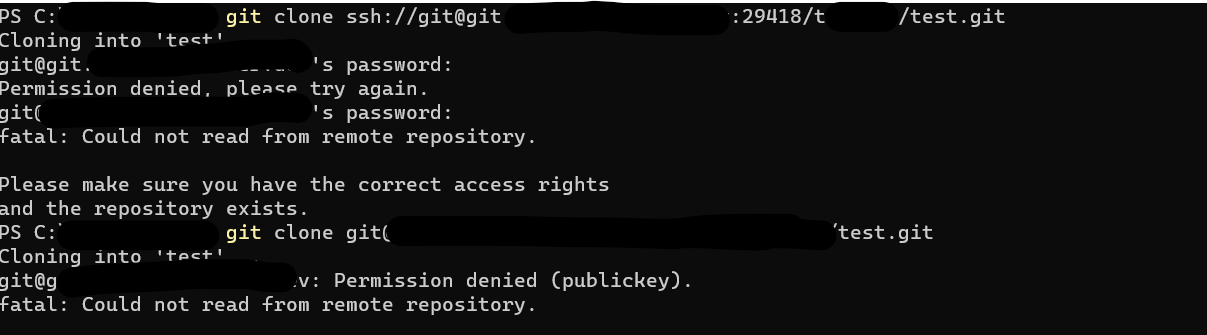
I am getting this error on a fresh install as well, call it gitea.example.com:
$ git clone ssh://git@gitea.example.com:29418/user/test-repo.git
Cloning into 'test-repo'...
git@gitea.example.com's password:
I wondered if it's possible the port is wrong, and the command is trying to ssh into the machine as user git, instead of trying to log in. I did try from two different machines with their own ssh keys. I also tried with a verified public key:
$ git clone ssh://git@gitea.example.com:/user/test-repo.git Cloning into 'test-repo'... git@gitea.example.com: Permission denied (publickey). fatal: Could not read from remote repository. Please make sure you have the correct access rights and the repository exists. -
-
You probably miss the
Hostsection for your gitea origin in~/.ssh/configTo let git know which ssh key to use.
This should look something like this:Host git.domain.com IdentityFile ~/.ssh/id_rsa IdentitiesOnly yes -
I am looking at issues like this (maybe on the wrong track). https://github.com/go-gitea/gitea/issues/11050
Thank you for any help. Will report back if I find anything. -
Are you behind Cloudflare maybe? Or some other firewall in the front?
Usually, the way to debug git ssh issues is like this:
GIT_SSH_COMMAND="ssh -vvv" git clone ssh://git@gitea.example.com:29418/user/test-repo.gitThis will show you what ssh keys of yours it is trying to use.
-
Thank you, I have been using that command to debug though without success so far. I am not behind Cloudflare or any firewall.
I only have one ssh key on the machines I am using to test. I verified it in the Gitea interface, but it is rejected:
$ GIT_SSH_COMMAND="ssh -vvv" git clone ssh://git@gitea.example.com:29418/user/test-repo.git
# ...
debug1: Next authentication method: publickey
debug1: Offering public key: /home/linuxuser/.ssh/id_rsa RSA SHA256:XXXXX explicit agent
debug3: send packet: type 50
debug2: we sent a publickey packet, wait for reply
debug3: receive packet: type 51
debug1: Authentications that can continue: publickey,password
debug2: we did not send a packet, disable method
debug3: authmethod_lookup password
# ...
I am curious about the difference between these command formats for cloning a repo:
git clone ssh://git@gitea.example.com:29418/user/test-repo.git  # Cloudron Gitea
git clone git@gitea.example2.com:user/test-repo.git  # non-Cloudron Gitea
I also get this difference: with Cloudron,
$ ssh -p 29418 git@gitea.example.com
git@gitea.cutheory.dev's password:
but with non-Cloudron,
$ ssh git@gitea.example2.com Hi there, user! You've successfully authenticated with the key named <keyname>, but Gitea does not provide shell access. -
-
-
N nebulon has marked this topic as solved on


Hello! It looks like you're interested in this conversation, but you don't have an account yet.
Getting fed up of having to scroll through the same posts each visit? When you register for an account, you'll always come back to exactly where you were before, and choose to be notified of new replies (either via email, or push notification). You'll also be able to save bookmarks and upvote posts to show your appreciation to other community members.
With your input, this post could be even better 💗
Register Login