
Cloudron Update to 7.7.0 - PostgreSQL does not start
-
After upgrading to 7.7.0, PostgreSQL does not seem to come up, even after putting it into recovery mode, increasing the memory limit to 8 GB, and restarting.
Mar 11 11:13:28 ...........2024-03-11 10:13:28.823 UTC [16] LOG: database system was not properly shut down; automatic recovery in progress
Mar 11 11:13:28 2024-03-11 10:13:28.832 UTC [16] LOG: redo starts at 3/D14653B0
Mar 11 11:13:28 2024-03-11 10:13:28.832 UTC [16] LOG: invalid record length at 3/D146A858: wanted 24, got 0
Mar 11 11:13:28 2024-03-11 10:13:28.832 UTC [16] LOG: redo done at 3/D146A7C0 system usage: CPU: user: 0.00 s, system: 0.00 s, elapsed: 0.00 s
Mar 11 11:13:28 2024-03-11 10:13:28.915 UTC [15] LOG: database system is ready to accept connections
Mar 11 11:13:29 done
Mar 11 11:13:29 server started
Mar 11 11:13:29 pg_ctl: server is running (PID: 15)
Mar 11 11:13:29 /usr/lib/postgresql/14/bin/postgres "-D" "/var/lib/postgresql/14/main"
Mar 11 11:13:29 ALTER ROLE
Mar 11 11:13:29 UPDATE 6
Mar 11 11:13:29 ALTER SYSTEM
Mar 11 11:13:29 2024-03-11 10:13:29.181 UTC [35] ERROR: database "cloudronpgvectorupdate" already exists
Mar 11 11:13:29 2024-03-11 10:13:29.181 UTC [35] STATEMENT: CREATE DATABASE cloudronpgvectorupdate
Mar 11 11:13:29 ERROR: database "cloudronpgvectorupdate" already exists
Mar 11 11:13:29 Detected existing installation
Mar 11 11:13:29 Resetting root password
Mar 11 11:13:29 pg_ctl: another server might be running; trying to start server anyway
Mar 11 11:13:29 waiting for server to start....2024-03-11 10:13:29.975 UTC [15] LOG: starting PostgreSQL 14.10 (Ubuntu 14.10-0ubuntu0.22.04.1) on x86_64-pc-linux-gnu, compiled by gcc (Ubuntu 11.4.0-1ubuntu1~22.04) 11.4.0, 64-bit
Mar 11 11:13:29 2024-03-11 10:13:29.975 UTC [15] LOG: listening on IPv6 address "::1", port 5432
Mar 11 11:13:29 2024-03-11 10:13:29.975 UTC [15] LOG: listening on IPv4 address "127.0.0.1", port 5432
Mar 11 11:13:29 2024-03-11 10:13:29.985 UTC [15] LOG: listening on Unix socket "/var/run/postgresql/.s.PGSQL.5432"
Mar 11 11:13:30 2024-03-11 10:13:30.000 UTC [16] LOG: database system was interrupted; last known up at 2024-03-11 10:13:28 UTC
Is there anything else I can do? I don't see anything specific on https://docs.cloudron.io/troubleshooting/#unresponsive-service
-
 G girish referenced this topic on
-
We reverted the release. But to bring this back, you have to do this:
- Put postgresl in recovery mode in Services -> Postgresql -> edit -> recovery mode
- Then,
docker exec -ti postgresql /bin/bash
2.1 Run./start.sh. it will say database exists. Runpsql -Uroot --dbname=postgres -c "DROP DATABASE cloudronpgvectorupdate" - Exit out of above docker shell
- Remove recovery mode of step 1
- Wait a bit for postgresql to be green. Then
systemctl restart box
-
G girish marked this topic as a question on
-
Thanks, that worked!
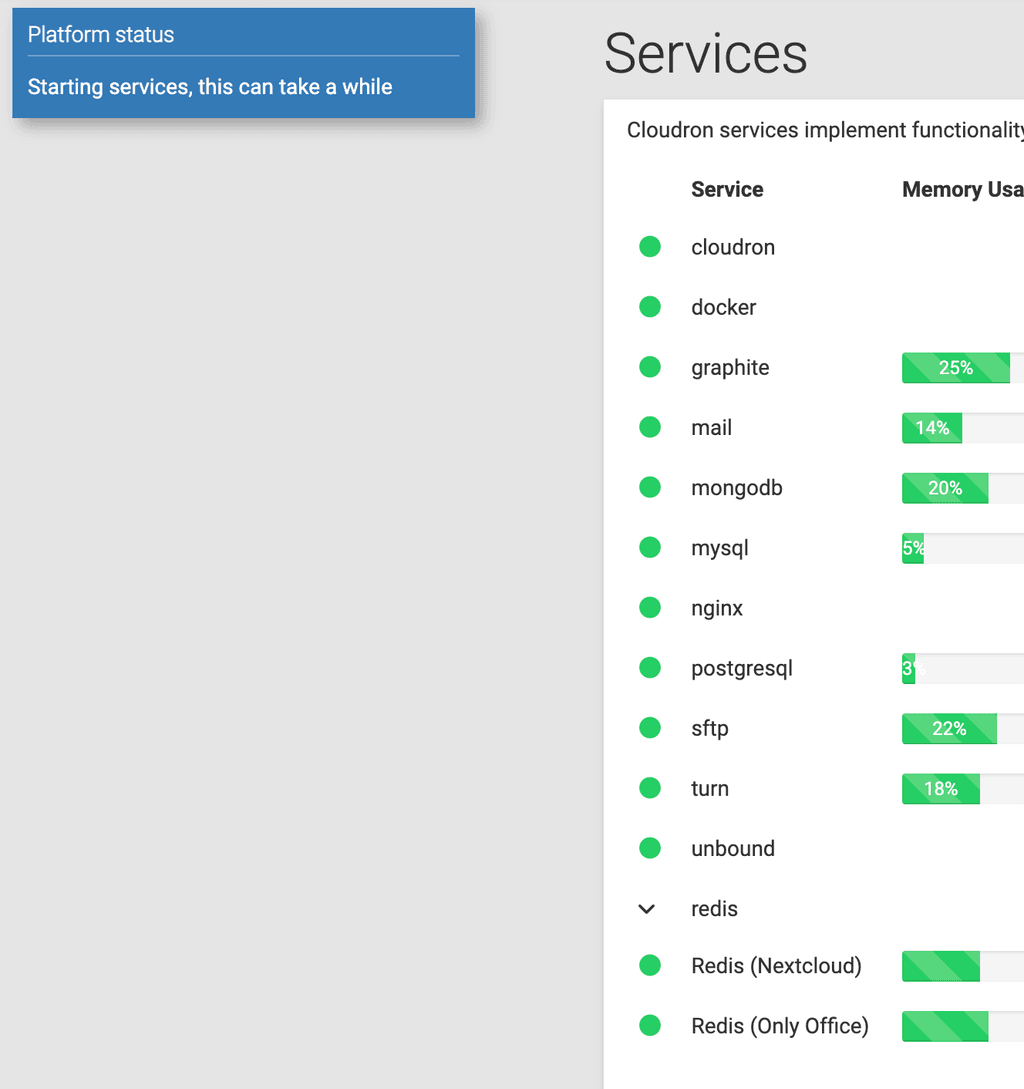
Though now the "Platform status" notification does not disappear...
-
N necrevistonnezr has marked this topic as solved on
-
Thanks, it went away after ~10 mins...
-
C contactlight11 referenced this topic on
-
 N nebulon referenced this topic on
-
N nebulon referenced this topic on
-
 B BrutalBirdie referenced this topic on
-
J jsit referenced this topic on
Hello! It looks like you're interested in this conversation, but you don't have an account yet.
Getting fed up of having to scroll through the same posts each visit? When you register for an account, you'll always come back to exactly where you were before, and choose to be notified of new replies (either via email, or push notification). You'll also be able to save bookmarks and upvote posts to show your appreciation to other community members.
With your input, this post could be even better 💗
Register Login