Cloudron makes it easy to run web apps like WordPress, Nextcloud, GitLab on your server. Find out more or install now.


Skip to content
  • Categories
  • Recent
  • Tags
  • Popular
  • Bookmarks
  • Search
Skins
  • Light
  • Brite
  • Cerulean
  • Cosmo
  • Flatly
  • Journal
  • Litera
  • Lumen
  • Lux
  • Materia
  • Minty
  • Morph
  • Pulse
  • Sandstone
  • Simplex
  • Sketchy
  • Spacelab
  • United
  • Yeti
  • Zephyr
  • Dark
  • Cyborg
  • Darkly
  • Quartz
  • Slate
  • Solar
  • Superhero
  • Vapor

  • Default (No Skin)
  • No Skin
Collapse
Brand Logo

Cloudron Forum

Apps - Status | Demo | Docs | Install
  1. Cloudron Forum
  2. Paperless-ngx
  3. High cpu utilization since update 1.25.1

High cpu utilization since update 1.25.1
Scheduled Pinned Locked Moved Solved Paperless-ngx
42 Posts 14 Posters 13.6k Views 17 Watching
  • Oldest to Newest
  • Newest to Oldest
  • Most Votes
Reply
  • Reply as topic
Log in to reply
This topic has been deleted. Only users with topic management privileges can see it.
  • humptyH humpty

    Shoutout to stumpylog (paperless maintainer) for the fix. Using the file manager, browse to /app/data/data and delete celerybeat-schedule.db.db and restart the server app. CPU usage went down for me. Hopefully, it stays that way.
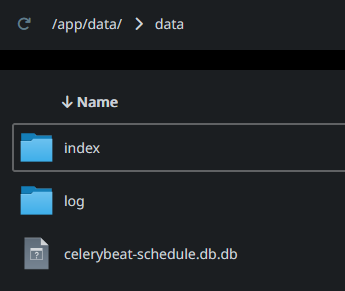
    image.png

    image.png

    imc67I Offline
    imc67I Offline
    imc67
    translator
    wrote on last edited by
    #24

    @humptydumpty said in High cpu utilization since update 1.25.1:

    Shoutout to stumpylog (paperless maintainer) for the fix. Using the file manager, browse to /app/data/data and delete celerybeat-schedule.db.db and restart the server app. CPU usage went down for me. Hopefully, it stays that way.

    image.png

    image.png

    This solution solved the issue for me! Thanks!!🙏

    1 Reply Last reply
    5
    • humptyH humpty

      Shoutout to stumpylog (paperless maintainer) for the fix. Using the file manager, browse to /app/data/data and delete celerybeat-schedule.db.db and restart the server app. CPU usage went down for me. Hopefully, it stays that way.

      image.png

      image.png

      necrevistonnezrN Offline
      necrevistonnezrN Offline
      necrevistonnezr
      wrote on last edited by
      #25

      @humptydumpty said in High cpu utilization since update 1.25.1:

      Shoutout to stumpylog (paperless maintainer) for the fix. Using the file manager, browse to /app/data/data and delete celerybeat-schedule.db.db and restart the server app. CPU usage went down for me. Hopefully, it stays that way.

      So it was not a Cloudron issue in the end?

      humptyH 1 Reply Last reply
      1
      • necrevistonnezrN necrevistonnezr

        @humptydumpty said in High cpu utilization since update 1.25.1:

        Shoutout to stumpylog (paperless maintainer) for the fix. Using the file manager, browse to /app/data/data and delete celerybeat-schedule.db.db and restart the server app. CPU usage went down for me. Hopefully, it stays that way.

        So it was not a Cloudron issue in the end?

        humptyH Offline
        humptyH Offline
        humpty
        wrote on last edited by
        #26

        @necrevistonnezr we still don’t know the root cause of the file corruption. It could happen again anytime. Upstream closed the discussion and moved on. It looks like only Cloudron users are affected on existing installs and not on a fresh app. App update snafu?

        Btw, upstream said the +500mb ram on idle is normal. I don’t get why it should be that high.

        1 Reply Last reply
        2
        • humptyH Offline
          humptyH Offline
          humpty
          wrote on last edited by humpty
          #27

          @nebulon I uploaded the corrupted db file upstream as requested.. edit: just realized I can copy the github link https://github.com/user-attachments/files/16591433/celerybeat-schedule.db.zip

          I'll keep the cloned app for the time being. Please let me know if you need more info.

          1 Reply Last reply
          1
          • necrevistonnezrN necrevistonnezr referenced this topic on
          • humptyH Offline
            humptyH Offline
            humpty
            wrote on last edited by
            #28

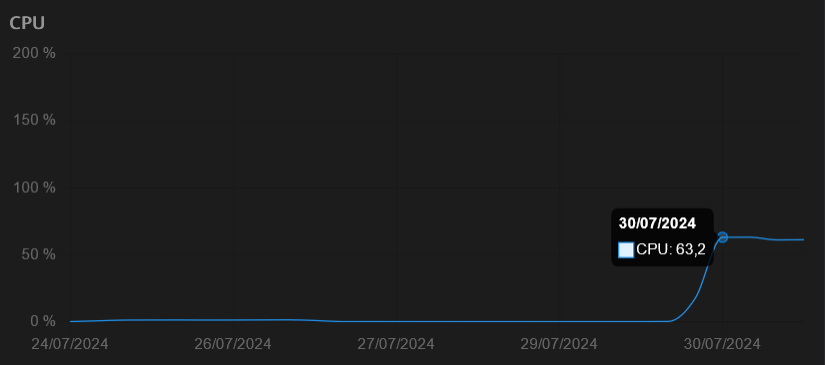
            CPU is high again on Paperless-ngx 2.11.6. Deleting the celery file and restarting still works as a temp fix. I did turn off the server today and updated the BIOS. Idk if that has anything to do with it.

            1 Reply Last reply
            0
            • nebulonN nebulon referenced this topic on
            • nebulonN nebulon referenced this topic on
            • M manngobaum referenced this topic on
            • W Offline
              W Offline
              wheez
              wrote on last edited by
              #29

              Do we know by now what is causing this problem? I have had it for the second time today. Last time about a Month ago. The fix worked in both cases but I guess it would still be interesting to know why this is happening.

              1 Reply Last reply
              2
              • humptyH Offline
                humptyH Offline
                humpty
                wrote on last edited by humpty
                #30

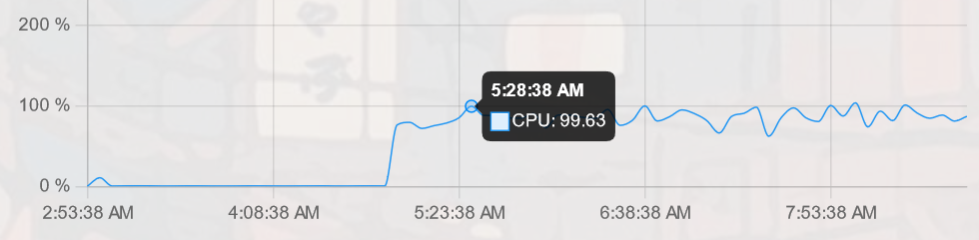
                It's going nuts again after it updated to 1.27 then 1.28 today.

                image.png

                edit: This time I had to delete the celery file and restart the app twice for the fix to work.

                1 Reply Last reply
                2
                • nebulonN nebulon referenced this topic on
                • humptyH Offline
                  humptyH Offline
                  humpty
                  wrote on last edited by
                  #31

                  Just an FYI, it's still recurring on v.1.3.2.

                  1 Reply Last reply
                  0
                  • F Offline
                    F Offline
                    flwd
                    wrote on last edited by
                    #32

                    Same issue for me. I ran cloudron as a VM on unraid and on proxmox, on 2 different hosts and with and without a CIFS mount as consume folder. The issue recurred in every constellation.

                    J 1 Reply Last reply
                    0
                    • F flwd

                      Same issue for me. I ran cloudron as a VM on unraid and on proxmox, on 2 different hosts and with and without a CIFS mount as consume folder. The issue recurred in every constellation.

                      J Offline
                      J Offline
                      joseph
                      Staff
                      wrote on last edited by
                      #33

                      @flwd said in High cpu utilization since update 1.25.1:

                      The issue recurred in every constellation

                      What does this mean?

                      jdaviescoatesJ F 2 Replies Last reply
                      0
                      • J joseph

                        @flwd said in High cpu utilization since update 1.25.1:

                        The issue recurred in every constellation

                        What does this mean?

                        jdaviescoatesJ Offline
                        jdaviescoatesJ Offline
                        jdaviescoates
                        wrote on last edited by
                        #34

                        @joseph installation typo would be my guess 🙂

                        I use Cloudron with Gandi & Hetzner

                        1 Reply Last reply
                        1
                        • J joseph

                          @flwd said in High cpu utilization since update 1.25.1:

                          The issue recurred in every constellation

                          What does this mean?

                          F Offline
                          F Offline
                          flwd
                          wrote on last edited by
                          #35

                          @joseph it occured in every installation variant i tried, independant of the CIFS mount and config.

                          J 1 Reply Last reply
                          1
                          • F flwd

                            @joseph it occured in every installation variant i tried, independant of the CIFS mount and config.

                            J Offline
                            J Offline
                            joseph
                            Staff
                            wrote on last edited by
                            #36

                            @flwd thanks for the clarification. I think the original issue atleast was narrowed down to celery database going corrupt and it's not related to volume type. Have you tried deleting that database pointed out earlier in the thread?

                            F 1 Reply Last reply
                            0
                            • J joseph

                              @flwd thanks for the clarification. I think the original issue atleast was narrowed down to celery database going corrupt and it's not related to volume type. Have you tried deleting that database pointed out earlier in the thread?

                              F Offline
                              F Offline
                              flwd
                              wrote on last edited by
                              #37

                              @joseph yes, deleting the database fixes the problem temporarily.

                              1 Reply Last reply
                              0
                              • lukasgabrielL Offline
                                lukasgabrielL Offline
                                lukasgabriel
                                wrote on last edited by
                                #38

                                Same problem still happening...

                                humptyH 1 Reply Last reply
                                0
                                • lukasgabrielL lukasgabriel

                                  Same problem still happening...

                                  humptyH Offline
                                  humptyH Offline
                                  humpty
                                  wrote on last edited by
                                  #39

                                  @lukasgabriel at this point consider it a feature rather than a bug

                                  1 Reply Last reply
                                  0
                                  • perelinP Offline
                                    perelinP Offline
                                    perelin
                                    wrote on last edited by
                                    #40

                                    Also just run into this issue. Deleted the .db.db file which fixed it (for now) com.paperlessng.cloudronapp@1.35.0

                                    1 Reply Last reply
                                    0
                                    • humptyH Offline
                                      humptyH Offline
                                      humpty
                                      wrote on last edited by
                                      #41

                                      It was going crazy over the weekend for me too and of course, it happened the only time when I didn't check it (been monitoring it daily nowadays). I'll stick to using the Quickscan app on iOS which has OCR and will have it upload to my Nextcloud directly. Adios papersh*t.

                                      1 Reply Last reply
                                      0
                                      • perelinP Offline
                                        perelinP Offline
                                        perelin
                                        wrote on last edited by
                                        #42

                                        Yup, its up again. Took 1 day. Maybe cron/automating the deletion of the .db.db file is something that I will try.

                                        1 Reply Last reply
                                        0
                                        • jamesJ james has marked this topic as solved on

                                        Hello! It looks like you're interested in this conversation, but you don't have an account yet.

                                        Getting fed up of having to scroll through the same posts each visit? When you register for an account, you'll always come back to exactly where you were before, and choose to be notified of new replies (either via email, or push notification). You'll also be able to save bookmarks and upvote posts to show your appreciation to other community members.

                                        With your input, this post could be even better 💗

                                        Register Login
                                        Reply
                                        • Reply as topic
                                        Log in to reply
                                        • Oldest to Newest
                                        • Newest to Oldest
                                        • Most Votes


                                        • Login

                                        • Don't have an account? Register

                                        • Login or register to search.
                                        • First post
                                          Last post
                                        0
                                        • Categories
                                        • Recent
                                        • Tags
                                        • Popular
                                        • Bookmarks
                                        • Search