
CiviCRM | Open source constituent relationship management for non-profits, NGOs and advocacy organizations
-
I tried. Failed. There is some mix up that I can't unravel between the installation directory and final URL. I tried installing with the pertinent items in /app/data/public, using crm.example.com, and even though the install said it worked, I couldn't login because it was looking for crm.example.com/civicrm. So I emptied the db and started again, this time using /app/data/public/civicrm, but that time it seemed to want to just use crm.example.com; a partial admin login appeared if I used crm.example.com/civicrm, but after pressing Enter the page wouldn't load and a message about some problem popped up. Bizarre. I really don't feel like trying again. All permissions were fine. I've already uninstalled the LAMP app. Oh well.
A life lived in fear is a life half-lived
-
I tried. Failed. There is some mix up that I can't unravel between the installation directory and final URL. I tried installing with the pertinent items in /app/data/public, using crm.example.com, and even though the install said it worked, I couldn't login because it was looking for crm.example.com/civicrm. So I emptied the db and started again, this time using /app/data/public/civicrm, but that time it seemed to want to just use crm.example.com; a partial admin login appeared if I used crm.example.com/civicrm, but after pressing Enter the page wouldn't load and a message about some problem popped up. Bizarre. I really don't feel like trying again. All permissions were fine. I've already uninstalled the LAMP app. Oh well.
@scooke quick & dirty:
- install LAMP on your Cloudron
- open the webterminal
- cd /app/data/
- wget https://storage.googleapis.com/civicrm/civicrm-stable/5.80.1/civicrm-5.80.1-standalone.tar.gz
- tar -xzf civicrm-5.80.1-standalone.tar.gz
- rm -rf public civicrm-5.80.1-standalone.tar.gz
- ln -s civicrm-standalone public
- chown -R www-data: civicrm-standalone public
Open civicrm.example.com. Install CiviCRM.
Credentials for mysql -> (easiest way) opencredentials.txtin the filemanagerPronouns: he/him | Primary language: German
-
@luckow Instead of ln -s to /app/data/public, I extracted the tar to that directory. Permissions were all fine.
So you're saying you have it up and running? Because I did essentially what you outlined, and it didn't work.
A life lived in fear is a life half-lived
-
@luckow Instead of ln -s to /app/data/public, I extracted the tar to that directory. Permissions were all fine.
So you're saying you have it up and running? Because I did essentially what you outlined, and it didn't work.
@scooke said in CiviCRM | Open source constituent relationship management for non-profits, NGOs and advocacy organizations:
@luckow Instead of ln -s to /app/data/public, I extracted the tar to that directory. Permissions were all fine.
So you're saying you have it up and running? Because I did essentially what you outlined, and it didn't work.
I did exactly step by step what @luckow wrote and had it up and running within a minute. Though I didn’t manage to get the cron working and didn’t liked the UI so waiting for v6.
-
-
@scooke quick & dirty:
- install LAMP on your Cloudron
- open the webterminal
- cd /app/data/
- wget https://storage.googleapis.com/civicrm/civicrm-stable/5.80.1/civicrm-5.80.1-standalone.tar.gz
- tar -xzf civicrm-5.80.1-standalone.tar.gz
- rm -rf public civicrm-5.80.1-standalone.tar.gz
- ln -s civicrm-standalone public
- chown -R www-data: civicrm-standalone public
Open civicrm.example.com. Install CiviCRM.
Credentials for mysql -> (easiest way) opencredentials.txtin the filemanager@luckow said in CiviCRM | Open source constituent relationship management for non-profits, NGOs and advocacy organizations:
Open civicrm.example.com. Install CiviCRM.
Credentials for mysql -> (easiest way) open credentials.txt in the filemanagerThanks for this, but I wasn't able to complete it.
For "open civicrm", you can just click on the GLAMP (LAMP) application in cloudron and it will take you to the CiviCRM page.
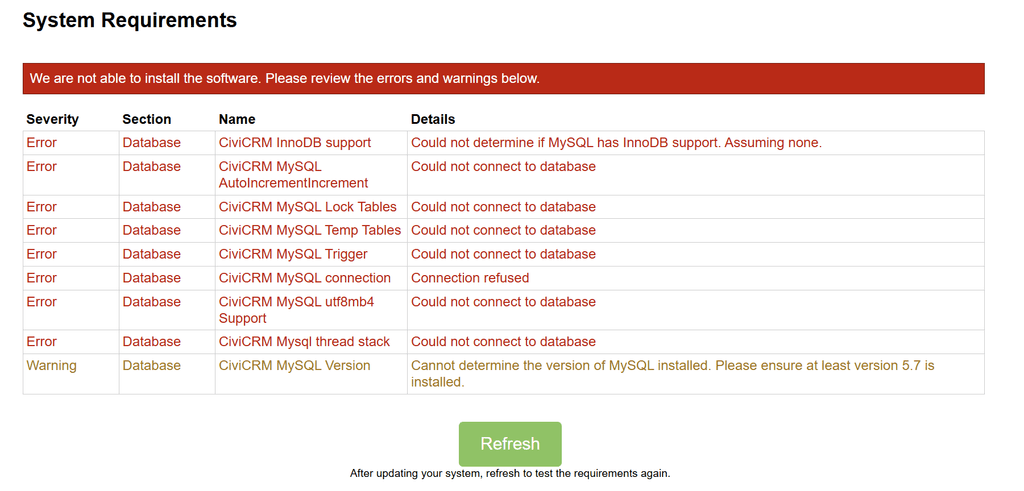
There were errors which meant the civicrm wasn't installable. I am not sure how to proceed
-
@scooke quick & dirty:
- install LAMP on your Cloudron
- open the webterminal
- cd /app/data/
- wget https://storage.googleapis.com/civicrm/civicrm-stable/5.80.1/civicrm-5.80.1-standalone.tar.gz
- tar -xzf civicrm-5.80.1-standalone.tar.gz
- rm -rf public civicrm-5.80.1-standalone.tar.gz
- ln -s civicrm-standalone public
- chown -R www-data: civicrm-standalone public
Open civicrm.example.com. Install CiviCRM.
Credentials for mysql -> (easiest way) opencredentials.txtin the filemanager@LoudLemur said in CiviCRM | Open source constituent relationship management for non-profits, NGOs and advocacy organizations:
There were errors which meant the civicrm wasn't installable. I am not sure how to proceed
Looks like perhaps you didn't give it the correct mysql credentials to me:
@luckow said in CiviCRM | Open source constituent relationship management for non-profits, NGOs and advocacy organizations:
Credentials for mysql -> (easiest way) open credentials.txt in the filemanager
-
@LoudLemur said in CiviCRM | Open source constituent relationship management for non-profits, NGOs and advocacy organizations:
There were errors which meant the civicrm wasn't installable. I am not sure how to proceed
Looks like perhaps you didn't give it the correct mysql credentials to me:
@luckow said in CiviCRM | Open source constituent relationship management for non-profits, NGOs and advocacy organizations:
Credentials for mysql -> (easiest way) open credentials.txt in the filemanager
@jdaviescoates @LoudLemur Most ikely it is the server bit. The default is 127.0.0.1:3306 but that is replaced with
mysql
EDIT: i tried again and it once more didn't work. I can't even access the /phpmyadmin to empty the db to retry without having to install.The error this time, in the logs, was a table not being found. But, it failed as soon as I pressed INSTALL, and gave me a 500 error. I will try one more time, fresh.
-
3rd times a charm. THIS time, I choose "Allow all users" rather than just my specific user. THEN I increased the memory in the Cloudron app dashboard to 2GB, AND I edited the php.ini to reflect the same, then restarted. AND instead of just writing mysql in the db location I typed mysql:3306. So which ensured it worked this time? Who knows.
SPOKE TOO SOON. I had forgotten to edit the admin user fields, and pressed Install. It alerted me to this... but continued with the install! So I filled in the fields even though the spinning activity wheel was present (Chrome on a Mac). A few minutes later, as I was logged in somehow and editing the details for my company, it all crashed with a note about a fatal db error. I will try ONE MORE TIME, and if it still doesn't work, I'm turning my back on this infernal app.
-
-
Hello @loudlemur
As discussed before here https://forum.cloudron.io/post/118000.
Please don't post AI output plain into the forum.





Hello! It looks like you're interested in this conversation, but you don't have an account yet.
Getting fed up of having to scroll through the same posts each visit? When you register for an account, you'll always come back to exactly where you were before, and choose to be notified of new replies (either via email, or push notification). You'll also be able to save bookmarks and upvote posts to show your appreciation to other community members.
With your input, this post could be even better 💗
Register Login