Cloudron makes it easy to run web apps like WordPress, Nextcloud, GitLab on your server. Find out more or install now.


Skip to content
  • Categories
  • Recent
  • Tags
  • Popular
  • Bookmarks
  • Search
Skins
  • Light
  • Brite
  • Cerulean
  • Cosmo
  • Flatly
  • Journal
  • Litera
  • Lumen
  • Lux
  • Materia
  • Minty
  • Morph
  • Pulse
  • Sandstone
  • Simplex
  • Sketchy
  • Spacelab
  • United
  • Yeti
  • Zephyr
  • Dark
  • Cyborg
  • Darkly
  • Quartz
  • Slate
  • Solar
  • Superhero
  • Vapor

  • Default (No Skin)
  • No Skin
Collapse
Brand Logo

Cloudron Forum

Apps - Status | Demo | Docs | Install
  1. Cloudron Forum
  2. App Wishlist
  3. CiviCRM | Open source constituent relationship management for non-profits, NGOs and advocacy organizations

CiviCRM | Open source constituent relationship management for non-profits, NGOs and advocacy organizations

Scheduled Pinned Locked Moved App Wishlist
31 Posts 18 Posters 10.2k Views 16 Watching
  • Oldest to Newest
  • Newest to Oldest
  • Most Votes
Reply
  • Reply as topic
Log in to reply
This topic has been deleted. Only users with topic management privileges can see it.
  • girishG Offline
    girishG Offline
    girish
    Staff
    wrote on last edited by
    #15

    That's great news. I think it would make sense to package the standalone app for Cloudron when it's available.

    jdaviescoatesJ 1 Reply Last reply
    3
    • jeauJ Offline
      jeauJ Offline
      jeau
      App Dev
      wrote on last edited by
      #16

      thanks @girish,

      This repo contains resources to run CiviCRM on Docker.
      https://github.com/civicrm/civicrm-docker

      1 Reply Last reply
      1
      • girishG girish

        That's great news. I think it would make sense to package the standalone app for Cloudron when it's available.

        jdaviescoatesJ Offline
        jdaviescoatesJ Offline
        jdaviescoates
        wrote on last edited by
        #17

        @girish said in CiviCRM | Open source constituent relationship management for non-profits, NGOs and advocacy organizations:

        That's great news. I think it would make sense to package the standalone app for Cloudron when it's available.

        I think it is available, no? 🤔

        I use Cloudron with Gandi & Hetzner

        luckowL 1 Reply Last reply
        0
        • jdaviescoatesJ jdaviescoates

          @girish said in CiviCRM | Open source constituent relationship management for non-profits, NGOs and advocacy organizations:

          That's great news. I think it would make sense to package the standalone app for Cloudron when it's available.

          I think it is available, no? 🤔

          luckowL Offline
          luckowL Offline
          luckow
          translator
          wrote on last edited by
          #18

          @jdaviescoates taken from here -> https://civicrm.org/blog/ufundo/next-steps-civicrm-standalone

          What is CiviCRM Standalone?

          Standalone is a release of CiviCRM that runs independent of any CMS. No Drupal, no Wordpress, no Backdrop, no Joomla. Pure CiviCRM, if you will. If you don’t need functionality from the CMS side, then Standalone gives you all the features of CiviCRM in a simpler and faster package.
          And now it’s finished?

          Well… no. But nor is CiviCRM generally. Anyone who’s worked with complex software like CiviCRM will know, it’s never finished...


          You can get a standalone version 5.80.1 from here -> https://civicrm.org/download
          Installation in a Cloudron LAMP app, works without problems.

          So everything looks like a valid release candidate. But taken from here https://civicrm.org/blog/josh/announcing-civicrm-6, the next major release is planned for
          05 march 2025.

          Should we take the time to install CiviCRM standalone in a Cloudron LAMP app and help the community debug - and launch with a Cloudron app after version 6 is released?

          Pronouns: he/him | Primary language: German

          1 Reply Last reply
          3
          • girishG Offline
            girishG Offline
            girish
            Staff
            wrote on last edited by
            #19

            That will be great, if someone who has used CiviCRM in the past can install it in LAMP and report back!

            1 Reply Last reply
            4
            • jeauJ Offline
              jeauJ Offline
              jeau
              App Dev
              wrote on last edited by
              #20

              I've been using CiviCRM for several years with Wordpress. I've installed the standalone version on a LAMP application, it works fine but I haven't taken the time to test it thoroughly.

              1 Reply Last reply
              2
              • scookeS Offline
                scookeS Offline
                scooke
                wrote on last edited by scooke
                #21

                I tried. Failed. There is some mix up that I can't unravel between the installation directory and final URL. I tried installing with the pertinent items in /app/data/public, using crm.example.com, and even though the install said it worked, I couldn't login because it was looking for crm.example.com/civicrm. So I emptied the db and started again, this time using /app/data/public/civicrm, but that time it seemed to want to just use crm.example.com; a partial admin login appeared if I used crm.example.com/civicrm, but after pressing Enter the page wouldn't load and a message about some problem popped up. Bizarre. I really don't feel like trying again. All permissions were fine. I've already uninstalled the LAMP app. Oh well.

                A life lived in fear is a life half-lived

                luckowL 1 Reply Last reply
                0
                • scookeS scooke

                  I tried. Failed. There is some mix up that I can't unravel between the installation directory and final URL. I tried installing with the pertinent items in /app/data/public, using crm.example.com, and even though the install said it worked, I couldn't login because it was looking for crm.example.com/civicrm. So I emptied the db and started again, this time using /app/data/public/civicrm, but that time it seemed to want to just use crm.example.com; a partial admin login appeared if I used crm.example.com/civicrm, but after pressing Enter the page wouldn't load and a message about some problem popped up. Bizarre. I really don't feel like trying again. All permissions were fine. I've already uninstalled the LAMP app. Oh well.

                  luckowL Offline
                  luckowL Offline
                  luckow
                  translator
                  wrote on last edited by luckow
                  #22

                  @scooke quick & dirty:

                  • install LAMP on your Cloudron
                  • open the webterminal
                  • cd /app/data/
                  • wget https://storage.googleapis.com/civicrm/civicrm-stable/5.80.1/civicrm-5.80.1-standalone.tar.gz
                  • tar -xzf civicrm-5.80.1-standalone.tar.gz
                  • rm -rf public civicrm-5.80.1-standalone.tar.gz
                  • ln -s civicrm-standalone public
                  • chown -R www-data: civicrm-standalone public

                  Open civicrm.example.com. Install CiviCRM.
                  Credentials for mysql -> (easiest way) open credentials.txt in the filemanager

                  Pronouns: he/him | Primary language: German

                  L jdaviescoatesJ 2 Replies Last reply
                  7
                  • scookeS Offline
                    scookeS Offline
                    scooke
                    wrote on last edited by
                    #23

                    @luckow Instead of ln -s to /app/data/public, I extracted the tar to that directory. Permissions were all fine.

                    So you're saying you have it up and running? Because I did essentially what you outlined, and it didn't work.

                    A life lived in fear is a life half-lived

                    imc67I 1 Reply Last reply
                    0
                    • scookeS scooke

                      @luckow Instead of ln -s to /app/data/public, I extracted the tar to that directory. Permissions were all fine.

                      So you're saying you have it up and running? Because I did essentially what you outlined, and it didn't work.

                      imc67I Offline
                      imc67I Offline
                      imc67
                      translator
                      wrote on last edited by
                      #24

                      @scooke said in CiviCRM | Open source constituent relationship management for non-profits, NGOs and advocacy organizations:

                      @luckow Instead of ln -s to /app/data/public, I extracted the tar to that directory. Permissions were all fine.

                      So you're saying you have it up and running? Because I did essentially what you outlined, and it didn't work.

                      I did exactly step by step what @luckow wrote and had it up and running within a minute. Though I didn’t manage to get the cron working and didn’t liked the UI so waiting for v6.

                      1 Reply Last reply
                      1
                      • scookeS Offline
                        scookeS Offline
                        scooke
                        wrote on last edited by
                        #25

                        Well, geez, now I gotta try again.

                        A life lived in fear is a life half-lived

                        1 Reply Last reply
                        0
                        • luckowL luckow

                          @scooke quick & dirty:

                          • install LAMP on your Cloudron
                          • open the webterminal
                          • cd /app/data/
                          • wget https://storage.googleapis.com/civicrm/civicrm-stable/5.80.1/civicrm-5.80.1-standalone.tar.gz
                          • tar -xzf civicrm-5.80.1-standalone.tar.gz
                          • rm -rf public civicrm-5.80.1-standalone.tar.gz
                          • ln -s civicrm-standalone public
                          • chown -R www-data: civicrm-standalone public

                          Open civicrm.example.com. Install CiviCRM.
                          Credentials for mysql -> (easiest way) open credentials.txt in the filemanager

                          L Offline
                          L Offline
                          LoudLemur
                          wrote on last edited by
                          #26

                          @luckow said in CiviCRM | Open source constituent relationship management for non-profits, NGOs and advocacy organizations:

                          Open civicrm.example.com. Install CiviCRM.
                          Credentials for mysql -> (easiest way) open credentials.txt in the filemanager

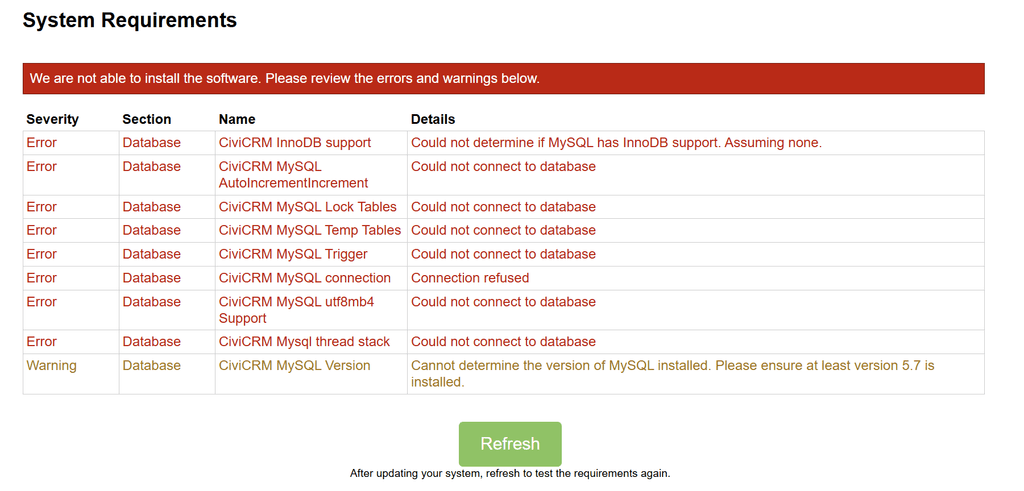
                          Thanks for this, but I wasn't able to complete it.

                          For "open civicrm", you can just click on the GLAMP (LAMP) application in cloudron and it will take you to the CiviCRM page.

                          There were errors which meant the civicrm wasn't installable. I am not sure how to proceed
                          brave_8zPX5lBS5I.png

                          1 Reply Last reply
                          0
                          • luckowL luckow

                            @scooke quick & dirty:

                            • install LAMP on your Cloudron
                            • open the webterminal
                            • cd /app/data/
                            • wget https://storage.googleapis.com/civicrm/civicrm-stable/5.80.1/civicrm-5.80.1-standalone.tar.gz
                            • tar -xzf civicrm-5.80.1-standalone.tar.gz
                            • rm -rf public civicrm-5.80.1-standalone.tar.gz
                            • ln -s civicrm-standalone public
                            • chown -R www-data: civicrm-standalone public

                            Open civicrm.example.com. Install CiviCRM.
                            Credentials for mysql -> (easiest way) open credentials.txt in the filemanager

                            jdaviescoatesJ Offline
                            jdaviescoatesJ Offline
                            jdaviescoates
                            wrote on last edited by
                            #27

                            @LoudLemur said in CiviCRM | Open source constituent relationship management for non-profits, NGOs and advocacy organizations:

                            There were errors which meant the civicrm wasn't installable. I am not sure how to proceed

                            Looks like perhaps you didn't give it the correct mysql credentials to me:

                            @luckow said in CiviCRM | Open source constituent relationship management for non-profits, NGOs and advocacy organizations:

                            Credentials for mysql -> (easiest way) open credentials.txt in the filemanager

                            I use Cloudron with Gandi & Hetzner

                            scookeS 1 Reply Last reply
                            0
                            • jdaviescoatesJ jdaviescoates

                              @LoudLemur said in CiviCRM | Open source constituent relationship management for non-profits, NGOs and advocacy organizations:

                              There were errors which meant the civicrm wasn't installable. I am not sure how to proceed

                              Looks like perhaps you didn't give it the correct mysql credentials to me:

                              @luckow said in CiviCRM | Open source constituent relationship management for non-profits, NGOs and advocacy organizations:

                              Credentials for mysql -> (easiest way) open credentials.txt in the filemanager

                              scookeS Offline
                              scookeS Offline
                              scooke
                              wrote on last edited by scooke
                              #28

                              @jdaviescoates @LoudLemur Most ikely it is the server bit. The default is 127.0.0.1:3306 but that is replaced with mysql
                              EDIT: i tried again and it once more didn't work. I can't even access the /phpmyadmin to empty the db to retry without having to install.

                              The error this time, in the logs, was a table not being found. But, it failed as soon as I pressed INSTALL, and gave me a 500 error. I will try one more time, fresh.

                              A life lived in fear is a life half-lived

                              1 Reply Last reply
                              0
                              • scookeS Offline
                                scookeS Offline
                                scooke
                                wrote on last edited by scooke
                                #29

                                3rd times a charm. THIS time, I choose "Allow all users" rather than just my specific user. THEN I increased the memory in the Cloudron app dashboard to 2GB, AND I edited the php.ini to reflect the same, then restarted. AND instead of just writing mysql in the db location I typed mysql:3306. So which ensured it worked this time? Who knows.

                                SPOKE TOO SOON. I had forgotten to edit the admin user fields, and pressed Install. It alerted me to this... but continued with the install! So I filled in the fields even though the spinning activity wheel was present (Chrome on a Mac). A few minutes later, as I was logged in somehow and editing the details for my company, it all crashed with a note about a fatal db error. I will try ONE MORE TIME, and if it still doesn't work, I'm turning my back on this infernal app.

                                A life lived in fear is a life half-lived

                                1 Reply Last reply
                                1
                                • L Offline
                                  L Offline
                                  LoudLemur
                                  wrote last edited by
                                  #30

                                  A lot of improvements have happened to CiviCRM since it was first requested. These are summarized here. I hope we can package it for Cloudron:

                                  CiviCRM Improvements Since March 2018 (Focus on Standalone for Cloudron Packaging) + Roadmap

                                  Hey folks,

                                  CiviCRM is now at 6.12 (as of March 2026), and the changes have been transformative — especially for self-hosted use cases like Cloudron.

                                  Here's a breakdown of the main improvements:

                                  1. No-Code/Low-Code Revolution: SearchKit + FormBuilder (Powered by APIv4)

                                  • SearchKit (rolled out ~2020–2021, constantly enhanced): Visual query builder that replaced most legacy searches. Create complex joins, aggregations, charts, calendars, maps, saved searches, dashboards, and Smart Groups — all shareable and embeddable.
                                  • FormBuilder (Afform): Drag-and-drop custom forms and workflows (events, contributions, petitions, data entry, etc.). Supports conditionals, multi-step forms, drafts ("save and finish later"), and deep SearchKit integration.
                                  • These tools + mature APIv4 are the biggest game-changer for flexibility without PHP hacking.

                                  2. CiviCRM Standalone – The Big Win for Self-Hosting & Cloudron

                                  • Introduced as an extension (early 2020s), then moved to core and stabilized/promoted with CiviCRM 6.0 (March 2025).
                                  • Runs completely without Drupal, WordPress, Joomla, or any CMS — just CiviCRM + a web server + database.
                                  • Cloudron-friendly features:
                                    • Official tarballs, Composer support, and Docker images published with every release (civicrm/civicrm on Docker Hub).
                                    • Built-in user management, email login, 2FA, and dedicated extensions (Auto Logout for Standalone, Standalone Switch User, etc.).
                                    • Simpler stack, fewer dependencies, easier updates, and cleaner resource usage.
                                  • This is the single biggest reason to be excited: packaging Standalone is far more straightforward and maintainable than the old CMS-integrated versions.

                                  3. Modern Theming & UX: RiverLea Theme Framework

                                  • New theming system launched ~2024 and made default/popular in 6.x.
                                  • Uses CSS variables (separates structure from styling), resulting in much lighter/faster themes (~15–30 kb vs. megabytes).
                                  • Major UX/accessibility gains: Dark mode, better contrast, keyboard navigation, accordions, error messaging, and responsive design.
                                  • Makes branding and future core UI changes far less painful.

                                  4. Technical Infrastructure, Performance & Stability

                                  • Smarty5 migration completed in 6.12 (2026): Dropped old Smarty2 for better security, performance, and modern PHP compatibility.
                                  • Entity Construction Kit (ECK) (stable ~2025): Create custom entities via UI — they automatically get SearchKit/FormBuilder support.
                                  • Ongoing performance tweaks, better multilingual support, improved logging, imports, and admin screens rebuilt with the new tools.
                                  • Regular monthly releases + Extended Security Releases (ESR) option for stability-focused users.

                                  5. Core Feature & Extensibility Enhancements

                                  • Better handling across Contributions, Events, Cases, Mailings, and CiviMobile (native app).
                                  • Stronger integrations (e.g., Mailchimp Sync) and a thriving extension ecosystem.
                                  • Accessibility upgrades throughout and general polish that makes the whole system feel more modern and reliable.

                                  Promising Features on the Horizon / Roadmap (2025–2026+)

                                  • RiverLea polish: In-app customizer, better frontend/public theming, and full accessibility compliance (community interest high, though some core funding paused).
                                  • Deeper SearchKit/FormBuilder integration into more core admin screens (AdminUI/SearchUI work ongoing).
                                  • Continued ECK evolution for even richer custom data models.
                                  • Enhanced reporting (Pivot Reports), financial tools, and automation features.
                                  • Focus on Standalone improvements, headless/API-first use cases, and overall stability (community sprints and CiviConf driving this).

                                  Overall verdict: CiviCRM has gone from a capable but somewhat rigid tool to a highly flexible, modern, self-hostable platform. Standalone + RiverLea + SearchKit/FormBuilder make it especially attractive for Cloudron packaging right now.

                                  Tips on must-have core extensions would be awesome too!

                                  Links for reference:

                                  • Release announcements → https://civicrm.org/blog/tags/release
                                  • Standalone install docs → https://docs.civicrm.org/installation/en/latest/standalone/
                                  • Docker repo → https://github.com/civicrm/civicrm-docker

                                  Looking forward to your thoughts! 🚀

                                  1 Reply Last reply
                                  2
                                  • jamesJ Offline
                                    jamesJ Offline
                                    james
                                    Staff
                                    wrote last edited by
                                    #31

                                    Hello @loudlemur
                                    As discussed before here https://forum.cloudron.io/post/118000.
                                    Please don't post AI output plain into the forum.

                                    1 Reply Last reply
                                    3

                                    Hello! It looks like you're interested in this conversation, but you don't have an account yet.

                                    Getting fed up of having to scroll through the same posts each visit? When you register for an account, you'll always come back to exactly where you were before, and choose to be notified of new replies (either via email, or push notification). You'll also be able to save bookmarks and upvote posts to show your appreciation to other community members.

                                    With your input, this post could be even better 💗

                                    Register Login
                                    Reply
                                    • Reply as topic
                                    Log in to reply
                                    • Oldest to Newest
                                    • Newest to Oldest
                                    • Most Votes


                                    • Login

                                    • Don't have an account? Register

                                    • Login or register to search.
                                    • First post
                                      Last post
                                    0
                                    • Categories
                                    • Recent
                                    • Tags
                                    • Popular
                                    • Bookmarks
                                    • Search