
OIDC Button ?
-
Hi,
It seems as the OIDC button of to access the dashboard does not follow the Cloudron branding specification.

Is this because the Cloudron Wordpress package needs to be adapted or do I need to setup this up somewhere else (I could not find anything relevant in the Wordpress OIDC plugin option, or in the docs for maybe an env. variable)?
Bonus question: is there a way to have OIDC login as the only way to login into the dashboard?
Many thanks,
-
Thanks @girish @vladimir.d - However this does not seem to be working on my instance, even with the latest package.
I am on Cloudron v8.3.1 and WordPress (Developer) 6.7.2
Is there anything to do config wise to get this enabled?In testing this, I have notice that any change to the Cloudron Name on the Branding page trigger a re-configuration as well as a restart of the app.
Log shows:Apr 03 13:20:23 Success: Value passed for 'openid_connect_generic_settings' option is unchanged.despite changing the Cloudron Name.
Any hints?
Many thanks,
-
@Neiluj can you run
env | grep CLOUDRON_OIDC_PROVIDER_NAMEin Web Terminal of the app ? It should print the Cloudron name . -
A quick addition to this, the tiniest of the things and absolutely not a showstopper, but maybe worth mentioning:
the OIDC button is not centered on the login page.At the moment, provided that the cloudron name is a bit of a long string, this jumps on the page, as not aligned with the rest of the elements on the page. Please see here:
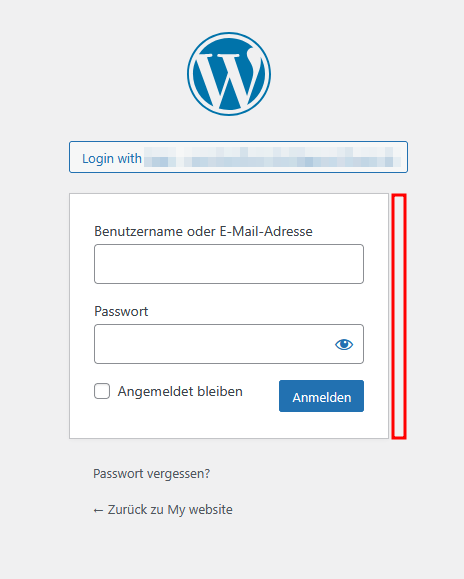
Maybe it is by design, but also maybe not



Hello! It looks like you're interested in this conversation, but you don't have an account yet.
Getting fed up of having to scroll through the same posts each visit? When you register for an account, you'll always come back to exactly where you were before, and choose to be notified of new replies (either via email, or push notification). You'll also be able to save bookmarks and upvote posts to show your appreciation to other community members.
With your input, this post could be even better 💗
Register Login