
Stirling v2: How to change password


-
-
-
-
 N nebulon marked this topic as a question on
-
Hello @stirling-pdf users
It seems, this is intentional.https://github.com/Stirling-Tools/Stirling-PDF/discussions/4845
There isn't a built-in way to reset a user's password in the non-pro (free) version of Stirling-PDF. The free version only offers basic user management—adding users and managing profiles—but does not include password reset functionality or admin tools for this purpose. Advanced user management, including password resets, is only available in the Pro version, and there are no documented or supported manual reset methods in the free version's code or UI
But planned in the future.
Oddly this has not been a requested feature but certainly is something we should add.. will look into getting this sorted out but in meantime you may have to delete and recreate the user
So, your option is, create a new user, make the new user admin, delete the old admin.
I think we will also update the Cloudron app to generate a random secure password and store it in/app/data/.passwordto avoid this burden. -
Hello @stirling-pdf users
It seems, this is intentional.https://github.com/Stirling-Tools/Stirling-PDF/discussions/4845
There isn't a built-in way to reset a user's password in the non-pro (free) version of Stirling-PDF. The free version only offers basic user management—adding users and managing profiles—but does not include password reset functionality or admin tools for this purpose. Advanced user management, including password resets, is only available in the Pro version, and there are no documented or supported manual reset methods in the free version's code or UI
But planned in the future.
Oddly this has not been a requested feature but certainly is something we should add.. will look into getting this sorted out but in meantime you may have to delete and recreate the user
So, your option is, create a new user, make the new user admin, delete the old admin.
I think we will also update the Cloudron app to generate a random secure password and store it in/app/data/.passwordto avoid this burden.@james Thank you for pointing to this file. It's incredible to me that in 2025, with all the security issues around, that they decide to drop such a feature. This sounds inherently insecure. Astonishing!
I followed your advice and established a new user and proceeded to delete the old admin user. Thank you for this suggestion.
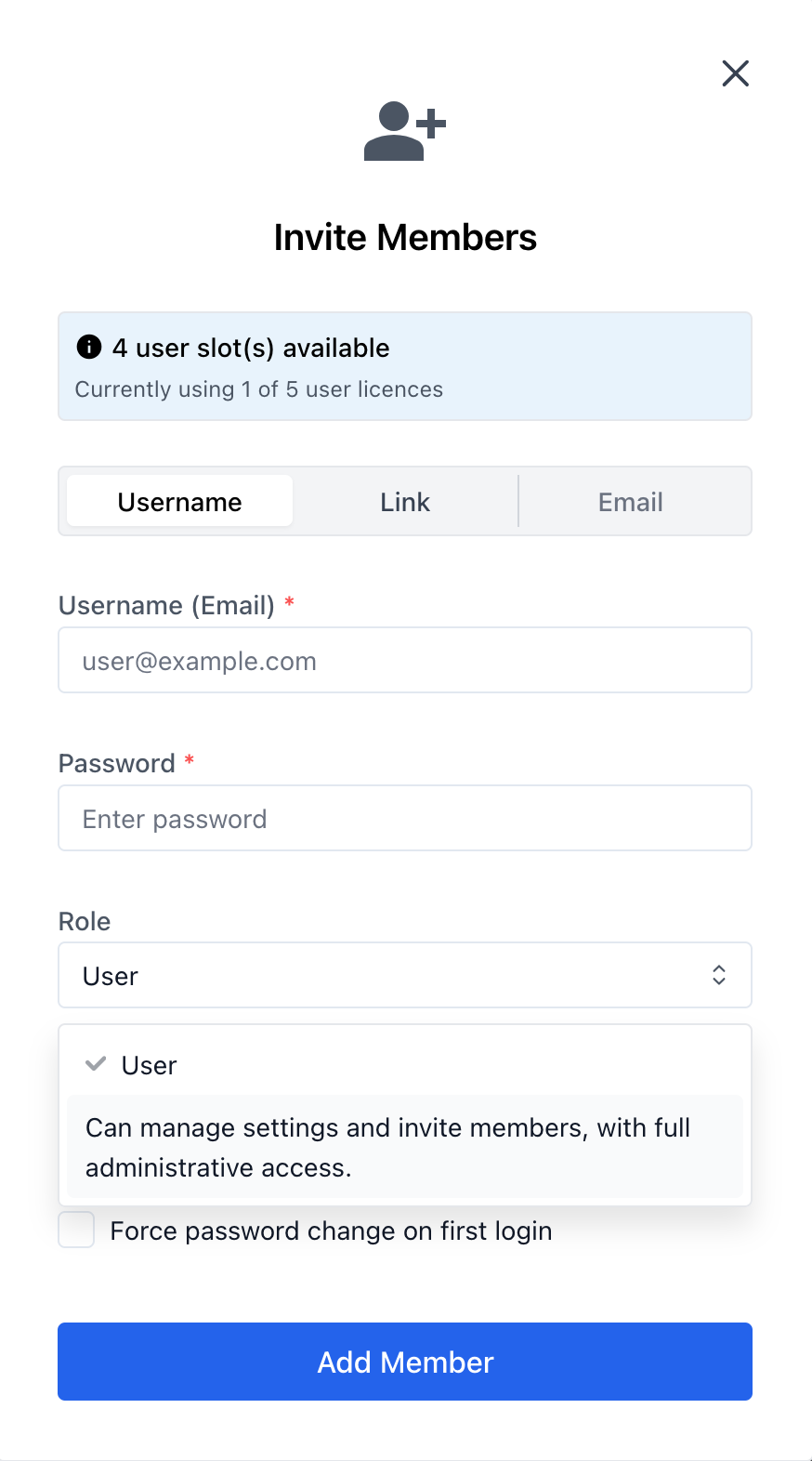
To other users of this app - they decided to call the admin role "Can manage settings and invite members, with full administrative access" instead of calling it "admin".

-
J joseph marked this topic as a regular topic on
-
Hey creator of Stirling PDF here
We didn't drop it on purpose
We just missed change user password in the migration to V2
The 'missed' feature discussed before was changing another users password that isn't your own
We are adding both in upcoming updateAlso we should have roll called as admin and the can manage settings etc as description, on my screen it shows as such, could be a UI bug related to your browser or something else
Are you able to provide a screenshot and extra info for that? -
-
Hey creator of Stirling PDF here
We didn't drop it on purpose
We just missed change user password in the migration to V2
The 'missed' feature discussed before was changing another users password that isn't your own
We are adding both in upcoming updateAlso we should have roll called as admin and the can manage settings etc as description, on my screen it shows as such, could be a UI bug related to your browser or something else
Are you able to provide a screenshot and extra info for that?@froodle said in Stirling v2: How to change password:
Hey creator of Stirling PDF here
We didn't drop it on purpose
We just missed change user password in the migration to V2
The 'missed' feature discussed before was changing another users password that isn't your own
We are adding both in upcoming updateAlso we should have roll called as admin and the can manage settings etc as description, on my screen it shows as such, could be a UI bug related to your browser or something else
Are you able to provide a screenshot and extra info for that?Thank you for adding this pw-change feature. I would still prefer to have a "change password" button on my "Settings->Security" menu. It's a bit weird having to go into the "People" menu, select your own user, and then change the password from there.
Here's the screenshot of the "admin role" title. It appears when you add a user. For me, it's confusing when one role is "user" and the other is a really long text (instead of "admin"):




Hello! It looks like you're interested in this conversation, but you don't have an account yet.
Getting fed up of having to scroll through the same posts each visit? When you register for an account, you'll always come back to exactly where you were before, and choose to be notified of new replies (either via email, or push notification). You'll also be able to save bookmarks and upvote posts to show your appreciation to other community members.
With your input, this post could be even better 💗
Register Login