
Add a way to clear app search more easily
-
One more suggestion if I may. Clear the search box when you click on the logo in the top left.
Use case: You search for an app. To see the rest of your apps, you have to delete what you searched for or refresh the page which has a "reload" time and isn't instant. Clearing the input search box by pressing on the logo is faster and feels more natural.

Edit: Chatgpt spat out this code, don't shoot me

Clear search when clicking the Cloudron logo
// Clears the dashboard search field on logo click or ESC key
function enableClearSearchIntegration() {
  const searchInput = document.querySelector('input.pankow-text-input[placeholder="Search Apps"]');
  const logo = document.querySelector('.sidebar-logo');

  if (!searchInput) return;

  // ---- LOGO CLICK HANDLER ----
  if (logo && !logo.dataset._cloudronClearSearch) {
    logo.dataset._cloudronClearSearch = "1";

    logo.addEventListener("click", () => {
      clearSearch(searchInput);
    }, true);
  }

  // ---- ESC KEY HANDLER ----
  if (!window._cloudronClearSearchEsc) {
    window._cloudronClearSearchEsc = true;

    document.addEventListener("keydown", (event) => {
      if (event.key === "Escape") {
        clearSearch(searchInput);
      }
    });
  }
}

// Clears the input and triggers Cloudron filtering
function clearSearch(searchInput) {
  searchInput.value = "";
  searchInput.dispatchEvent(new Event("input", { bubbles: true }));
  searchInput.dispatchEvent(new Event("change", { bubbles: true }));
}

// Run once on initial load
enableClearSearchIntegration();

// Re-run when the SPA updates the DOM (Cloudron dashboard is an SPA)
const observer = new MutationObserver(enableClearSearchIntegration);
observer.observe(document.body, { childList: true, subtree: true });
Edit 2: fixed the code as we didn't use the right class selector for the logo. I tested it in the console and the code works as intended!
Edit 3: fixed the code again to use the proper selector for the search box. NOW it's ready
Edit 4: added support for escape key clear action thanks @robi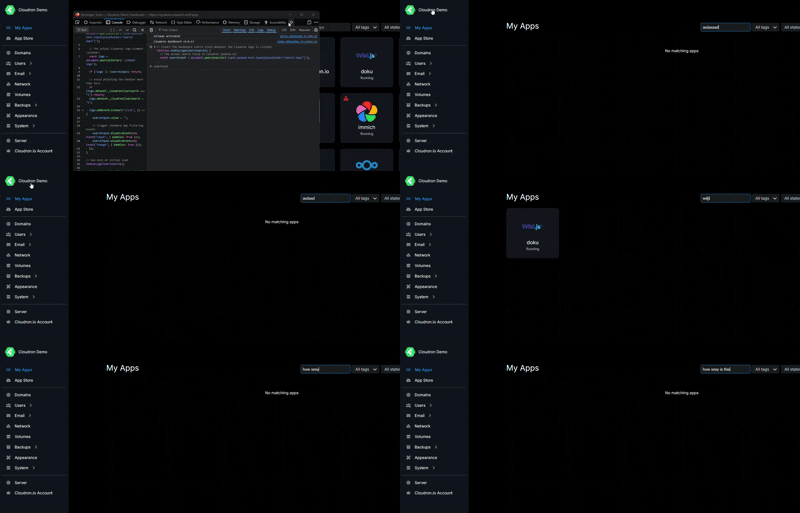
-
One more suggestion if I may. Clear the search box when you click on the logo in the top left.
Use case: You search for an app. To see the rest of your apps, you have to delete what you searched for or refresh the page which has a "reload" time and isn't instant. Clearing the input search box by pressing on the logo is faster and feels more natural.
Edit: Chatgpt spat out this code, don't shoot me
Clear search when clicking the Cloudron logo
// Clears the dashboard search field on logo click or ESC key
function enableClearSearchIntegration() {
  const searchInput = document.querySelector('input.pankow-text-input[placeholder="Search Apps"]');
  const logo = document.querySelector('.sidebar-logo');

  if (!searchInput) return;

  // ---- LOGO CLICK HANDLER ----
  if (logo && !logo.dataset._cloudronClearSearch) {
    logo.dataset._cloudronClearSearch = "1";

    logo.addEventListener("click", () => {
      clearSearch(searchInput);
    }, true);
  }

  // ---- ESC KEY HANDLER ----
  if (!window._cloudronClearSearchEsc) {
    window._cloudronClearSearchEsc = true;

    document.addEventListener("keydown", (event) => {
      if (event.key === "Escape") {
        clearSearch(searchInput);
      }
    });
  }
}

// Clears the input and triggers Cloudron filtering
function clearSearch(searchInput) {
  searchInput.value = "";
  searchInput.dispatchEvent(new Event("input", { bubbles: true }));
  searchInput.dispatchEvent(new Event("change", { bubbles: true }));
}

// Run once on initial load
enableClearSearchIntegration();

// Re-run when the SPA updates the DOM (Cloudron dashboard is an SPA)
const observer = new MutationObserver(enableClearSearchIntegration);
observer.observe(document.body, { childList: true, subtree: true });
Edit 2: fixed the code as we didn't use the right class selector for the logo. I tested it in the console and the code works as intended!
Edit 3: fixed the code again to use the proper selector for the search box. NOW it's ready
Edit 4: added support for escape key clear action thanks @robi -
I think the ESC key clearing search is a good idea.
The generated code above though, while probably working, is not a good solution. It clearly has no clue how the app is actually developed, using vue components. It just operates on the resulting DOM output from vuejs, which would be very fragile (vuejs deletes/creates DOM nodes based on a virutal DOM, so the referenced DOM nodes may or may not exist when events fire, if written like that) and requires monkey patching like the DOM mutation observers, which is impossible to properly maintain. But its a good way for a proof of concept or playground

-
I think the ESC key clearing search is a good idea.
The generated code above though, while probably working, is not a good solution. It clearly has no clue how the app is actually developed, using vue components. It just operates on the resulting DOM output from vuejs, which would be very fragile (vuejs deletes/creates DOM nodes based on a virutal DOM, so the referenced DOM nodes may or may not exist when events fire, if written like that) and requires monkey patching like the DOM mutation observers, which is impossible to properly maintain. But its a good way for a proof of concept or playground



Hello! It looks like you're interested in this conversation, but you don't have an account yet.
Getting fed up of having to scroll through the same posts each visit? When you register for an account, you'll always come back to exactly where you were before, and choose to be notified of new replies (either via email, or push notification). You'll also be able to save bookmarks and upvote posts to show your appreciation to other community members.
With your input, this post could be even better 💗
Register Login