
Community Apps workflow observations
-
Trying to smooth my workflow for CommunityApps (w/o mentioning Safari
 ) ...
) ...
- given that CloudronVersions.json is, well, a JSON file, presumably we can edit it if needed, then give access (git repo, static site) ? 2 scenarios I've met are :
- (a) cli revoke only revokes the last entry, user might want to revoke previous ones (parameter to specify which to revoke would be nice),
- (b) docker image location might be wrong ... or moved ... and don't want to repeat build workflow
- publishing docs should make explicit a clear expected workflow (dangerous assumption that I have this correct), maybe with a pic for fast absorption w/o reading
- do your dev
- update CloudronManifest.json & CHANGELOG
- do your build / push
- run cloudron versions add
- commit/post CloudronVersions.json
- test / loop
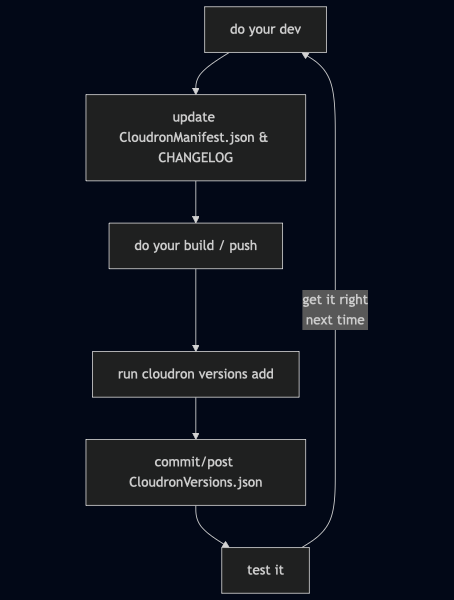
- docs for CLI should explain more about 'cloudron build' and 'cloudron build build' (repeat words does my head in BTW, please don't )
- docs should make clear that 'cloudron build' will auto assign a tag if not provided ?
- CHANGELOG is great discipline ... but I am not disciplined :
- presumably we can mock it out ("frig it" in AngloSaxon) to make 'cloudron versions add' work, ...
- or better question, can we automate it (use a publish script to bump version in CloudronManifest.json, maybe with user input, replicate in CHANGELOG, do cloudron build, run cloudron versions add, commit to git, push CloudronVersions.json to static location), ...
- or EVEN BETTER question, how do you as pro devs handle this ? I'm guessing not manually.
- can we please have some short options for things like :
- '--build-arg <namevalue>' [maybe '-a' or '-arg' or '-ba']
- '--repository' [maybe '-r' or '-repo'].
- Even '-nc' for no cache and '-np' for no push (others are ok).
Although I guess they are probably in a script so maybe it does not matter.
Indie app dev, scratching my itches : communityapps.appx.uk, portfolio at myca.appx.uk
- given that CloudronVersions.json is, well, a JSON file, presumably we can edit it if needed, then give access (git repo, static site) ? 2 scenarios I've met are :
-
Yeah the build process I have I actually avoid using cloudronversion for testing the install until I see it work with cloudron install --image first. I dont mind it taking time but its a janky build process. CI/CD goes a long way but I can't be bothered atm lol
--
https://urgero.org
~ Professional Nerd. Freelance Programmer. ~ -
Yeah the build process I have I actually avoid using cloudronversion for testing the install until I see it work with cloudron install --image first. I dont mind it taking time but its a janky build process. CI/CD goes a long way but I can't be bothered atm lol
@murgero I'm with you

The bash build script I am building uses a parameter :
echo " -p 0 = install only, 1 = publish (revoke/add/push)"If command has
-p 0, it doescloudron install --image ....If command has
-p 1, it doescloudron versions addetc.Not sure how it will work in practice, needs some real-world usage.
Indie app dev, scratching my itches : communityapps.appx.uk, portfolio at myca.appx.uk
-
@murgero I'm with you
The bash build script I am building uses a parameter :
echo " -p 0 = install only, 1 = publish (revoke/add/push)"If command has
-p 0, it doescloudron install --image ....If command has
-p 1, it doescloudron versions addetc.Not sure how it will work in practice, needs some real-world usage.
-
Trying to smooth my workflow for CommunityApps (w/o mentioning Safari
) ...
- given that CloudronVersions.json is, well, a JSON file, presumably we can edit it if needed, then give access (git repo, static site) ? 2 scenarios I've met are :
- (a) cli revoke only revokes the last entry, user might want to revoke previous ones (parameter to specify which to revoke would be nice),
- (b) docker image location might be wrong ... or moved ... and don't want to repeat build workflow
- publishing docs should make explicit a clear expected workflow (dangerous assumption that I have this correct), maybe with a pic for fast absorption w/o reading
- do your dev
- update CloudronManifest.json & CHANGELOG
- do your build / push
- run cloudron versions add
- commit/post CloudronVersions.json
- test / loop
- docs for CLI should explain more about 'cloudron build' and 'cloudron build build' (repeat words does my head in BTW, please don't )
- docs should make clear that 'cloudron build' will auto assign a tag if not provided ?
- CHANGELOG is great discipline ... but I am not disciplined :
- presumably we can mock it out ("frig it" in AngloSaxon) to make 'cloudron versions add' work, ...
- or better question, can we automate it (use a publish script to bump version in CloudronManifest.json, maybe with user input, replicate in CHANGELOG, do cloudron build, run cloudron versions add, commit to git, push CloudronVersions.json to static location), ...
- or EVEN BETTER question, how do you as pro devs handle this ? I'm guessing not manually.
- can we please have some short options for things like :
- '--build-arg <namevalue>' [maybe '-a' or '-arg' or '-ba']
- '--repository' [maybe '-r' or '-repo'].
- Even '-nc' for no cache and '-np' for no push (others are ok).
Although I guess they are probably in a script so maybe it does not matter.
cli revoke only revokes the last entry, user might want to revoke previous ones
Good catch, added this now. cloudron versions update already had --version.
docs for CLI should explain more about 'cloudron build' and 'cloudron build build'
For the tutorial, we switched to using source builds as the default approach. The next "advanced" step is to build using a local or remote builder. https://docs.cloudron.io/packaging/tutorial#alternative-build-methods explains cloudron build and automatic tags.
TBH, most people don't read docs despite all this
 The longer the tutorial, the even lesser it will be read.
 - given that CloudronVersions.json is, well, a JSON file, presumably we can edit it if needed, then give access (git repo, static site) ? 2 scenarios I've met are :
-
@timconsidine so if you don't care about the changelog as such, you could just put a string there, which will be reused or maybe better some
https://foo.bar/changeloglink which then would have some info on the ongoing changes. The UI should render the link clickable. Only thefile://triggers the loading of that from the folder and checks for the section with the version info. -
Thanks @girish
TBH, most people don't read docs despite all this
Yep, true
Soon there won't be any docs. AI coding agent utility will produce some illegible binary asset "cloudron.aifood", which another agent will use. We humans won't need to know or read anything.
Thanks @nebulon
maybe better some https://foo.bar/changelog link
nice idea, let me think about that.
testing my build script which makes it a mandatory input (to overcome my lack of discipline )
)




Hello! It looks like you're interested in this conversation, but you don't have an account yet.
Getting fed up of having to scroll through the same posts each visit? When you register for an account, you'll always come back to exactly where you were before, and choose to be notified of new replies (either via email, or push notification). You'll also be able to save bookmarks and upvote posts to show your appreciation to other community members.
With your input, this post could be even better 💗
Register Login