
WebSocket Connection Error
-
I tried to look into why queued documents are not processed. In the end, it was only a question of enough patience.
But I noticed an error inSettings>System Status(top right) > "WebSocket Connection"{ "pngx_version": "2.20.15", "server_os": "Linux-6.8.0-111-generic-x86_64-with-glibc2.39", "install_type": "bare-metal", "storage": { "total": 92342554660, "available": 43966247799 }, "database": { "type": "postgresql", "url": "dbd53e3dca2edd46f2b70b12cc2d9b0c26", "status": "OK", "error": null, "migration_status": { "latest_migration": "documents.1075_workflowaction_order", "unapplied_migrations": [] } }, "tasks": { "redis_url": "redis://redis-d53e3dca-2edd-46f2-b70b-12cc2d9b0c26:6379", "redis_status": "OK", "redis_error": null, "celery_status": "OK", "celery_url": "celery@d53e3dca-2edd-46f2-b70b-12cc2d9b0c26", "celery_error": null, "index_status": "OK", "index_last_modified": "2026-05-17T12:53:29.784656Z", "index_error": null, "classifier_status": "OK", "classifier_last_trained": "2026-05-17T12:05:02.705492Z", "classifier_error": null, "sanity_check_status": "OK", "sanity_check_last_run": "2026-05-17T00:30:02.789882Z", "sanity_check_error": null }, "websocket_connected": "ERROR" }Don't know how critical that is...
-
Hello @mononym
Is there something 'unique' about your Cloudron set up?
Please post the output ofcloudron-support --troubleshoot.I just tried to reproduce this and the @paperless-ngx shows this status:
{
    "pngx_version": "2.20.15",
    "server_os": "Linux-6.8.0-106-generic-x86_64-with-glibc2.39",
    "install_type": "bare-metal",
    "storage": {
        "total": 105089261568,
        "available": 75854053376
    },
    "database": {
        "type": "postgresql",
        "url": "db03d44177398c497fbc6f4e8c08ee8092",
        "status": "OK",
        "error": null,
        "migration_status": {
            "latest_migration": "documents.1075_workflowaction_order",
            "unapplied_migrations": []
        }
    },
    "tasks": {
        "redis_url": "redis://redis-03d44177-398c-497f-bc6f-4e8c08ee8092:6379",
        "redis_status": "OK",
        "redis_error": null,
        "celery_status": "OK",
        "celery_url": "celery@03d44177-398c-497f-bc6f-4e8c08ee8092",
        "celery_error": null,
        "index_status": "OK",
        "index_last_modified": "2026-05-18T00:00:01.273615Z",
        "index_error": null,
        "classifier_status": "OK",
        "classifier_last_trained": "2026-05-18T08:05:01.763426Z",
        "classifier_error": null,
        "sanity_check_status": "OK",
        "sanity_check_last_run": "2026-05-17T00:30:01.353326Z",
        "sanity_check_error": null
    },
    "websocket_connected": "OK"
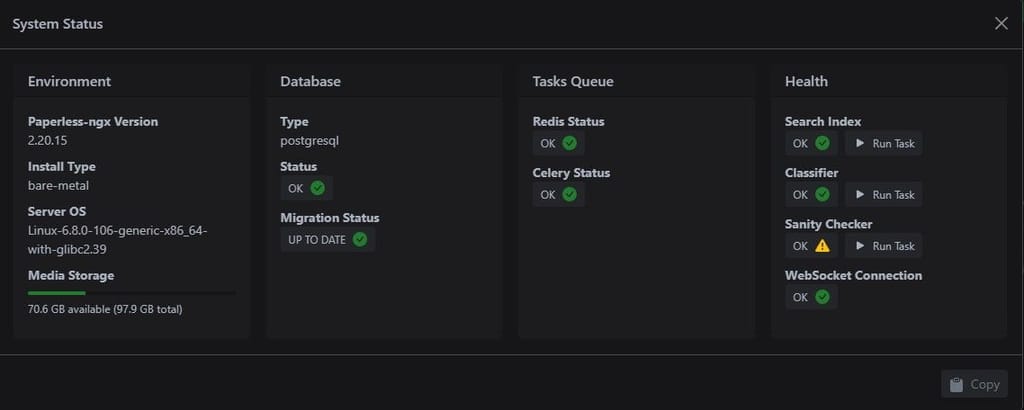
}
-
Hello @mononym
Is there something 'unique' about your Cloudron set up?
Please post the output ofcloudron-support --troubleshoot.I just tried to reproduce this and the @paperless-ngx shows this status:
{ "pngx_version": "2.20.15", "server_os": "Linux-6.8.0-106-generic-x86_64-with-glibc2.39", "install_type": "bare-metal", "storage": { "total": 105089261568, "available": 75854053376 }, "database": { "type": "postgresql", "url": "db03d44177398c497fbc6f4e8c08ee8092", "status": "OK", "error": null, "migration_status": { "latest_migration": "documents.1075_workflowaction_order", "unapplied_migrations": [] } }, "tasks": { "redis_url": "redis://redis-03d44177-398c-497f-bc6f-4e8c08ee8092:6379", "redis_status": "OK", "redis_error": null, "celery_status": "OK", "celery_url": "celery@03d44177-398c-497f-bc6f-4e8c08ee8092", "celery_error": null, "index_status": "OK", "index_last_modified": "2026-05-18T00:00:01.273615Z", "index_error": null, "classifier_status": "OK", "classifier_last_trained": "2026-05-18T08:05:01.763426Z", "classifier_error": null, "sanity_check_status": "OK", "sanity_check_last_run": "2026-05-17T00:30:01.353326Z", "sanity_check_error": null }, "websocket_connected": "OK" }Is there something 'unique' about your Cloudron set up? Also no Cloudflare.
Not that I'm aware of. The check looks good.
Vendor: QEMU Product: Standard PC (i440FX + PIIX, 1996)
Linux: 6.8.0-111-generic
Ubuntu: noble 24.04
Cloudron: 9.1.7
Execution environment: kvm
Processor: Intel(R) Xeon(R) Gold 6126 CPU @ 2.60GHz
BIOS pc-i440fx-9.2  CPU @ 2.0GHz x 4
RAM: 12248260KB
Disk: /dev/sda2       232G
[OK]    node version is correct
[OK]    IPv6 is enabled in kernel. No public IPv6 address
[OK]    docker is running
[OK]    docker version is correct
[OK]    MySQL is running
[OK]    netplan is good
[OK]    DNS is resolving via systemd-resolved
[OK]    unbound is running
[OK]    nginx is running
[OK]    dashboard cert is valid
[OK]    dashboard is reachable via loopback
[OK]    No pending database migrations
[OK]    Service 'mysql' is running and healthy
[OK]    Service 'postgresql' is running and healthy
[OK]    Service 'mongodb' is running and healthy
[OK]    Service 'mail' is running and healthy
[OK]    Service 'graphite' is running and healthy
[OK]    Service 'sftp' is running and healthy
[OK]    box v9.1.7 is running
[OK]    Dashboard is reachable via domain name
[WARN]  Domain *******.com expiry check skipped because whois does not have this information

Hello! It looks like you're interested in this conversation, but you don't have an account yet.
Getting fed up of having to scroll through the same posts each visit? When you register for an account, you'll always come back to exactly where you were before, and choose to be notified of new replies (either via email, or push notification). You'll also be able to save bookmarks and upvote posts to show your appreciation to other community members.
With your input, this post could be even better 💗
Register Login