
🚀 vLLM: community package now available
-
TL;DR: vLLM is the inference server with the most widely supported OpenAI-compatible API in the self-hosted world. It is now packaged for Cloudron: one install serves one model at
https://<location>/v1behind a generated API key. CPU inference, honestly framed. Built and tested on Cloudron 10; unofficial and community-maintained.Links
-
 Project homepage: https://docs.vllm.ai
 -
 Upstream repo: https://github.com/vllm-project/vllm
 -
🧱 Cloudron package repo: https://github.com/OrcVole/vllm-cloudron
-
 ️ Also listed in the Community App Store: https://ca.cloudron.io/
There is no web UI beyond a small landing page: this is an API server whose clients are your other apps (OpenWebUI, LibreChat, gateways, editors, scripts).
 How to install
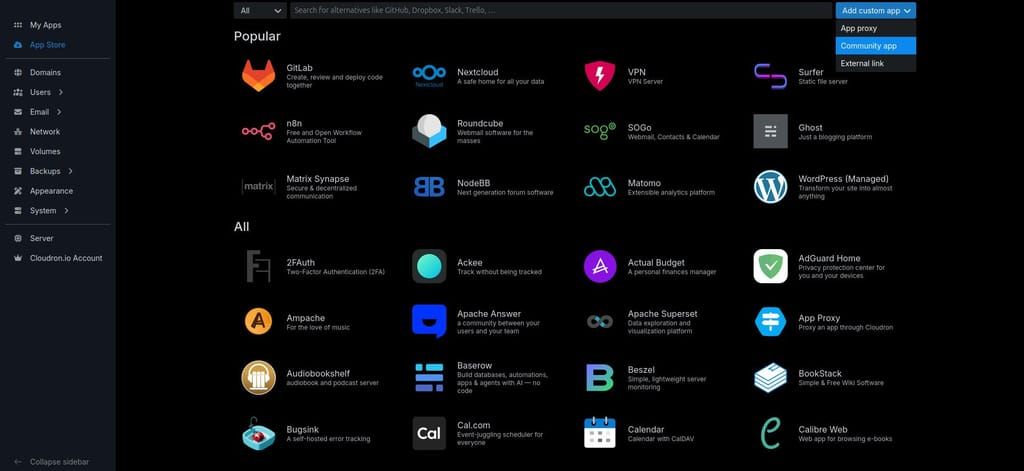
The easiest way is the dashboard: click the Add custom app dropdown (top right in the App Store) and choose Community app, then paste this URL into the box. Apps installed this way receive automatic updates.
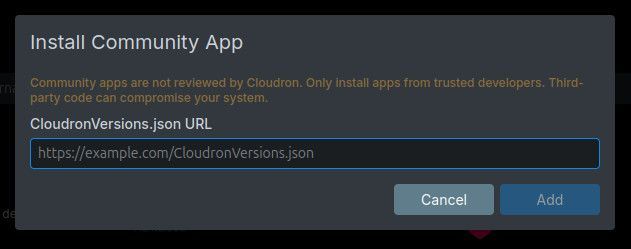
https://raw.githubusercontent.com/OrcVole/vllm-cloudron/main/CloudronVersions.jsonOr with the CLI:
cloudron install \
  --versions-url https://raw.githubusercontent.com/OrcVole/vllm-cloudron/main/CloudronVersions.json \
  --location vllm.example.com
Minimums: a 10 GB memory limit (measured, not guessed: the default model idles at around 7.4 GB because its cache is preallocated) and the localstorage addon only. The README lists the CPU requirements. First boot downloads the default model (Qwen3 0.6B, about 1.5 GB) before the API answers; the app reports healthy immediately and
/readyreturns 200 once the model is loaded.First run: no login, no SSO. A single API key is generated on first boot; open a Terminal for the app and run
cat /app/data/.secrets/keys.env. Send it asAuthorization: Bearer <key>to everything under/v1. Change the model by settingLLM_MODELin the app's Environment. For users
Why try it: a fully self-hosted OpenAI endpoint on the server you already run, for integrations, automations, and private processing of text that must not leave your box.
What you get:
/v1/chat/completions,/v1/completions,/v1/models, Prometheus metrics, streaming that works through the platform proxy, and model weights cached outside your backups, so a large model never bloats a nightly backup.Speed Expectations on CPU: Cloudron supports CPU inference, and it is deliberate rather than fast. Expect on the order of a token per second on the small default model; the README carries measured figures and tuning guidance. Always use
"stream": true, because a long non-streamed completion will hit the platform's 60 second proxy timeout by design.Good fit if you want a private OpenAI-compatible backend for your Cloudron AI stack. Probably not the right choice if you want fast interactive chat; pair a chat frontend with GPU inference elsewhere for that.
🧰 For packagers: what we learned
What helped: upstream ships prebuilt CPU wheels attached to GitHub releases, pinnable by exact URL, plus an official CPU Docker image; sibling packages for embeddings and reranking provided the whole shape (generated key, an nginx immediate-health front end, the model cache layout).
What was tricky: vLLM binds its HTTP port only after the model loads, so first boot needs an nginx shim answering
/healthimmediately or the install grace window kills the app. A model's declared context length can exceed the cache budget and abort engine start, so the package caps context explicitly.VLLM_*is upstream's reserved environment namespace, so package settings use anLLM_prefix. And uv cannot resolve the release wheel's exact setuptools pin against the PyTorch CPU index, so that one step uses pip.Still rough: the versions-channel update path from 0.1.0 to a future release has not run yet (a single entry so far), and multi-model serving is one instance per model by upstream design.
 ️ For the Cloudron team
Maintenance burden: upstream releases roughly fortnightly; the package tracks minor releases monthly and says so. The package is thin: a venv of the pinned wheel on cloudron/base, nginx, and a start script.
Why it suits the App Store: vLLM is the backend that third-party AI tools document first, and it completes the platform's AI story alongside the official Ollama and OpenWebUI apps.
Friction worth knowing: GPU passthrough remains the platform gap for every AI package; Docker has shipped the Container Device Interface natively since 25.x and Cloudron already runs 28.x, so the historical patched-runtime objection no longer applies, and topic 12401 has a concrete community proposal waiting. A backup-exclusion primitive for reproducible multi-gigabyte caches would also help every AI package; persistentDirs works but is all-or-nothing per path. And the 60 second proxy timeout against non-streamed LLM responses is a recurring integration trap worth a docs note.
 For vLLM's developers
Three small things would make packaging even easier: a documented liveness endpoint that answers before model load (the current
/healthconflates liveness and readiness, forcing packagers to front the server); official CPU performance expectations and memory guidance for small models, so self-hosters can size before installing; and a stated policy on theVLLM_*environment namespace, since the boot-time warning for unknown variables surprises anyone wrapping the server.Package source and PRs welcome: https://github.com/OrcVole/vllm-cloudron. Happy to co-maintain.
 Unlocks /
  Synergies
Now you can point any OpenAI-compatible client at your own box.
vLLM + OpenWebUI: add an OpenAI connection with base URL
https://vllm.example.com/v1and the key; a private chat backend with no external calls.vLLM + an AI gateway: one governed endpoint and one key for every client, with vLLM as a named backend; verified working with agentgateway, including streamed completions.
vLLM + TEI + Qdrant: generation, embeddings, and vector storage, all self-hosted on one Cloudron.
Feedback, bug reports, and "works on my install" confirmations are all welcome below.

-
-
-
vLLM package 0.3.0 (upstream vLLM 0.29.0) check your model before this one updates
This release is labelled a minor rather than a patch on purpose: vLLM 0.29 removes ten model architectures and makes Model Runner V2 the default engine. Most installs are unaffected, the package's default model (Qwen/Qwen3-0.6B) and mainstream families like Llama, Qwen, Mistral, DeepSeek and Gemma all continue to work.
But if your LLM_MODEL points at one of the removed architectures, the app will fail to start rather than degrade gracefully:
Arctic, Chameleon, Cheers, Fairseq2Llama, FireRedLID, GritLM, HCXVision, MPT, the RWForCausalLM/StableLMEpochForCausalLM aliases, or PrithviGeoSpatialMAE.
The same applies if you pass the now-removed VLLM_TEST_FORCE_FP8_MARLIN or VLLM_ROCM_USE_AITER_FP4_ASM_GEMM through LLM_EXTRA_ARGS, or rely on the PyAV video decoder backend (use OpenCV or Torchcodec instead).
If you have auto-updates enabled, check the LLM_MODEL value in your app's Environment section now. If it names one of the above, switch to a supported model before the update reaches you. If it has already updated and the app will not start, Cloudron takes a backup immediately before every update, so restoring that backup returns you to the previous version while you pick a replacement model.
Hello! It looks like you're interested in this conversation, but you don't have an account yet.
Getting fed up of having to scroll through the same posts each visit? When you register for an account, you'll always come back to exactly where you were before, and choose to be notified of new replies (either via email, or push notification). You'll also be able to save bookmarks and upvote posts to show your appreciation to other community members.
With your input, this post could be even better 💗
Register Login