Cloudron makes it easy to run web apps like WordPress, Nextcloud, GitLab on your server. Find out more or install now.


Skip to content
  • Categories
  • Recent
  • Tags
  • Popular
  • Bookmarks
  • Search
Skins
  • Light
  • Brite
  • Cerulean
  • Cosmo
  • Flatly
  • Journal
  • Litera
  • Lumen
  • Lux
  • Materia
  • Minty
  • Morph
  • Pulse
  • Sandstone
  • Simplex
  • Sketchy
  • Spacelab
  • United
  • Yeti
  • Zephyr
  • Dark
  • Cyborg
  • Darkly
  • Quartz
  • Slate
  • Solar
  • Superhero
  • Vapor

  • Default (No Skin)
  • No Skin
Collapse
Brand Logo

Cloudron Forum

Offical apps | Community apps | Demo | Docs | Install
  1. Cloudron Forum
  2. Mail
  3. Webmail Request: Incremental Search in "Move to Folder"

Webmail Request: Incremental Search in "Move to Folder"

Scheduled Pinned Locked Moved Solved Mail
3 Posts 2 Posters 108 Views 2 Watching
  • Oldest to Newest
  • Newest to Oldest
  • Most Votes
Reply
  • Reply as topic
Log in to reply
This topic has been deleted. Only users with topic management privileges can see it.
  • necrevistonnezrN
    necrevistonnezrN
    necrevistonnezr
    wrote last edited by
    #1

    When right-clicking on a message to move it to a folder, provide a search field or allow an incremental search of some other kind, where I can start typing "subf" to move a message to "Folder/Subfolder".

    (Similar to https://addons.thunderbird.net/de/thunderbird/addon/quick-folder-move/ , i.e. where the right click menu allows you to enter part of the name of the folder you wish to navigate to or move messages into. Pressing the Enter key selects the first result. If you prefer to move or copy messages by right-clicking on them, you can also quickly search for the folder in this way.)

    1 Reply Last reply
    2
    • nebulonN
      nebulonN
      nebulon
      Staff
      wrote last edited by
      #2

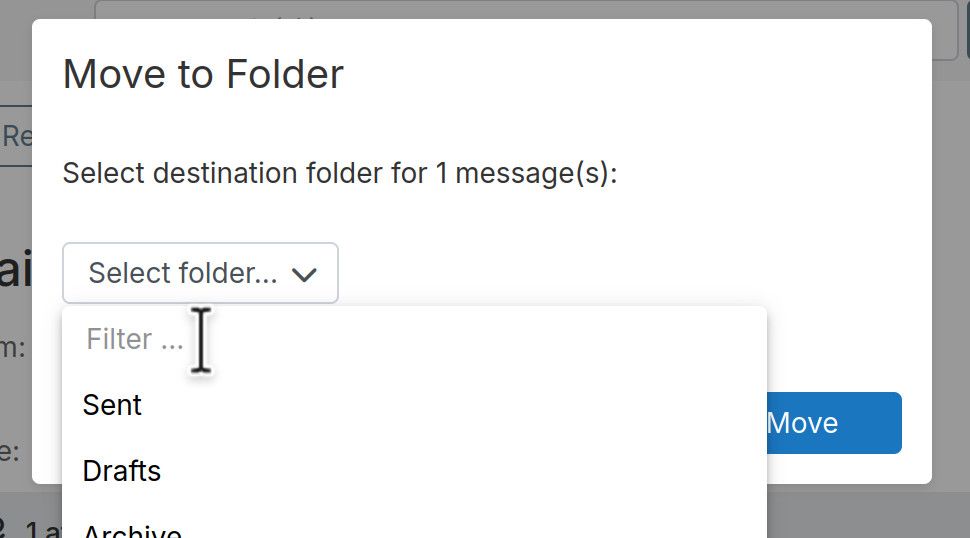
      in that dialog you can already filter like that in the target folder dropdown:

      image.jpeg

      or is that not what you were asking for?

      1 Reply Last reply
      2
      • necrevistonnezrN
        necrevistonnezrN
        necrevistonnezr
        wrote last edited by
        #3

        That's the feature I meant. In order to streamline things, I would probably show the folder list immediately and make the search field more visible... Thank you!

        1 Reply Last reply
        2
        • nebulonN nebulon marked this topic as a question
        • nebulonN nebulon has marked this topic as solved

        Hello! It looks like you're interested in this conversation, but you don't have an account yet.

        Getting fed up of having to scroll through the same posts each visit? When you register for an account, you'll always come back to exactly where you were before, and choose to be notified of new replies (either via email, or push notification). You'll also be able to save bookmarks and upvote posts to show your appreciation to other community members.

        With your input, this post could be even better 💗

        Register Login
        Reply
        • Reply as topic
        Log in to reply
        • Oldest to Newest
        • Newest to Oldest
        • Most Votes


        • Login

        • Don't have an account? Register

        • Login or register to search.
        • First post
          Last post
        0
        • Categories
        • Recent
        • Tags
        • Popular
        • Bookmarks
        • Search