
SpeakLLM : condense input, save tokens
-
Announcing SpeakLLM
Type like a human. Send like a machine.
You talk to your AI like a human. Your AI processes tokens like a machine. Something gets lost in between, and/or costs you time and money.
SpeakLLM is a small tool solving a specific problem: the gap between how humans naturally communicate and how LLMs efficiently process input. It's not a chatbot, not an agent, not a framework. It's a translator.
SpeakLLM is a self-hosted tool that translates verbose human requests into concise, token-efficient prompts. Type naturally. Get a compressed, LLM-optimized version. Paste it into any AI chat interface. (alternative direct workflow in next phase).
The Problem
Every AI chat interface is designed to feel like a conversation. The model responds in warm, expansive prose. You reciprocate.
You write "Hi! I was hoping you could maybe help me with something — I'm trying to write a product description for our new blue jacket and I'd really like it to be compelling, could you highlight the comfort and versatility? Please don't make it too long, thanks so much!"
and the model reads 47 tokens of packaging around 12 tokens of actual intent.The traditional chat UI creates a social contract loop. The model is verbose, so you're verbose, so the model is verbose, and every turn compounds the waste.
LLMs don't "speak English." They process tokens — sub-word fragments mapped to vectors in a high-dimensional mathematical space. When you write "please" and "could you" and "I'd really appreciate," those tokens don't activate useful semantic content. They take up space, dilute the signal, and cost compute and money without steering the model toward better output.
SpeakLLM breaks the loop.
How It Works
You type the way you actually think — with all the hedging, politeness, and roundabout phrasing that comes naturally to humans. SpeakLLM sends your text to an LLM with a system prompt that applies compression principles derived from how models actually process language:
- Eliminate social language — the model doesn't respond to politeness
- Positive framing — "use plain language" instead of "don't use jargon" (negative tokens inject the concept you're trying to avoid)
- Structure over prose — bullet points are parsed more reliably by attention mechanisms
- Concept anchors — "reduce Flesch-Kincaid grade to 8" activates more relevant knowledge than "make it easy to read"
- Match output length to task complexity — simple tasks get terse output, complex reasoning gets structured steps
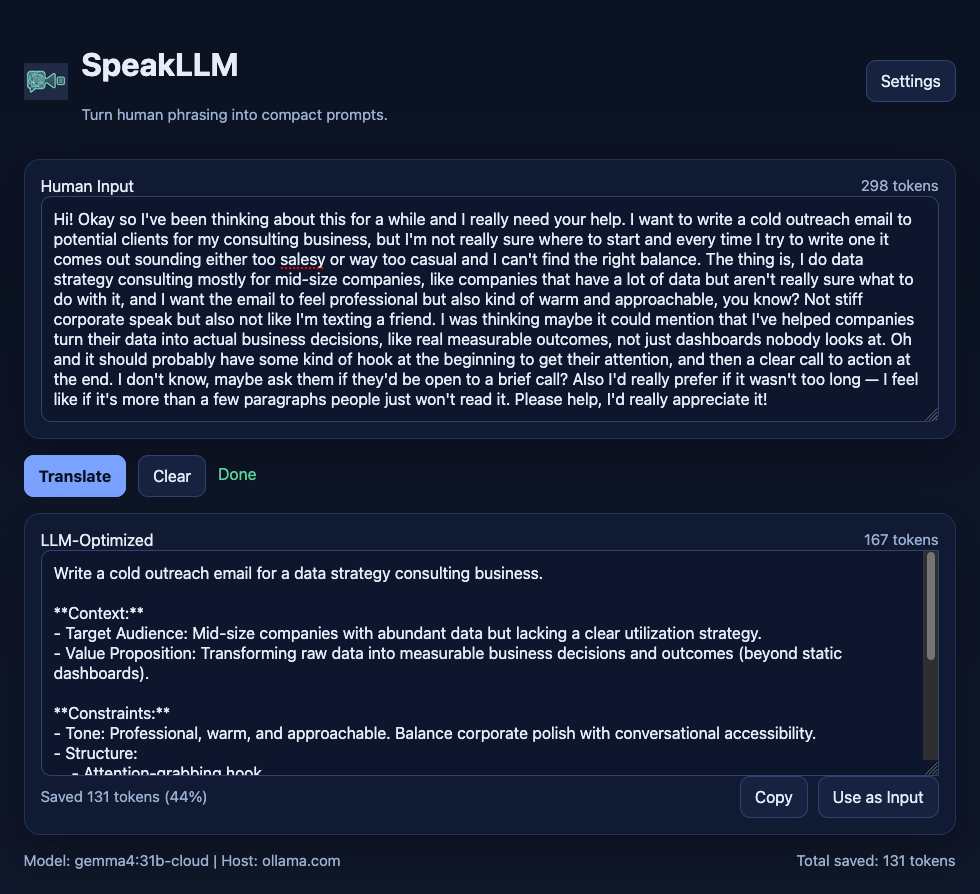
The translated prompt appears with a live token count comparison. A typical translation reduces input by 50–70%. Over a session of 20–30 prompts, that compounds into thousands of tokens saved — meaningful savings on any metered API, and faster, more focused responses from the model.
The system prompt is editable in the app's Settings panel. No code changes needed to tune the translation behavior for your use case.
Note
Sometimes SpeakLLM will actually lengthen (not shorten) your input. But that is making a better prompt, and should save input tokens later, avoiding need to clarify a poor initial input.
Installation
CloudronVersions :
https://communityapps.appx.uk/cloudron-speakllm/CloudronVersions.jsonNot yet on ca.cloudron.io.
What's Next
This is Phase 1 — a web app. You type, you translate, you copy, you paste. It works, and the savings are visible. But the workflow has friction: switching between SpeakLLM and your AI chat interface.
Phase 2
-
macOS menubar app :
Select text in any application, hit a global hotkey, and SpeakLLM translates in place. No app switching. No copy-paste loop. Two keystrokes. -
windows : err, not sure.
-
browser extension :
Detect when you're typing in ChatGPT, Claude, Gemini, or Perplexity, and optimize inline — or intercept the submission and translate automatically before the prompt reaches the model. You type naturally. The system handles the translation. The AI never sees your filler.
The system prompt — the translation logic — is the same across all use cases. One brain, three delivery surfaces.
No upstream - this is my work (MIT).
Probably other apps out there, don't care, this is my vision.Feedback and system prompt improvements welcome.
Indie app dev, scratching my itches : communityapps.appx.uk, portfolio at myca.appx.uk
-
Announcing SpeakLLM
Type like a human. Send like a machine.
You talk to your AI like a human. Your AI processes tokens like a machine. Something gets lost in between, and/or costs you time and money.
SpeakLLM is a small tool solving a specific problem: the gap between how humans naturally communicate and how LLMs efficiently process input. It's not a chatbot, not an agent, not a framework. It's a translator.
SpeakLLM is a self-hosted tool that translates verbose human requests into concise, token-efficient prompts. Type naturally. Get a compressed, LLM-optimized version. Paste it into any AI chat interface. (alternative direct workflow in next phase).
The Problem
Every AI chat interface is designed to feel like a conversation. The model responds in warm, expansive prose. You reciprocate.
You write "Hi! I was hoping you could maybe help me with something — I'm trying to write a product description for our new blue jacket and I'd really like it to be compelling, could you highlight the comfort and versatility? Please don't make it too long, thanks so much!"
and the model reads 47 tokens of packaging around 12 tokens of actual intent.The traditional chat UI creates a social contract loop. The model is verbose, so you're verbose, so the model is verbose, and every turn compounds the waste.
LLMs don't "speak English." They process tokens — sub-word fragments mapped to vectors in a high-dimensional mathematical space. When you write "please" and "could you" and "I'd really appreciate," those tokens don't activate useful semantic content. They take up space, dilute the signal, and cost compute and money without steering the model toward better output.
SpeakLLM breaks the loop.
How It Works
You type the way you actually think — with all the hedging, politeness, and roundabout phrasing that comes naturally to humans. SpeakLLM sends your text to an LLM with a system prompt that applies compression principles derived from how models actually process language:
- Eliminate social language — the model doesn't respond to politeness
- Positive framing — "use plain language" instead of "don't use jargon" (negative tokens inject the concept you're trying to avoid)
- Structure over prose — bullet points are parsed more reliably by attention mechanisms
- Concept anchors — "reduce Flesch-Kincaid grade to 8" activates more relevant knowledge than "make it easy to read"
- Match output length to task complexity — simple tasks get terse output, complex reasoning gets structured steps
The translated prompt appears with a live token count comparison. A typical translation reduces input by 50–70%. Over a session of 20–30 prompts, that compounds into thousands of tokens saved — meaningful savings on any metered API, and faster, more focused responses from the model.
The system prompt is editable in the app's Settings panel. No code changes needed to tune the translation behavior for your use case.
Note
Sometimes SpeakLLM will actually lengthen (not shorten) your input. But that is making a better prompt, and should save input tokens later, avoiding need to clarify a poor initial input.
Installation
CloudronVersions :
https://communityapps.appx.uk/cloudron-speakllm/CloudronVersions.jsonNot yet on ca.cloudron.io.
What's Next
This is Phase 1 — a web app. You type, you translate, you copy, you paste. It works, and the savings are visible. But the workflow has friction: switching between SpeakLLM and your AI chat interface.
Phase 2
-
macOS menubar app :
Select text in any application, hit a global hotkey, and SpeakLLM translates in place. No app switching. No copy-paste loop. Two keystrokes. -
windows : err, not sure.
-
browser extension :
Detect when you're typing in ChatGPT, Claude, Gemini, or Perplexity, and optimize inline — or intercept the submission and translate automatically before the prompt reaches the model. You type naturally. The system handles the translation. The AI never sees your filler.
The system prompt — the translation logic — is the same across all use cases. One brain, three delivery surfaces.
No upstream - this is my work (MIT).
Probably other apps out there, don't care, this is my vision.Feedback and system prompt improvements welcome.
Feedback and system prompt improvements welcome.
I noticed your intro text had:
Positive framing — "use plain language" instead of "don't use jargon" (negative tokens inject the concept you're trying to avoid)
But then the example of translated text in the screenshot has both "(avoiding "useless dashboards") and "avoid corporate jargon and overly casual language"


-
Feedback and system prompt improvements welcome.
I noticed your intro text had:
Positive framing — "use plain language" instead of "don't use jargon" (negative tokens inject the concept you're trying to avoid)
But then the example of translated text in the screenshot has both "(avoiding "useless dashboards") and "avoid corporate jargon and overly casual language"
@jdaviescoates ooops ! must eat my own dog food better.
I will fix - thanks for the nudge.
But the token savings are real : working well for me currently.
-
Mac menu bar app built and being tested.
Need to think about windows and browser extensions. -
Feedback and system prompt improvements welcome.
I noticed your intro text had:
Positive framing — "use plain language" instead of "don't use jargon" (negative tokens inject the concept you're trying to avoid)
But then the example of translated text in the screenshot has both "(avoiding "useless dashboards") and "avoid corporate jargon and overly casual language"
@jdaviescoates I've refined the output parameters to enforce stronger positive parameters.
And replaced the graphic.


Hello! It looks like you're interested in this conversation, but you don't have an account yet.
Getting fed up of having to scroll through the same posts each visit? When you register for an account, you'll always come back to exactly where you were before, and choose to be notified of new replies (either via email, or push notification). You'll also be able to save bookmarks and upvote posts to show your appreciation to other community members.
With your input, this post could be even better 💗
Register Login