
Cloudron makes it easy to run web apps like WordPress, Nextcloud, GitLab on your server. Find out more or install now.


Skip to content
  • Categories
  • Recent
  • Tags
  • Popular
  • Bookmarks
  • Search
Skins
  • Light
  • Brite
  • Cerulean
  • Cosmo
  • Flatly
  • Journal
  • Litera
  • Lumen
  • Lux
  • Materia
  • Minty
  • Morph
  • Pulse
  • Sandstone
  • Simplex
  • Sketchy
  • Spacelab
  • United
  • Yeti
  • Zephyr
  • Dark
  • Cyborg
  • Darkly
  • Quartz
  • Slate
  • Solar
  • Superhero
  • Vapor

  • Default (No Skin)
  • No Skin
Collapse
Brand Logo

Cloudron Forum

Offical apps | Community apps | Demo | Docs | Install
  1. Cloudron Forum
  2. SFTPGo
  3. SFTPGo fails to start: "could not start SFTP server: open id_rsa: read-only file system"

SFTPGo fails to start: "could not start SFTP server: open id_rsa: read-only file system"

Scheduled Pinned Locked Moved Solved SFTPGo
8 Posts 2 Posters 179 Views 2 Watching
  • Oldest to Newest
  • Newest to Oldest
  • Most Votes
Reply
  • Reply as topic
Log in to reply
This topic has been deleted. Only users with topic management privileges can see it.
  • V
    V
    Valexico
    wrote last edited by
    #1

    Hi,

    SFTPGo 2.7.6 fails to start on my Cloudron instance because it cannot create its SSH host key. The app restarts in a loop and the healthcheck never passes.

    Environment

    • Cloudron version: 10.0.5
    • SFTPGo package version: com.sftpgo.cloudronapp@1.4.5

    Logs
    No host keys configured and "id_rsa" does not exist; try to create a new host key
    error creating host key "id_rsa": open id_rsa: read-only file system
    could not start SFTP server: open id_rsa: read-only file system
    Healthcheck error: AbortError: The operation was aborted

    The log shows HostKeys:[] in the SFTP config and config dir: .. SFTPGo therefore tries to write id_rsa into its working directory, which is on the read-only filesystem (/app/code). The failure is retried every minute (restart loop).

    Everything else initializes fine: PostgreSQL migration (schema v33), SMTP, OIDC, HTTP on 8080 and WebDAV on 8888.

    Workaround
    Setting the host keys explicitly to a writable location fixed it for me. In /app/data/sftpgo.json:

    "sftpd": {
    "bindings": [{"port": 2022}],
    "host_keys": ["/app/data/id_rsa", "/app/data/id_ecdsa", "/app/data/id_ed25519"]
    }

    1 Reply Last reply
    1
    • jamesJ
      jamesJ
      james
      Staff
      wrote last edited by
      #2

      Hello @valexico
      Thanks for reporting, I will look into this.

      1 Reply Last reply
      0
      • jamesJ
        jamesJ
        james
        Staff
        wrote last edited by
        #3

        Hello @valexico
        I could not reproduce this with a fresh @sftpgo installation.

        @Valexico said:

        No host keys configured

        By default, the @sftpgo app always generates the /app/data/sftpgo_host_key and automatically configures the /app/data/sftpgo.json file.
        Only when the app is started without the SFTPd port the config file does not automatically configure the '.sftpd.host_keys[0]' config entry:
        When enabling the SFTPd port it configures it again.
        Just tested this.

        Could please share the real log file from your @sftpgo app via https://paste.cloudron.io/ ?

        1 Reply Last reply
        0
        • V
          V
          Valexico
          wrote last edited by
          #4

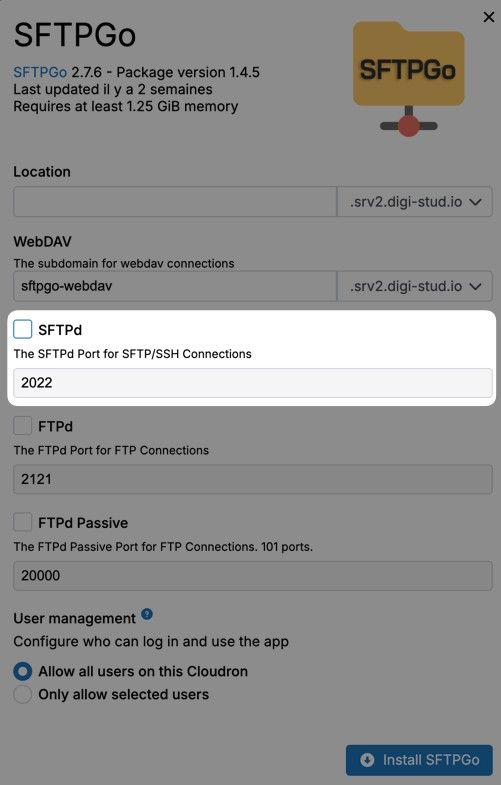
          I did install it like this :

          digi-studio 2026-10-02 at 10.08.47.jpeg

          is this the cause ?

          1 Reply Last reply
          0
          • jamesJ
            jamesJ
            james
            Staff
            wrote last edited by james
            #5

            Hello @valexico

            When SFTPd is not enabled the host_key for SFTPd will not be configured.
            So when you enable SFTPd and save, it will restart the app and configure the default host_key.

            Please answer the following question:

            You did install the app without SFTPd enabled.
            Then you did what exactly to get to the state of:

            @Valexico said:

            No host keys configured and "id_rsa" does not exist; try to create a new host key
            error creating host key "id_rsa": open id_rsa: read-only file system
            could not start SFTP server: open id_rsa: read-only file system
            Healthcheck error: AbortError: The operation was aborted

            1 Reply Last reply
            0
            • V
              V
              Valexico
              wrote last edited by
              #6

              I just install the app without SFTPd and then the app was not able to start with those logs
              https://paste.cloudron.io/p/mole-panda-whale

              then I did my workaround and restarted the app to boot properly

              Workaround
              "sftpd": {
              "bindings": [{"port": 2022}],
              "host_keys": ["/app/data/id_rsa", "/app/data/id_ecdsa", "/app/data/id_ed25519"]
              }

              1 Reply Last reply
              1
              • jamesJ
                jamesJ
                james
                Staff
                wrote last edited by
                #7

                Hello @valexico

                I am trying to reproduce this and will report back.

                1 Reply Last reply
                0
                • jamesJ
                  jamesJ
                  james
                  Staff
                  wrote last edited by
                  #8

                  Hello @valexico

                  I have reproduced it and identified the cause.
                  An app update will be available soon that will fix starting the @sftpgo app without SFTPd initially configured.

                  1 Reply Last reply
                  0
                  • jamesJ james marked this topic as a question
                  • jamesJ james has marked this topic as solved
                  Hello! It looks like you're interested in this conversation, but you don't have an account yet.

                  Getting fed up of having to scroll through the same posts each visit? When you register for an account, you'll always come back to exactly where you were before, and choose to be notified of new replies (either via email, or push notification). You'll also be able to save bookmarks and upvote posts to show your appreciation to other community members.

                  With your input, this post could be even better 💗

                  Register Login
                  Reply
                  • Reply as topic
                  Log in to reply
                  • Oldest to Newest
                  • Newest to Oldest
                  • Most Votes


                  • Login

                  • Don't have an account? Register

                  • Login or register to search.
                  • First post
                    Last post
                  0
                  • Categories
                  • Recent
                  • Tags
                  • Popular
                  • Bookmarks
                  • Search
