
Collabora 26.04: compact WebSocket URL /cool/ws is not proxied as a WebSocket upgrade → intermittent "Document loading failed"
-
I'm a user/admin who is getting frustrated by frequent "Document loading failed" errors. I tried to work out what was going on, with the help of an LLM, and it concluded that there was nothing I could do personally. Happy to provide more info if there's anything I can provide.
Here's a bug report that the LLM drafted. Exercise cynicism.
 ️ Authorship note: This report was drafted by a large language model (AI assistant) from server logs, browser-console output, and a debugging session. The log excerpts, config excerpts, and command outputs below are from the real system and are believed accurate; the root-cause analysis and proposed patch are LLM inferences and have not been confirmed by a human expert. Please verify before acting. The human reporter is a non-expert and can supply full logs and run further diagnostics on request.
Summary
On a Cloudron instance, opening office documents from Nextcloud intermittently fails with "Document loading failed / Failed to load Nextcloud Office (Collabora)". The failure is transient: retrying often works, and sometimes the document appears after a short wait without any page reload.
Root cause (as analysed): the Collabora app container ships a correct nginx config in
/etc/nginx/snippets/coolwsd.conf, but the active/etc/nginx/nginx.confdoes not include it. The active config has a WebSocket-upgrade location only for the legacy URL form/cool/<encoded-wopisrc>/ws. Collabora 26.04's new compact WebSocket URL/cool/ws?WOPISrc=…does not match it, falls through to a generic location~ ^/(c|l)oolthat does not set the upgrade headers, and coolwsd rejects it with HTTP 400 Invalid or unknown request. The client then intermittently falls back to the legacy URL, which is upgraded — which is why loading is flaky and self-heals.Environment
- Cloudron, with the Collabora Online (CODE) app and the Nextcloud app (Nextcloud Office / richdocuments)
- Collabora Online Development Edition 26.04.4.2
- Nextcloud: https://files.radicalroutes.org.uk/ · Collabora: https://https://docs.radicalroutes.org.uk/
- Both apps reported up to date (Collabra: 1.60.0, Nextcloud: 5.8.10)
Evidence
- Browser console, during a failure
GET wss://docs.example.org.uk/cool/ws?WOPISrc=https://files.example.org.uk/…/wopi/files/248470_…&…&compat=
    [HTTP/1.1 400 (Bad Request) 323ms]
Firefox can't establish a connection to the server at wss://docs.example.org.uk/cool/ws?WOPISrc=…
Document loading failed due to timeout: Please check for failing network requests
coolwsd log— compact URL is not upgraded
ERR #73: Bad request: GET HTTP/1.0 /cool/ws?WOPISrc=…&access_token=test, content-length: -1, chunked: false,
         Host: localhost:8000 / Connection: close / …  closeConnection: true
         …: Invalid or unknown request. |wsd/ClientRequestDispatcher.cpp:1721
"GET /cool/ws?WOPISrc=… HTTP/1.1" 400 0
The request arrives as
HTTP/1.0 with Connection: close— i.e. nginx forwarded it without the WebSocket upgrade. This happens both from the container's own nginx and through Cloudron's host proxy (public URL), so both layers fail to upgrade/cool/ws.- Real-session comparison — legacy URL is upgraded
"GET /cool/https%3A%2F%2Ffiles.example.org.uk%2F…%2Fwopi%2Ffiles%2F248470_…%2Fws?WOPISrc=…&compat=/ws HTTP/1.1" 101 462685101 = successful WebSocket upgrade. The compact URL gives 400; the legacy URL gives 101 — seconds apart, same document.
- Container nginx config
Active /etc/nginx/nginx.conf (port 8000 server) — the only upgrade location is the legacy regex:
# main websocket location ~ ^/cool/(.*)/ws$ { proxy_pass http://localhost:9980; proxy_set_header Upgrade $http_upgrade; proxy_set_header Connection "Upgrade"; proxy_set_header Host $http_host; proxy_read_timeout 36000s; } # download, presentation and image upload location ~ ^/(c|l)ool { proxy_pass http://localhost:9980; proxy_set_header Host $http_host; # ← no upgrade headers, HTTP/1.0 default }/cool/wsdoes not match^/cool/(.*)/ws$(that needs a segment between/cool/and/ws), so it falls through to^/(c|l)ooland is proxied without upgrade headers — exactly matching theHTTP/1.0 … Connection: closeseen at coolwsd.Meanwhile
/etc/nginx/snippets/coolwsd.confdoes contain a correct compact-URL rule:location ^~ /cool/ { proxy_pass http://localhost:9980; proxy_http_version 1.1; proxy_set_header Upgrade $http_upgrade; proxy_set_header Connection "Upgrade"; proxy_set_header Host $host; proxy_read_timeout 36000s; }…but it is not wired in. Proof:
- grep -rn 'snippets/coolwsd.conf' /etc/nginx/ returns nothing — no file includes it.
- The snippet sets proxy_http_version 1.1; the live requests reach coolwsd as HTTP/1.0, which only the active config (without proxy_http_version) would produce.
- Curl tests (reproducible)
# compact, container nginx → 400
curl -sS -o /dev/null -w '%{http_code}\n' -H 'Connection: Upgrade' -H 'Upgrade: websocket' \
  -H 'Sec-WebSocket-Version: 13' -H 'Sec-WebSocket-Key: x3JJHMbDL1EzLkh9GBhXDw==' \
  'http://localhost:8000/cool/ws?WOPISrc=https%3A%2F%2Ffiles.example.org.uk%2F…%2Fwopi%2Ffiles%2F248470_…&access_token=test'
# → 400

# compact, public URL (adds Cloudron host proxy + TLS) → 400
# → 400
(
access_token=testis a dummy, so status codes alone are not fully conclusive; thecoolwsdlog'sHTTP/1.0 vs WebSocketdistinction is the decisive evidence.)Root cause
Collabora 26.04 introduced a compact WebSocket URL /cool/ws?WOPISrc=…, replacing the older path-embedded form /cool/<encoded-wopisrc>/ws. Reverse proxies that only recognise the legacy form fail to upgrade the new URL. This is a documented upstream change requiring proxy-config updates:
- Upstream fix: Collabora Gerrit change 4102 — "Apache proxy: tunnel the compact /cool/ws WebSocket URL" (merged 2026-06-09), which adds ProxyPass /cool/ws ws://127.0.0.1:9980/cool/ws nocanon alongside the legacy rule: https://gerrit.collaboraoffice.com/c/online/+/4102
- Known issue: CollaboraOnline/online #15918 — "Websocket connection fails on Version 26 and newer" (Invalid or unknown request after upgrading to collabora/code:26.04.x): https://github.com/CollaboraOnline/online/issues/15918
- Proxy docs referenced by Collabora: https://sdk.collaboraonline.com/docs/installation/Proxy_settings.html
Proposed fix (Cloudron app package)
Add an exact-match upgrade location for the compact URL to the active
/etc/nginx/nginx.conf(port 8000 server), placed before the genericlocation ~ ^/(c|l)ool:# Main websocket (compact URL — document passed via the WOPISrc query parameter) location = /cool/ws { proxy_pass http://localhost:9980; proxy_http_version 1.1; proxy_set_header Upgrade $http_upgrade; proxy_set_header Connection "Upgrade"; proxy_set_header Host $http_host; proxy_read_timeout 36000s; }…or wire in the already-shipped snippet by replacing the inline /browser, /hosting/, /cool/, /lool locations with include /etc/nginx/snippets/coolwsd.conf;. The exact (=) match takes priority and leaves the legacy regex working.
Caveat for Cloudron to check: the snippet uses proxy_set_header Host $host, while the active config uses $http_host. Confirm the Host header the WOPI/WebSocket path relies on remains correct after switching.
This is inside the app container image (/etc/nginx/…), so it can't be fixed persistently by an end user and would be overwritten on update — hence an app-package fix is required.
Interim mitigations (end user)
- None clean. The failure is masked by the client's fallback to the legacy URL, so most documents eventually open; there is no user-side setting to add the proxy rule.
- If Cloudron can pin the Collabora app to a 25.04 build, that restores the pre-26.04 single WebSocket URL. (Confirm the option exists.)
Ruled out (from logs during failure windows)
- Resources: Collabora memory limit 4 GB, ~1 GB used; CPU near idle; no correlated spikes.
- WOPI allow-list / secret / DNS / host-alias: backend WOPI path completes cleanly with HTTP 200 (CheckFileInfo → GetFile → write-back) from COOLWSD HTTP Agent 26.04.4.2.
- Deleted-user / orphaned-share errors (NoUserException … sima/jack): present earlier, resolved via occ sharing:delete-orphan-shares; unrelated.
- HTTP/3 / CSP: not the trigger in the captured failures.
Secondary observations (not the cause)
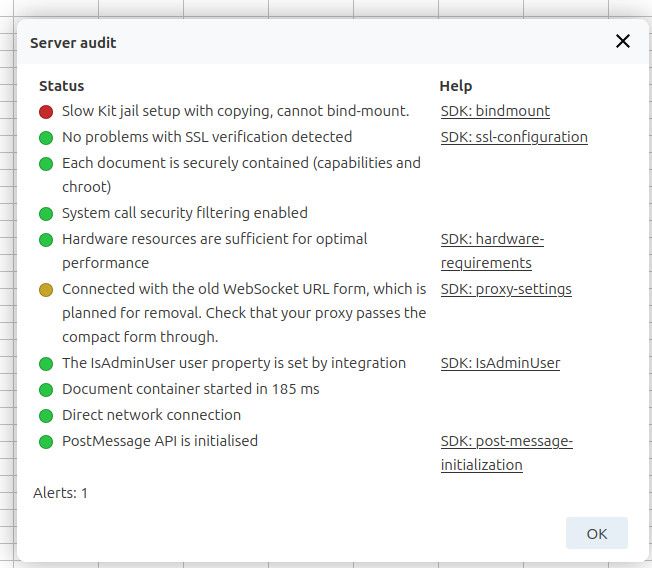
- Repeated Failed to exec coolmount … needs CAP_SYS_ADMIN … (known Cloudron jail-mount fallback; slower jail setup).
- client intended to send too large body … POST /cool/convert-to/png → 413 (thumbnails).
- Failed to fetch preset uri […/template/…] (template preload).
Attachments available on request
Browser console log, full coolwsd log, Nextcloud access log, and the container's nginx.conf / snippets/coolwsd.conf.
-
-
-

Hello! It looks like you're interested in this conversation, but you don't have an account yet.
Getting fed up of having to scroll through the same posts each visit? When you register for an account, you'll always come back to exactly where you were before, and choose to be notified of new replies (either via email, or push notification). You'll also be able to save bookmarks and upvote posts to show your appreciation to other community members.
With your input, this post could be even better 💗
Register Login