Cloudron makes it easy to run web apps like WordPress, Nextcloud, GitLab on your server. Find out more or install now.


Skip to content
  • Categories
  • Recent
  • Tags
  • Popular
  • Bookmarks
  • Search
Skins
  • Light
  • Brite
  • Cerulean
  • Cosmo
  • Flatly
  • Journal
  • Litera
  • Lumen
  • Lux
  • Materia
  • Minty
  • Morph
  • Pulse
  • Sandstone
  • Simplex
  • Sketchy
  • Spacelab
  • United
  • Yeti
  • Zephyr
  • Dark
  • Cyborg
  • Darkly
  • Quartz
  • Slate
  • Solar
  • Superhero
  • Vapor

  • Default (No Skin)
  • No Skin
Collapse
Brand Logo

Cloudron Forum

Apps - Status | Demo | Docs | Install
  1. Cloudron Forum
  2. Support
  3. memcached server and php-memcached

memcached server and php-memcached

Scheduled Pinned Locked Moved Solved Support
memcache
17 Posts 3 Posters 5.8k Views 3 Watching
  • Oldest to Newest
  • Newest to Oldest
  • Most Votes
Reply
  • Reply as topic
Log in to reply
This topic has been deleted. Only users with topic management privileges can see it.
  • girishG Offline
    girishG Offline
    girish
    Staff
    wrote on last edited by
    #3

    @b247_eu @rmdes I have pushed changes to the memcached branch. It removed redis addon and adds memcached instead. https://git.cloudron.io/cloudron/php7.3-postgres-app/-/commit/12c40aba6a3f05ad245290882fef9743bafed7c5

    One you install the app, memcached is running on port 11211 on localhost. You can test this with:

    root@a95330af-2470-45e7-a7cb-fe170bd184ed:/app/data# echo "stats settings" | nc localhost 11211
    STAT maxbytes 67108864
    STAT maxconns 1024
    STAT tcpport 11211
    STAT udpport 0
    STAT inter 127.0.0.1
    STAT verbosity 0
    STAT oldest 0
    STAT evictions on
    STAT domain_socket NULL
    STAT umask 700
    STAT growth_factor 1.25
    
    rmdesR 1 Reply Last reply
    1
    • girishG girish

      @b247_eu @rmdes I have pushed changes to the memcached branch. It removed redis addon and adds memcached instead. https://git.cloudron.io/cloudron/php7.3-postgres-app/-/commit/12c40aba6a3f05ad245290882fef9743bafed7c5

      One you install the app, memcached is running on port 11211 on localhost. You can test this with:

      root@a95330af-2470-45e7-a7cb-fe170bd184ed:/app/data# echo "stats settings" | nc localhost 11211
      STAT maxbytes 67108864
      STAT maxconns 1024
      STAT tcpport 11211
      STAT udpport 0
      STAT inter 127.0.0.1
      STAT verbosity 0
      STAT oldest 0
      STAT evictions on
      STAT domain_socket NULL
      STAT umask 700
      STAT growth_factor 1.25
      
      rmdesR Offline
      rmdesR Offline
      rmdes
      wrote on last edited by
      #4

      @girish yay! Thank you so much!
      Going to test and see if now that fits their requirements!
      Thanks a lot!

      rmdesR 1 Reply Last reply
      0
      • rmdesR rmdes

        @girish yay! Thank you so much!
        Going to test and see if now that fits their requirements!
        Thanks a lot!

        rmdesR Offline
        rmdesR Offline
        rmdes
        wrote on last edited by
        #5

        Alright install ran smoothly, now just waiting for feedback from the devs.

        1 Reply Last reply
        0
        • rmdesR Offline
          rmdesR Offline
          rmdes
          wrote on last edited by rmdes
          #6

          When I test echo "stats settings" | nc localhost 11211 on the web terminal I get :
          localhost [127.0.0.1] 11211 (?) : Connection refused

          Do I need to make this test under a specific user perhaps ?

          rmdesR 1 Reply Last reply
          0
          • girishG Offline
            girishG Offline
            girish
            Staff
            wrote on last edited by girish
            #7

            @rmdes Can you check if memcached is running at all (just to make sure you selected the correct branch when building). You can do this with supervisorctl status.

            root@dfa78176-bd47-44ed-9d07-3e66265886b7:/app/data# supervisorctl status
            apache2                          RUNNING   pid 22, uptime 0:00:15
            cron                             RUNNING   pid 21, uptime 0:00:15
            memcached                        RUNNING   pid 20, uptime 0:00:15
            root@dfa78176-bd47-44ed-9d07-3e66265886b7:/app/data# echo "stats settings" | nc localhost 11211
            STAT maxbytes 67108864
            STAT maxconns 1024
            STAT tcpport 11211
            STAT udpport 0
            STAT inter 127.0.0.1
            STAT verbosity 0
            ....
            
            rmdesR 2 Replies Last reply
            0
            • girishG girish

              @rmdes Can you check if memcached is running at all (just to make sure you selected the correct branch when building). You can do this with supervisorctl status.

              root@dfa78176-bd47-44ed-9d07-3e66265886b7:/app/data# supervisorctl status
              apache2                          RUNNING   pid 22, uptime 0:00:15
              cron                             RUNNING   pid 21, uptime 0:00:15
              memcached                        RUNNING   pid 20, uptime 0:00:15
              root@dfa78176-bd47-44ed-9d07-3e66265886b7:/app/data# echo "stats settings" | nc localhost 11211
              STAT maxbytes 67108864
              STAT maxconns 1024
              STAT tcpport 11211
              STAT udpport 0
              STAT inter 127.0.0.1
              STAT verbosity 0
              ....
              
              rmdesR Offline
              rmdesR Offline
              rmdes
              wrote on last edited by
              #8

              @girish I have

              root@659d2867-1273-4c51-b7e7-765edf705c2d:/app/data# supervisorctl status
              apache2                          RUNNING   pid 19, uptime 1 day, 22:13:15
              cron                             RUNNING   pid 18, uptime 1 day, 22:13:15
              
              1 Reply Last reply
              0
              • girishG girish

                @rmdes Can you check if memcached is running at all (just to make sure you selected the correct branch when building). You can do this with supervisorctl status.

                root@dfa78176-bd47-44ed-9d07-3e66265886b7:/app/data# supervisorctl status
                apache2                          RUNNING   pid 22, uptime 0:00:15
                cron                             RUNNING   pid 21, uptime 0:00:15
                memcached                        RUNNING   pid 20, uptime 0:00:15
                root@dfa78176-bd47-44ed-9d07-3e66265886b7:/app/data# echo "stats settings" | nc localhost 11211
                STAT maxbytes 67108864
                STAT maxconns 1024
                STAT tcpport 11211
                STAT udpport 0
                STAT inter 127.0.0.1
                STAT verbosity 0
                ....
                
                rmdesR Offline
                rmdesR Offline
                rmdes
                wrote on last edited by rmdes
                #9

                @girish I think I did selected the correct branch, because when I do git branch I have this
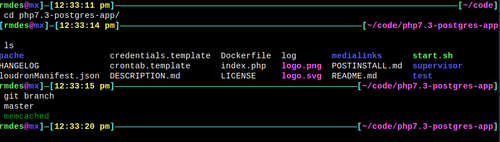
                10a6b05b-62a2-454e-b2f7-d4d25f997c9b-image.png

                And I did the build and the install from this branch.

                I probably did something wrong tho since memcached is not even running and the test put in place by the devs goes like this :
                Fatal error: Uncaught Error: Class 'Memcached' not found in /app/data/public/index.php:24 Stack trace: #0 {main} thrown in /app/data/public/index.php on line 24

                if (!$connection = pg_connect ("host=".getenv("CLOUDRON_POSTGRESQL_HOST")." dbname=". getenv("CLOUDRON_POSTGRESQL_DATABASE") ." user=" . getenv("CLOUDRON_POSTGRESQL_USERNAME")." password=" .getenv("CLOUDRON_POSTGRESQL_PASSWORD") ."")) {
                    $error = error_get_last();
                    echo "Connection to the PostgreSQL database failed. Error was: ". $error['message']. "\n";
                } else {
                    echo "Connected to the PostgreSQL database.\n";
                }
                
                print_r(get_loaded_extensions());
                
                $memcached = new Memcached();
                $memcached->addServer('172.18.0.158', 11211);
                
                phpinfo();
                exit;
                
                ?>
                
                1 Reply Last reply
                0
                • rmdesR rmdes

                  When I test echo "stats settings" | nc localhost 11211 on the web terminal I get :
                  localhost [127.0.0.1] 11211 (?) : Connection refused

                  Do I need to make this test under a specific user perhaps ?

                  rmdesR Offline
                  rmdesR Offline
                  rmdes
                  wrote on last edited by
                  #10

                  I got this from the devs of the custom web app :

                  So far: postgresql and memcached servers available - OK;
                  Missing: php-memcached extension (so I can't make use of the memcached server capabilities within a php script) - not OK

                  Please also don't forget about nginx x-accel, can you add an entry to the nginx conf file for that?


                  Not sure how to proceed

                  1 Reply Last reply
                  0
                  • rmdesR Offline
                    rmdesR Offline
                    rmdes
                    wrote on last edited by rmdes
                    #11

                    by inspecting php.ini in the container, I went to the extension section and added
                    extension=memcache

                    Aug 31 14:29:58 PHP Warning: PHP Startup: Unable to load dynamic library 'memcache' (tried: /usr/lib/php/20180731/memcache (/usr/lib/php/20180731/memcache: cannot open shared object file: No such file or directory), /usr/lib/php/20180731/memcache.so (/usr/lib/php/20180731/memcache.so: cannot open shared object file: No such file or directory)) in Unknown on line 0
                    

                    So does this mean the memcache server is not properly installed ?

                    1 Reply Last reply
                    0
                    • girishG Offline
                      girishG Offline
                      girish
                      Staff
                      wrote on last edited by
                      #12

                      I think the image you are using is wrong. php-memcached is also installed in the same patch as memcached itself - https://git.cloudron.io/cloudron/php7.3-postgres-app/-/commit/12c40aba6a3f05ad245290882fef9743bafed7c5#6651ddff6eb82c840ced7c1dddee15c6e1913dd4_8_7

                      Can you tell me the command you used to build and update the image? Also, what is the CLI version ? It should be 4.5.2.

                      $ cloudron --version
                      4.5.2

                      
                      rmdesR 1 Reply Last reply
                      0
                      • girishG girish

                        I think the image you are using is wrong. php-memcached is also installed in the same patch as memcached itself - https://git.cloudron.io/cloudron/php7.3-postgres-app/-/commit/12c40aba6a3f05ad245290882fef9743bafed7c5#6651ddff6eb82c840ced7c1dddee15c6e1913dd4_8_7

                        Can you tell me the command you used to build and update the image? Also, what is the CLI version ? It should be 4.5.2.

                        $ cloudron --version
                        4.5.2

                        
                        rmdesR Offline
                        rmdesR Offline
                        rmdes
                        wrote on last edited by
                        #13

                        @girish I'm on 4.5.2
                        the command I used after git clone
                        was cloudron build --local
                        then cloudron install
                        and that's it..

                        1 Reply Last reply
                        0
                        • girishG Offline
                          girishG Offline
                          girish
                          Staff
                          wrote on last edited by
                          #14

                          @rmdes Can you try cloudron exec and then check if /etc/supervisor/conf.d/memcache.conf exists? Otherwise, you are not using the correct build (not sure where the problem could be though).

                          1 Reply Last reply
                          0
                          • rmdesR Offline
                            rmdesR Offline
                            rmdes
                            wrote on last edited by
                            #15

                            @rmdes said in memcached server and php-memcached:

                            supervisorctl status

                            Yay!!!!

                            c7d3fff5-3f47-45c5-a67a-bf853e20d50f-image.png

                            1 Reply Last reply
                            0
                            • rmdesR Offline
                              rmdesR Offline
                              rmdes
                              wrote on last edited by
                              #16

                              Not sure what happened to my original git clone folder but by downloading the zip file from the memcache branch and then doing cloudron build --local & cloudron install I got it working !

                              1 Reply Last reply
                              0
                              • rmdesR Offline
                                rmdesR Offline
                                rmdes
                                wrote on last edited by
                                #17

                                @girish said in memcached server and php-memcached:

                                /etc/supervisor/conf.d/memcache.conf

                                Confirm this exists now 🙂

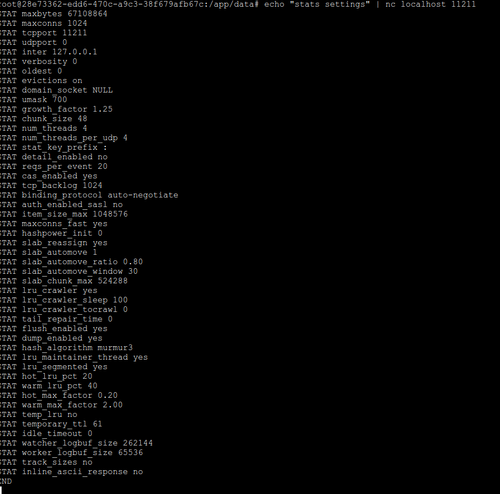
                                output of echo "stats settings" | nc localhost 11211

                                0d442845-118a-4aab-939e-583e3b383db8-image.png

                                1 Reply Last reply
                                1

                                Hello! It looks like you're interested in this conversation, but you don't have an account yet.

                                Getting fed up of having to scroll through the same posts each visit? When you register for an account, you'll always come back to exactly where you were before, and choose to be notified of new replies (either via email, or push notification). You'll also be able to save bookmarks and upvote posts to show your appreciation to other community members.

                                With your input, this post could be even better 💗

                                Register Login
                                Reply
                                • Reply as topic
                                Log in to reply
                                • Oldest to Newest
                                • Newest to Oldest
                                • Most Votes


                                • Login

                                • Don't have an account? Register

                                • Login or register to search.
                                • First post
                                  Last post
                                0
                                • Categories
                                • Recent
                                • Tags
                                • Popular
                                • Bookmarks
                                • Search