Cloudron makes it easy to run web apps like WordPress, Nextcloud, GitLab on your server. Find out more or install now.


Skip to content
  • Categories
  • Recent
  • Tags
  • Popular
  • Bookmarks
  • Search
Skins
  • Light
  • Brite
  • Cerulean
  • Cosmo
  • Flatly
  • Journal
  • Litera
  • Lumen
  • Lux
  • Materia
  • Minty
  • Morph
  • Pulse
  • Sandstone
  • Simplex
  • Sketchy
  • Spacelab
  • United
  • Yeti
  • Zephyr
  • Dark
  • Cyborg
  • Darkly
  • Quartz
  • Slate
  • Solar
  • Superhero
  • Vapor

  • Default (No Skin)
  • No Skin
Collapse
Brand Logo

Cloudron Forum

Apps - Status | Demo | Docs | Install
  1. Cloudron Forum
  2. AdGuard Home
  3. High CPU usage & service abuse

High CPU usage & service abuse

Scheduled Pinned Locked Moved AdGuard Home
13 Posts 6 Posters 4.6k Views 6 Watching
  • Oldest to Newest
  • Newest to Oldest
  • Most Votes
Reply
  • Reply as topic
Log in to reply
This topic has been deleted. Only users with topic management privileges can see it.
  • robiR Offline
    robiR Offline
    robi
    wrote on last edited by
    #1

    After installing it when it came out and forgetting about it until now, I noticed it was having high CPU usage in top. (20-60%)

    Logging in and checking the dashboard it seems that it's being abused by clients globally and processed 14.5 million queries in the last 7 days. (mostly for pizzaseo.com)

    This looks like the default install is open to the world and open to abuse.

    In the /#dns settings I found the Access Settings, but since I don't have a static IP, it doesn't help to put a dynamic one there temporarily.

    Is there a best practice we can configure for a private/secure by default install?

    Conscious tech

    doodlemania2D 1 Reply Last reply
    0
    • robiR robi

      After installing it when it came out and forgetting about it until now, I noticed it was having high CPU usage in top. (20-60%)

      Logging in and checking the dashboard it seems that it's being abused by clients globally and processed 14.5 million queries in the last 7 days. (mostly for pizzaseo.com)

      This looks like the default install is open to the world and open to abuse.

      In the /#dns settings I found the Access Settings, but since I don't have a static IP, it doesn't help to put a dynamic one there temporarily.

      Is there a best practice we can configure for a private/secure by default install?

      doodlemania2D Offline
      doodlemania2D Offline
      doodlemania2
      App Dev
      wrote on last edited by
      #2

      @robi If you're running this on CR at home, block port 53 at your firewall from public but allow it from internal. If you are on a VPS, you'd probably want something like dyndns.org to auto update stuff I'd think?

      robiR 1 Reply Last reply
      0
      • doodlemania2D doodlemania2

        @robi If you're running this on CR at home, block port 53 at your firewall from public but allow it from internal. If you are on a VPS, you'd probably want something like dyndns.org to auto update stuff I'd think?

        robiR Offline
        robiR Offline
        robi
        wrote on last edited by robi
        #3

        @doodlemania2 it's on a biz VPS and the abuse is severe enough to have used up 200+GB of disk space, which I need to track down now.

        Backups have been failing, and who knows what else.

        Conscious tech

        doodlemania2D ? 2 Replies Last reply
        0
        • robiR robi

          @doodlemania2 it's on a biz VPS and the abuse is severe enough to have used up 200+GB of disk space, which I need to track down now.

          Backups have been failing, and who knows what else.

          doodlemania2D Offline
          doodlemania2D Offline
          doodlemania2
          App Dev
          wrote on last edited by
          #4

          @robi yikes! good luck sir

          1 Reply Last reply
          0
          • robiR Offline
            robiR Offline
            robi
            wrote on last edited by robi
            #5

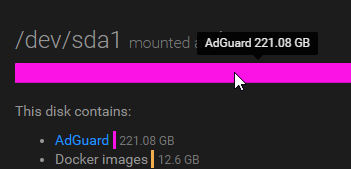
            036faf05-9a38-4cbe-8ddc-ba441fa524f5-image.png
            impressive. no wonder backup failed.

            -rw-r--r-- 1 root root 237376357024 Jan  1 22:23 querylog.json
            

            human readable:

            -rw-r--r-- 1 root root 222G Jan  1 22:23 querylog.json
            

            Conscious tech

            imc67I girishG 2 Replies Last reply
            0
            • robiR robi

              036faf05-9a38-4cbe-8ddc-ba441fa524f5-image.png
              impressive. no wonder backup failed.

              -rw-r--r-- 1 root root 237376357024 Jan  1 22:23 querylog.json
              

              human readable:

              -rw-r--r-- 1 root root 222G Jan  1 22:23 querylog.json
              
              imc67I Offline
              imc67I Offline
              imc67
              translator
              wrote on last edited by imc67
              #6

              @robi it's a serious issue you have (think of IP reputation!) but it was also mentioned before:

              https://forum.cloudron.io/topic/3840/adguard-on-upcoming-cloudron-v6-ddos-reflection-amplification

              And it's in the docs:

              https://docs.cloudron.io/apps/adguard-home/#securing-installation

              I think DDNS doesn't work because you have to add an IP in AdGuard, I have the same issue with my home connection, that's why I don't use AdGuard in my personal Cloudron. I run Pi-Hole in my home network on a Raspberry Pi.

              1 Reply Last reply
              1
              • robiR robi

                036faf05-9a38-4cbe-8ddc-ba441fa524f5-image.png
                impressive. no wonder backup failed.

                -rw-r--r-- 1 root root 237376357024 Jan  1 22:23 querylog.json
                

                human readable:

                -rw-r--r-- 1 root root 222G Jan  1 22:23 querylog.json
                
                girishG Offline
                girishG Offline
                girish
                Staff
                wrote on last edited by
                #7

                @robi Can you check what is taking so much space? Is this log files?

                doodlemania2D 1 Reply Last reply
                0
                • girishG girish

                  @robi Can you check what is taking so much space? Is this log files?

                  doodlemania2D Offline
                  doodlemania2D Offline
                  doodlemania2
                  App Dev
                  wrote on last edited by
                  #8

                  @girish yeah, the querylog was 222gigs eeeeek!

                  girishG robiR 2 Replies Last reply
                  0
                  • robiR robi

                    @doodlemania2 it's on a biz VPS and the abuse is severe enough to have used up 200+GB of disk space, which I need to track down now.

                    Backups have been failing, and who knows what else.

                    ? Offline
                    ? Offline
                    A Former User
                    wrote on last edited by
                    #9

                    @robi Does your VPS provider not let you block port 53? Or do you need it to be accessible externally?

                    ? 1 Reply Last reply
                    0
                    • ? A Former User

                      @robi Does your VPS provider not let you block port 53? Or do you need it to be accessible externally?

                      ? Offline
                      ? Offline
                      A Former User
                      wrote on last edited by
                      #10

                      @atrilahiji I might be wrong about this but I think port 53 needs to be used to resolve DNS, and since @robi mentioned that he installed it on a business VPS it has to be publicly accessible for it to function. If it were a homelab would this be less of an issue?

                      robiR 1 Reply Last reply
                      0
                      • ? A Former User

                        @atrilahiji I might be wrong about this but I think port 53 needs to be used to resolve DNS, and since @robi mentioned that he installed it on a business VPS it has to be publicly accessible for it to function. If it were a homelab would this be less of an issue?

                        robiR Offline
                        robiR Offline
                        robi
                        wrote on last edited by
                        #11

                        @thpuffin @atrilahiji it would not be an issue because of NAT at home.

                        Conscious tech

                        1 Reply Last reply
                        0
                        • doodlemania2D doodlemania2

                          @girish yeah, the querylog was 222gigs eeeeek!

                          girishG Offline
                          girishG Offline
                          girish
                          Staff
                          wrote on last edited by
                          #12

                          @doodlemania2 I decreased the query log retention from 90 days to 7 days as the default. But depending on the use case, it can be disabled altogether in the settings file.

                          1 Reply Last reply
                          0
                          • doodlemania2D doodlemania2

                            @girish yeah, the querylog was 222gigs eeeeek!

                            robiR Offline
                            robiR Offline
                            robi
                            wrote on last edited by
                            #13

                            @doodlemania2
                            Thanks to rclone I uploaded all 222GB to my Google Drive in less then a couple hours. (didn't time it, but expected it to be much longer.)

                            VPS is on a 200mbit line last time I checked, so could be under an hour.
                            If only we had network graph stats.

                            Conscious tech

                            1 Reply Last reply
                            0

                            Hello! It looks like you're interested in this conversation, but you don't have an account yet.

                            Getting fed up of having to scroll through the same posts each visit? When you register for an account, you'll always come back to exactly where you were before, and choose to be notified of new replies (either via email, or push notification). You'll also be able to save bookmarks and upvote posts to show your appreciation to other community members.

                            With your input, this post could be even better 💗

                            Register Login
                            Reply
                            • Reply as topic
                            Log in to reply
                            • Oldest to Newest
                            • Newest to Oldest
                            • Most Votes


                            • Login

                            • Don't have an account? Register

                            • Login or register to search.
                            • First post
                              Last post
                            0
                            • Categories
                            • Recent
                            • Tags
                            • Popular
                            • Bookmarks
                            • Search