
Installing Cloudron behind a reverse proxy
-
Hey folks, is it possible to run cloudron behind a reverse proxt at all? Right now I use Caddy to redirect several subdomain.mydomain services to local containers, can I have it passthrough to Cloudron somehow? Has anyone else done this? I just ran the installer and get this error:
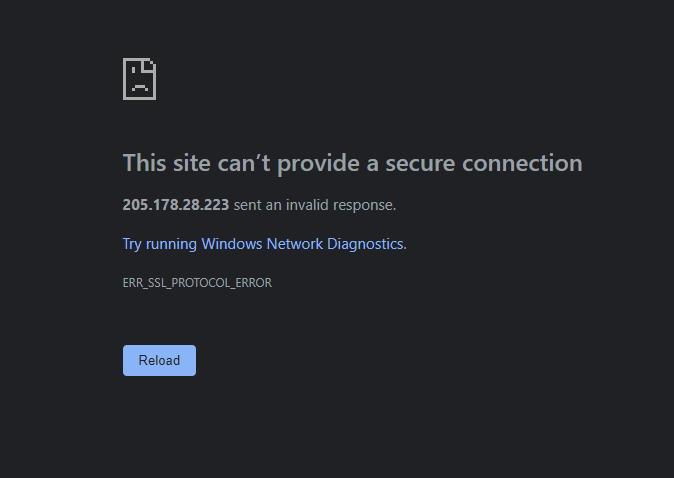
with the following in my caddyfile:
http://ian.gay https://ian.gay {
reverse_proxy https://191.168.1.203
} -
Hey folks, is it possible to run cloudron behind a reverse proxt at all? Right now I use Caddy to redirect several subdomain.mydomain services to local containers, can I have it passthrough to Cloudron somehow? Has anyone else done this? I just ran the installer and get this error:
with the following in my caddyfile:
http://ian.gay https://ian.gay {
reverse_proxy https://191.168.1.203
}@ianhyzy are you running caddy on that same server instance? Cloudron already has a built-in reverse proxy (nginx) which also is the TLS/SSL termination endpoint, maybe you can explain your use-case for caddy here?
Generally if this is a SSL transparent proxy (not sure about caddy) it should be possible if everything is correctly pipe through, but I haven't tried that myself, especially not with caddy.
-
@ianhyzy are you running caddy on that same server instance? Cloudron already has a built-in reverse proxy (nginx) which also is the TLS/SSL termination endpoint, maybe you can explain your use-case for caddy here?
Generally if this is a SSL transparent proxy (not sure about caddy) it should be possible if everything is correctly pipe through, but I haven't tried that myself, especially not with caddy.
@nebulon No, I had Caddy on another machine before installing Cloudron locally. I'm willing to transfer it over to Cloudron's NGINX for sure, will it persist across updates? According to what I can see from the forums caddy is transparent by default (it passes all headers) but it also tries to auto-provision SSL certs for everything so that may require a lot of work and it'll just be easier to use the Cloudron box.
-
@nebulon No, I had Caddy on another machine before installing Cloudron locally. I'm willing to transfer it over to Cloudron's NGINX for sure, will it persist across updates? According to what I can see from the forums caddy is transparent by default (it passes all headers) but it also tries to auto-provision SSL certs for everything so that may require a lot of work and it'll just be easier to use the Cloudron box.
-
@ianhyzy I think I still don't really understand the use-case and what you try to achieve here. Can you explain that a bit, so we can better find a solution?
@nebulon Basically I'm trying to run cloudron at home and I have a Synology NAS running docker containers with a lot of stuff. Previously, I was running Cloudron in a VPS so I setup a raspberry pi at home to run caddy and act as a reverse proxy for the Synology services (Sonarr, Radarr, etc). Now I'm trying to figure out how to get them to coexist where Cloudron can operate normally but I can keep the docker containers on the NAS and proxied to a subdomain. For example, sonarr.ian.gay is proxied to a Sonarr container on the NAS, but I want to make sure blog.ian.gay still proxies to the Wordpress installation on Cloudron.
-
Hey folks, is it possible to run cloudron behind a reverse proxt at all? Right now I use Caddy to redirect several subdomain.mydomain services to local containers, can I have it passthrough to Cloudron somehow? Has anyone else done this? I just ran the installer and get this error:
with the following in my caddyfile:
http://ian.gay https://ian.gay {
reverse_proxy https://191.168.1.203
}@ianhyzy In theory, it should work with https proxying. See also this thread - https://forum.cloudron.io/topic/4463/cloudron-and-apps-behind-a-proxy/ . Do you see any errors in the caddy logs?
You can test quickly if it is some networking issue or configuration error. From the server where caddy is installed:
curl -k -H 'Host: ian.gay' https://191.168.1.203If the above works, it is some configuration issue.
-
@girish Oddly, it did fail:
pi@raspberrypi:/etc/caddy $ curl -k -H 'Host: ian.gay' https://191.168.1.203
curl: (7) Failed to connect to 191.168.1.203 port 443: Connection timed out
Going to did around in that other thread a bit, if it's easier to just use NGINX on cloudron I'll swap the rules over
-
@girish Oddly, it did fail:
pi@raspberrypi:/etc/caddy $ curl -k -H 'Host: ian.gay' https://191.168.1.203
curl: (7) Failed to connect to 191.168.1.203 port 443: Connection timed out
Going to did around in that other thread a bit, if it's easier to just use NGINX on cloudron I'll swap the rules over
-
@girish Nope, I did double check and the IP is 192.168.1.202 but it fails with the same timout. If I remove the Caddy proxy and just forward 80/443 to Cloudron to get it setup, can I just migrate the rules over to /etc/nginx/nginx.conf? I feel like that would be easier over the long run
-
@girish Nope, I did double check and the IP is 192.168.1.202 but it fails with the same timout. If I remove the Caddy proxy and just forward 80/443 to Cloudron to get it setup, can I just migrate the rules over to /etc/nginx/nginx.conf? I feel like that would be easier over the long run
@ianhyzy the nginx config is managed by Cloudron and there is a risk it will get overwritten across updates. This doesn't happen often, so maybe you can just add new configs under /etc/nginx/applications but be sure to keep a copy of those extra configs, so you can put them back in case Cloudron over wrote it. Note that Cloudron will only overwrite a Cloudron update that updates the internal nginx configuration templates (so it doesn't happen all that often but happens every 2-3 releases or so).
-
@ianhyzy the nginx config is managed by Cloudron and there is a risk it will get overwritten across updates. This doesn't happen often, so maybe you can just add new configs under /etc/nginx/applications but be sure to keep a copy of those extra configs, so you can put them back in case Cloudron over wrote it. Note that Cloudron will only overwrite a Cloudron update that updates the internal nginx configuration templates (so it doesn't happen all that often but happens every 2-3 releases or so).
@girish I'm setting this up now, just to start I created a file called proxy.conf:
http {
server {
    listen 80;
    server_name sonarr.ian.gay;

    location /sonarr {
       proxy_pass http://192.168.1.201:8989;
    }
}
}
This seems to work just fine (and I will be backing the configs up like you said). Can I safely use Certbot with these to enable HTTPS (understanding I may need to set it up again if it gets wiped). From what I see online it's just
certbot --nginxand then specifying the domain. -
@girish I'm setting this up now, just to start I created a file called proxy.conf:
http {
server {
    listen 80;
    server_name sonarr.ian.gay;

    location /sonarr {
       proxy_pass http://192.168.1.201:8989;
    }
}
}
This seems to work just fine (and I will be backing the configs up like you said). Can I safely use Certbot with these to enable HTTPS (understanding I may need to set it up again if it gets wiped). From what I see online it's just
certbot --nginxand then specifying the domain. -
it's useful to create separate configs for all apps you have custom settings for.. in this case sonarr.conf among the others.
-
@robi is there a safe/easy way to point Syncthing or a similar tool at these directories or should this be a manual task?




Hello! It looks like you're interested in this conversation, but you don't have an account yet.
Getting fed up of having to scroll through the same posts each visit? When you register for an account, you'll always come back to exactly where you were before, and choose to be notified of new replies (either via email, or push notification). You'll also be able to save bookmarks and upvote posts to show your appreciation to other community members.
With your input, this post could be even better 💗
Register Login