Cloudron makes it easy to run web apps like WordPress, Nextcloud, GitLab on your server. Find out more or install now.


Skip to content
  • Categories
  • Recent
  • Tags
  • Popular
  • Bookmarks
  • Search
Skins
  • Light
  • Brite
  • Cerulean
  • Cosmo
  • Flatly
  • Journal
  • Litera
  • Lumen
  • Lux
  • Materia
  • Minty
  • Morph
  • Pulse
  • Sandstone
  • Simplex
  • Sketchy
  • Spacelab
  • United
  • Yeti
  • Zephyr
  • Dark
  • Cyborg
  • Darkly
  • Quartz
  • Slate
  • Solar
  • Superhero
  • Vapor

  • Default (No Skin)
  • No Skin
Collapse
Brand Logo

Cloudron Forum

Apps - Status | Demo | Docs | Install
  1. Cloudron Forum
  2. YOURLS
  3. YOULS plugins / error 403

YOULS plugins / error 403

Scheduled Pinned Locked Moved YOURLS
6 Posts 2 Posters 2.6k Views 2 Watching
  • Oldest to Newest
  • Newest to Oldest
  • Most Votes
Reply
  • Reply as topic
Log in to reply
This topic has been deleted. Only users with topic management privileges can see it.
  • dmegatoolD Offline
    dmegatoolD Offline
    dmegatool
    wrote on last edited by
    #1

    There seems to be a permission problems with plugins. The doc says to just git clone in the plugins folder but when I activate them in the admin interface, the browser console gives some 403 error for the files and the plugins don't work.

    Any idea ? What's suppose to be the right path and permissions / owner ? www-data ? Cloudron ? ¯_(ツ)_/¯

    girishG 1 Reply Last reply
    1
    • dmegatoolD dmegatool

      There seems to be a permission problems with plugins. The doc says to just git clone in the plugins folder but when I activate them in the admin interface, the browser console gives some 403 error for the files and the plugins don't work.

      Any idea ? What's suppose to be the right path and permissions / owner ? www-data ? Cloudron ? ¯_(ツ)_/¯

      girishG Do not disturb
      girishG Do not disturb
      girish
      Staff
      wrote on last edited by
      #2

      @dmegatool said in YOULS plugins / error 403:

      www-data

      Yes, correct, they should be www-data. I will fix the docs.

      1 Reply Last reply
      0
      • girishG Do not disturb
        girishG Do not disturb
        girish
        Staff
        wrote on last edited by
        #3

        OK, I am able to activate them. Fixed the docs as well - https://docs.cloudron.io/apps/yourls/#plugins
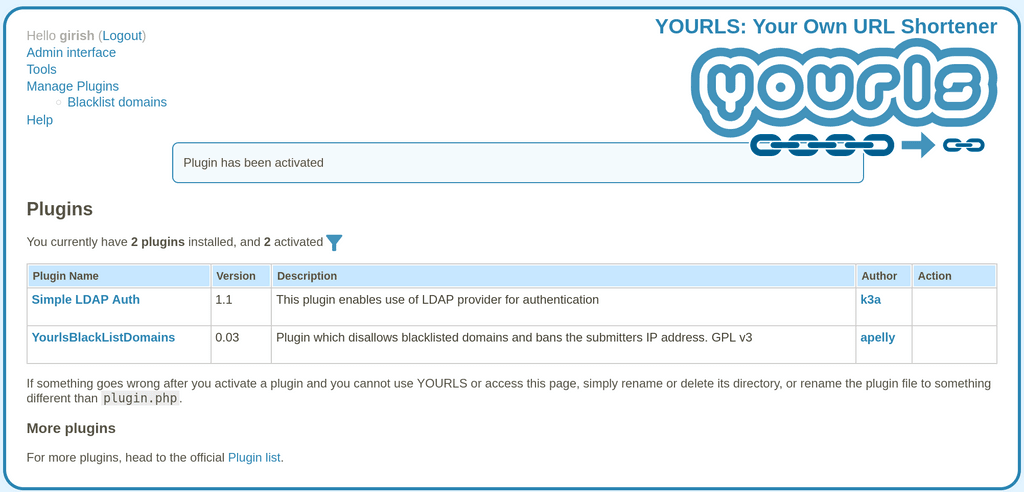
        4eed2588-9e39-475f-899e-aa123ba55e2d-image.png

        dmegatoolD 1 Reply Last reply
        1
        • girishG girish

          OK, I am able to activate them. Fixed the docs as well - https://docs.cloudron.io/apps/yourls/#plugins

          4eed2588-9e39-475f-899e-aa123ba55e2d-image.png

          dmegatoolD Offline
          dmegatoolD Offline
          dmegatool
          wrote on last edited by
          #4

          @girish I can activate them too. But the files ain't accessible (error 403). I'm trying to activate a plugin called Air 66 Design YOURLS Admin Theme.


          9ffe3926-3eb1-4178-8449-ee0d9ab213fd-image.png
          dbf0d2fb-319d-4018-8f66-f0112b7e8c49-image.png

          girishG 1 Reply Last reply
          1
          • dmegatoolD dmegatool

            @girish I can activate them too. But the files ain't accessible (error 403). I'm trying to activate a plugin called Air 66 Design YOURLS Admin Theme.

            9ffe3926-3eb1-4178-8449-ee0d9ab213fd-image.png
            dbf0d2fb-319d-4018-8f66-f0112b7e8c49-image.png

            girishG Do not disturb
            girishG Do not disturb
            girish
            Staff
            wrote on last edited by
            #5

            @dmegatool ah! That plugin is similar to Sleeky plugin. It's not really plugin. Please see this thread - https://forum.cloudron.io/topic/2949/sleeky-plugin/7

            The sleeky plugin is not really a plugin as such. For all practical purposes, it's like a "fork" of yourls because it comes with it's own frontend and backend. This means that one has to create a separate app called "Sleeky" and we cannot modify the current Yourls app to have sleeky theme/plugin installable.

            So, if you really want that plugin, I recommend installing yourls in the LAMP app instead.

            dmegatoolD 1 Reply Last reply
            1
            • girishG girish

              @dmegatool ah! That plugin is similar to Sleeky plugin. It's not really plugin. Please see this thread - https://forum.cloudron.io/topic/2949/sleeky-plugin/7

              The sleeky plugin is not really a plugin as such. For all practical purposes, it's like a "fork" of yourls because it comes with it's own frontend and backend. This means that one has to create a separate app called "Sleeky" and we cannot modify the current Yourls app to have sleeky theme/plugin installable.

              So, if you really want that plugin, I recommend installing yourls in the LAMP app instead.

              dmegatoolD Offline
              dmegatoolD Offline
              dmegatool
              wrote on last edited by
              #6

              @girish Yeah I may go with the LAMP as other plugins I tried had similar problems too (js file getting 403). Thx for the help !

              1 Reply Last reply
              0

              Hello! It looks like you're interested in this conversation, but you don't have an account yet.

              Getting fed up of having to scroll through the same posts each visit? When you register for an account, you'll always come back to exactly where you were before, and choose to be notified of new replies (either via email, or push notification). You'll also be able to save bookmarks and upvote posts to show your appreciation to other community members.

              With your input, this post could be even better 💗

              Register Login
              Reply
              • Reply as topic
              Log in to reply
              • Oldest to Newest
              • Newest to Oldest
              • Most Votes


              • Login

              • Don't have an account? Register

              • Login or register to search.
              • First post
                Last post
              0
              • Categories
              • Recent
              • Tags
              • Popular
              • Bookmarks
              • Search