
Recovery using a new Cloudron with a mounted partition of the old instance volume
-
Cloudron wont boot after update, because disk was full.
So I setuped a new Cloudron instance. SSH into it, and mounted the old Cloudron partition. I can see the backup file into /mounted-old-cloudron/var/backups.
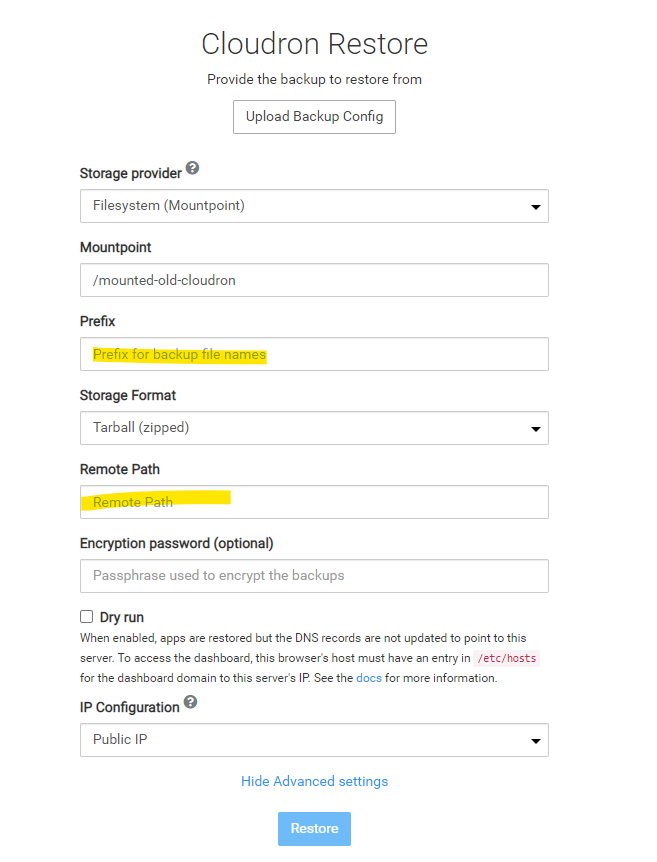
Now, what information do I have to enter into the restore screen on the new cloudron (see attached screenshot, info missing in yellow)?
By the way, should I assign the ip of the old instance to the new one before doing this?
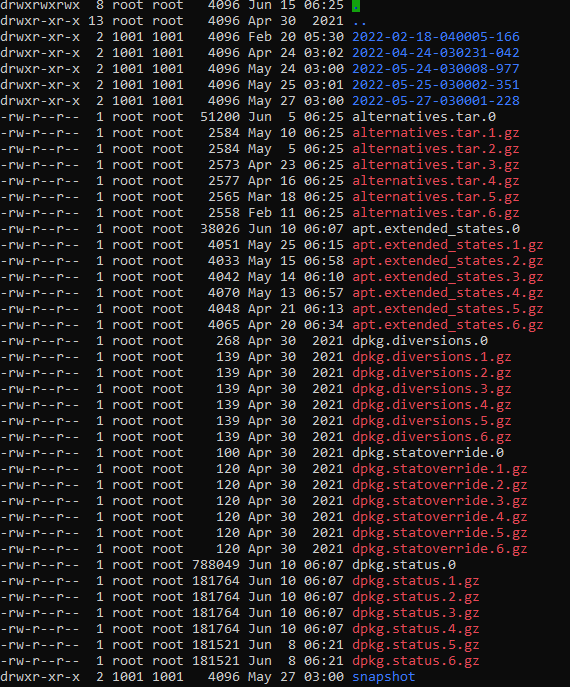
And finally the backup are not that fresh,. as I can see (see other screenshot attached). Is there a way to get more recent recovery by restoring each app individually using the files only? Can I do the recovery first and then update with the files?
-
Cloudron wont boot after update, because disk was full.
So I setuped a new Cloudron instance. SSH into it, and mounted the old Cloudron partition. I can see the backup file into /mounted-old-cloudron/var/backups.
Now, what information do I have to enter into the restore screen on the new cloudron (see attached screenshot, info missing in yellow)?
By the way, should I assign the ip of the old instance to the new one before doing this?
And finally the backup are not that fresh,. as I can see (see other screenshot attached). Is there a way to get more recent recovery by restoring each app individually using the files only? Can I do the recovery first and then update with the files?
@therealwebmaster If you mount it manually, use the
Filesystemprovider. Then, the backup path is simply/mounted-old-cloudron/var/backups/<timestamp>/box_<timestamp>_v<box_version>.See https://docs.cloudron.io/guides/download-backups/#backup-file-names for some hints.
-
 G girish marked this topic as a question on
-
G girish has marked this topic as solved on
Hello! It looks like you're interested in this conversation, but you don't have an account yet.
Getting fed up of having to scroll through the same posts each visit? When you register for an account, you'll always come back to exactly where you were before, and choose to be notified of new replies (either via email, or push notification). You'll also be able to save bookmarks and upvote posts to show your appreciation to other community members.
With your input, this post could be even better 💗
Register Login