Cloudron makes it easy to run web apps like WordPress, Nextcloud, GitLab on your server. Find out more or install now.


Skip to content
  • Categories
  • Recent
  • Tags
  • Popular
  • Bookmarks
  • Search
Skins
  • Light
  • Brite
  • Cerulean
  • Cosmo
  • Flatly
  • Journal
  • Litera
  • Lumen
  • Lux
  • Materia
  • Minty
  • Morph
  • Pulse
  • Sandstone
  • Simplex
  • Sketchy
  • Spacelab
  • United
  • Yeti
  • Zephyr
  • Dark
  • Cyborg
  • Darkly
  • Quartz
  • Slate
  • Solar
  • Superhero
  • Vapor

  • Default (No Skin)
  • No Skin
Collapse
Brand Logo

Cloudron Forum

Offical apps | Community apps | Demo | Docs | Install
A

allanbowe

@allanbowe
Unfollow Follow
About
Posts
33
Topics
8
Shares
0
Groups
0
Followers
0
Following
0

Posts

Recent Best Controversial

  • Do app passwords work on searxng for anyone else?
    A allanbowe
    SearXNG

    the use case was to give an AI agent the ability to use browser search without having to create a dedicated cloudron account

    But since then we've moved to firecracker for agents which allows unsandboxed browser usage so it's no longer a priority honestly. thanks for getting back to us


  • Do app passwords work on searxng for anyone else?
    A allanbowe
    SearXNG

    We have set up the app such that any cloudron user can log into it (cloudron auth).

    When clicking on the user profile, and adding an app password for the searxng (in the dropdown, without expiry), the generated password is apparently invalid.

    Regular user credentials work fine.

    We have tried both logging into the app normally (using the browser), and using basic auth in a http header.


  • Do app passwords work on searxng for anyone else?
    A allanbowe
    SearXNG

    For us, no..


  • Table 'box.backupSites' doesn't exist
    A allanbowe
    Support

    --troubleshoot gave everything as "ok"

    however:

    root@my ~ # cloudron-support --check-db-migration
    /usr/bin/cloudron-support: unrecognized option '--check-db-migration'
    

    Running the start.sh fixed the backups page issue, and now the updates appear to be running (and the error is gone)

    thankyou!


  • Table 'box.backupSites' doesn't exist
    A allanbowe
    Support

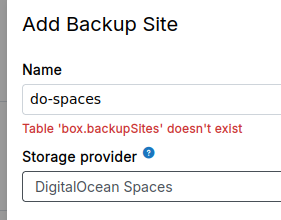
    Our cloudron updated to v9 automatically, and ever since we've been getting "Table 'box.backupSites' doesn't exist" in our logs

    The /backup-sites endpoint just spins (previous backup config not displayed) and when I try to add a new backup location we again get the error "Table 'box.backupSites' doesn't exist"

    How to fix?

    7e2cc9a7-7b54-4e04-8704-9e0d08b21c2d-image.png


  • "Unlock instructions" email due to brute force attack on gitlab users
    A allanbowe
    GitLab

    Is there a way to restrict access to a cloudron app to users on the cloudron VPN?

    I did not realise this was a feature - it would be amazing, very (very) useful indeed


  • "Unlock instructions" email due to brute force attack on gitlab users
    A allanbowe
    GitLab

    One thought is that now the usernames are "known", the attacker can continue the login attempts (even though they are futile).

    So our new approach is to delete the old accounts and create new ones.


  • "Unlock instructions" email due to brute force attack on gitlab users
    A allanbowe
    GitLab

    So it turns out this does NOT stop the "Unlock Instructions" email being sent. They even continue after forcing 2FA for all users.
    What is more, we even get the emails for internal staff, who don't even have a password - because they authenticate using OIDC in cloudron.

    Any suggestions?


  • "Unlock instructions" email due to brute force attack on gitlab users
    A allanbowe
    GitLab

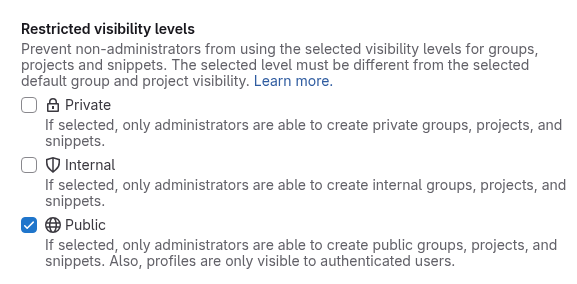
    Just discovered a setting at the following path: /admin/application_settings/general#js-visibility-settings

    Section: Restricted visibility levels
    Setting: Public - If selected, only administrators are able to create public groups, projects, and snippets. Also, profiles are only visible to authenticated users.

    0b3371ff-5bf9-4b28-bf75-8b8a8fceb58a-image.png

    After checking this, and testing with CURL, the /api/v4/users/XXX endpoints now consistently return a 404 whether authenticated or not!!

    I suspect this is the fix, but will wait and see if there are any more "Unlock Instructions" emails tonight / tomorrow.

    Weirdly, after checking this checkbox and hitting save, it gets unchecked immediately after - but refreshing the page shows that it was indeed checked.

    Another side note - we saw in our email logs that we were getting a large number of requests from a subdomain of https://academyforinternetresearch.org/

    So it seems that this could be an issue on their radar.


  • "Unlock instructions" email due to brute force attack on gitlab users
    A allanbowe
    GitLab

    So it appears that unauthenticated users (or attackers) are able to brute force usernames due to the fact that the corresponding API endpoints are not authenticated: https://gitlab.com/gitlab-org/gitlab/-/issues/297473

    Furthermore, the gitlab team do not plan to fix the issue:

    • https://gitlab.com/gitlab-org/gitlab/-/issues/16179
    • https://gitlab.com/gitlab-org/gitlab/-/issues/336601

    To mitigate the risk from such attacks in the future we took the following measures:

    Actions taken on the server:

    • Installed Fail2ban

    Actions taken on the platform (cloudron):

    • Removed several platform apps that were not being used
    • Restricted visibility of (and access to) the gitlab instance to just those who need it
    • Removed several users

    Actions taken on the gitlab instance (cloudron container):

    • Enabled 2FA (we had it natively on cloudron / OIDC but not for guest users)
    • Removed Oauth apps that are no longer used
    • Enabled "Deactivate dormant users after a period of inactivity" (90 days)
    • Enabled "Enable unauthenticated API request rate limit" (1 per second)
    • Enabled "Enable unauthenticated web request rate limit" (1 per second)
    • Enabled "Enable authenticated API request rate limit" (2 per second)
    • Enabled "Enable authenticated API request rate limit" (2 per second)
    • Deleted 3 inactive runners and removed one active but no longer needed runner
    • Removed dormant users

    Suggestions (to the packaging team) for improvement:

    • A hardened Gitlab configuration "out of the box" in cloudron
    • Updates to the documentation (eg that the logs location is under /home/git/gitlab/log). Maybe even putting that location in the file explorer, to make log capture / analysis easier.
    • Options within the cloudron platform itself to more aggressively reject IP addresses. It was noted that some attacker IPs were re-used after some time.

  • "Unlock instructions" email due to brute force attack on gitlab users
    A allanbowe
    GitLab

    I found the logs - they were inside the container at /home/git/gitlab/log

    Running grep -i "failed" revealed that the attack started in the early morning of 20th June. Somehow the list of usernames was known (probably relates to the issue in the link in my previous post) and signin requests are being made from random ip addresses.

    First 5 entries shown below (this pattern has continued since):

    ./application_json.log:{"severity":"INFO","time":"2025-07-20T03:17:13.349Z","correlation_id":"xxx","meta.caller_id":"SessionsController#create","meta.feature_category":"system_access","meta.organization_id":1,"meta.remote_ip":"156.146.59.50","meta.client_id":"ip/156.146.59.50","message":"Failed Login: username=xxx1 ip=156.146.59.50"}
    ./application_json.log:{"severity":"INFO","time":"2025-07-20T03:18:20.163Z","correlation_id":"xxx","meta.caller_id":"SessionsController#create","meta.feature_category":"system_access","meta.organization_id":1,"meta.remote_ip":"193.176.84.35","meta.client_id":"ip/193.176.84.35","message":"Failed Login: username=xxx2 ip=193.176.84.35"}
    ./application_json.log:{"severity":"INFO","time":"2025-07-20T03:18:39.636Z","correlation_id":"xxx","meta.caller_id":"SessionsController#create","meta.feature_category":"system_access","meta.organization_id":1,"meta.remote_ip":"20.205.138.223","meta.client_id":"ip/20.205.138.223","message":"Failed Login: username=xxxx3 ip=20.205.138.223"}
    ./application_json.log:{"severity":"INFO","time":"2025-07-20T03:19:04.255Z","correlation_id":"xxx","meta.caller_id":"SessionsController#create","meta.feature_category":"system_access","meta.organization_id":1,"meta.remote_ip":"98.152.200.61","meta.client_id":"ip/98.152.200.61","message":"Failed Login: username=xxx4 ip=98.152.200.61"}
    ./application_json.log:{"severity":"INFO","time":"2025-07-20T03:21:03.314Z","correlation_id":"xxx","meta.caller_id":"SessionsController#create","meta.feature_category":"system_access","meta.organization_id":1,"meta.remote_ip":"200.34.32.138","meta.client_id":"ip/200.34.32.138","message":"Failed Login: username=xxx5 ip=200.34.32.138"}

    

  • "Unlock instructions" email due to brute force attack on gitlab users
    A allanbowe
    GitLab

    I found this thread which implies that it is a known issue in gitlab: https://gitlab.com/gitlab-org/gitlab/-/issues/297473


  • "Unlock instructions" email due to brute force attack on gitlab users
    A allanbowe
    GitLab

    It was from my user but I also did this with one of the locked users and it was the same result (only shows successful logins). This was after the restart.


  • "Unlock instructions" email due to brute force attack on gitlab users
    A allanbowe
    GitLab

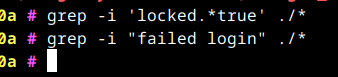
    I found the cloudron app logs of the gitlab app under /home/yellowtent/platformdata/logs/$APPID and tried the following:

    image.png

    Neither gave any result.

    I wasn't able to find the gitlab internal logs..


  • "Unlock instructions" email due to brute force attack on gitlab users
    A allanbowe
    GitLab

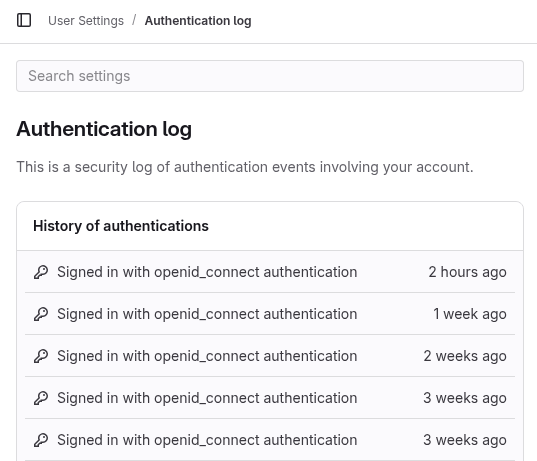
    Gotcha. According to the link you provided:

    Audit events of failed logins are currently recorded only on GitLab Starter and visible 
    under GitLab Premium (via Admin Area > Audit Log)🤕. Having those events surfaced 
    under Authentication log would means either one of these two things:
    
    1. Move failed login audit events completely to GitLab Core
    2. Add an extra EE version of Authentication log for licensed customer (i.e. for GitLab Premium)
    

    Here is what I do see in that location:

    image.png

    So for some reason the failed events are not shown.

    What is also interesting. When the event happened, the affected user(s) DID have a value in the "Locked account email verification code last sent at:" field under "/admin/users/XXXX". But after restarting the box, that entry is empty again. Not sure if that happened automatically after 10 minutes though.


  • "Unlock instructions" email due to brute force attack on gitlab users
    A allanbowe
    GitLab

    I was thinking about cloudron, yes

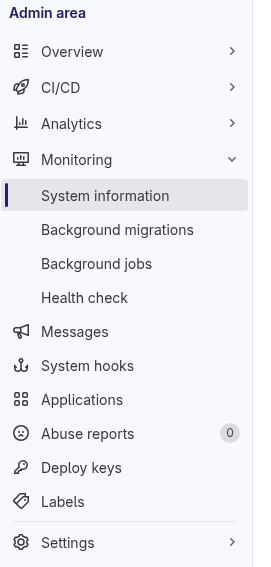
    The admin UI doesn't appear to have a "System Logs" option

    image.png

    The user accounts affected are indeed locked


  • "Unlock instructions" email due to brute force attack on gitlab users
    A allanbowe
    GitLab

    Not on the day that it happened, happy to dm a (sanitised) copy


  • "Unlock instructions" email due to brute force attack on gitlab users
    A allanbowe
    GitLab

    Running v1.104.4 since 5 days ago. Suddenly a large number of ourGitlab users have received the message below (both cloudron and external login accounts). There are no failed signin attempts in the log, that I can see. Did anyone else have this issue?

    From: GitLab git.app@xxxx
    Sent: xxxx
    To: xxxxx
    Subject: Unlock instructions

    GitLab
    Hello, xxxx!

    Your GitLab account has been locked due to an excessive number of unsuccessful sign in attempts. You can wait for your account to automatically unlock in 10 minutes or you can click the link below to unlock now.
    Unlock account

    If you did not initiate these sign-in attempts, please reach out to your administrator or enable two-factor authentication (2FA) on your account.


  • Prevent external users joining gitea instance
    A allanbowe
    Gitea

    Thankyou! This fixed it up.


  • Prevent external users joining gitea instance
    A allanbowe
    Gitea

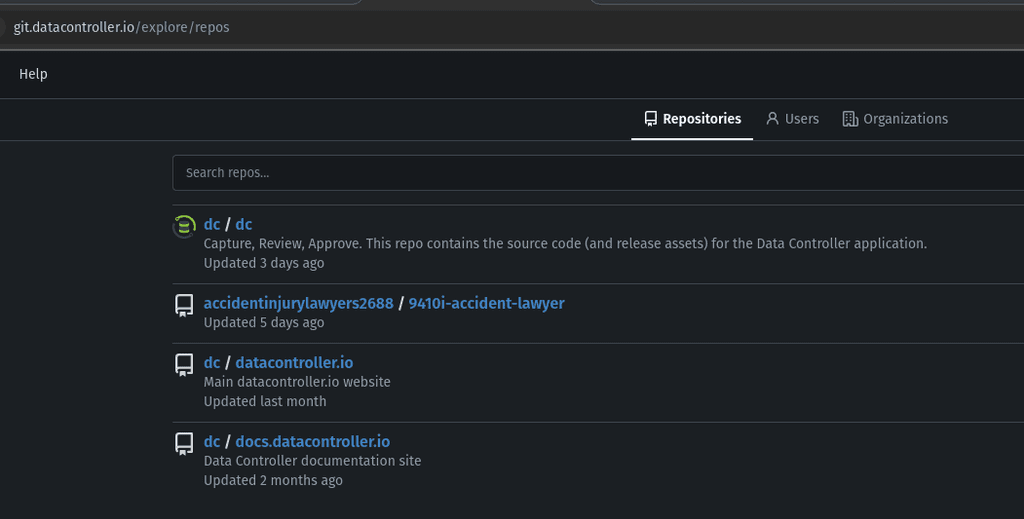
    We have started getting random repositories / users appear in our gitea instance, eg "AccidentInjuryLawyers". Before that, we had a sofa company. It looks like spam, I have to keep deleting them. How to prevent such signups?

    a4474dce-25e7-446b-9064-d7feabd44708-image.png

    https://git.datacontroller.io/explore/repos

  • Login

  • Don't have an account? Register

  • Login or register to search.
  • First post
    Last post
0
  • Categories
  • Recent
  • Tags
  • Popular
  • Bookmarks
  • Search