
Cloudron makes it easy to run web apps like WordPress, Nextcloud, GitLab on your server. Find out more or install now.


Skip to content
  • Categories
  • Recent
  • Tags
  • Popular
  • Bookmarks
  • Search
Skins
  • Light
  • Brite
  • Cerulean
  • Cosmo
  • Flatly
  • Journal
  • Litera
  • Lumen
  • Lux
  • Materia
  • Minty
  • Morph
  • Pulse
  • Sandstone
  • Simplex
  • Sketchy
  • Spacelab
  • United
  • Yeti
  • Zephyr
  • Dark
  • Cyborg
  • Darkly
  • Quartz
  • Slate
  • Solar
  • Superhero
  • Vapor

  • Default (No Skin)
  • No Skin
Collapse
Brand Logo

Cloudron Forum

Offical apps | Community apps | Demo | Docs | Install
M

Mani

@Mani
Unfollow Follow
About
Posts
2
Topics
1
Shares
0
Groups
0
Followers
0
Following
0

Posts

Recent Best Controversial

  • "User session inhibited" and issue with ip adress
    M Mani
    Support

    Thank you for your help, I'll try this!


  • "User session inhibited" and issue with ip adress
    M Mani
    Support

    Hello, begginer here. I want to install cloudron on a local computer, with ubuntu 26.04.1 LTS. When I install cloudron, it asks to reboot the server to apply the settings. When I say yes, it stops ands says:

    Operation inhibited by "mani" (PID 8333 "gnome-session-s", user mani), reason is "user session inhibited
    User mani is logged in on tty2


    I looged out manually, restarted the computer, and even rebooted via the command ligne "systemctl reboot -i" but i cannot access the online panel with the ip adress Cloudron gave me.

    Does anyone knows how to properly bypass or effectively reboot the server (directly via my terminal or an external computer ?)

    Thank you for your help,
    Mani
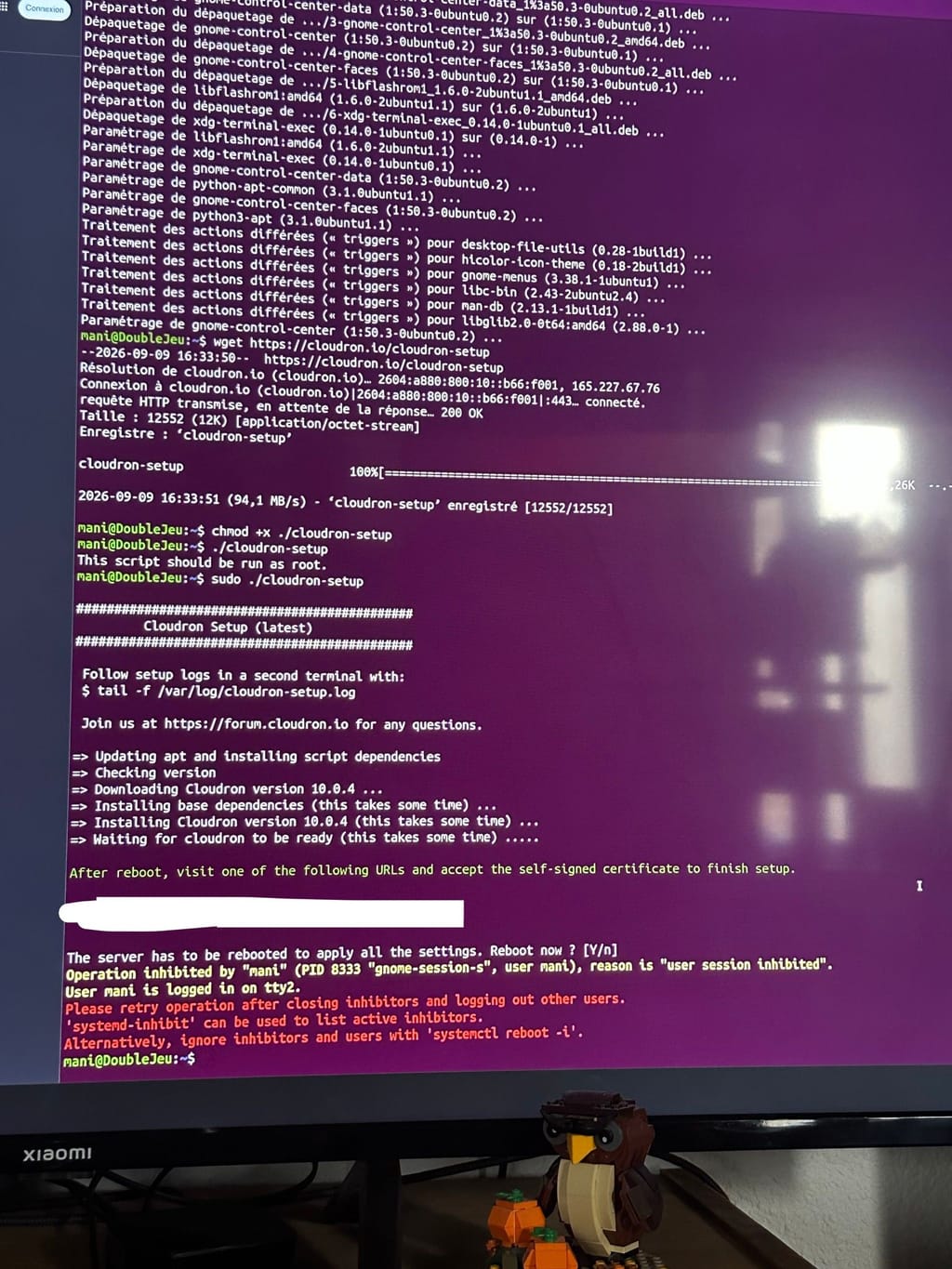
    signal-2026-09-09-171107.jpeg

  • Login

  • Don't have an account? Register

  • Login or register to search.
  • First post
    Last post
0
  • Categories
  • Recent
  • Tags
  • Popular
  • Bookmarks
  • Search