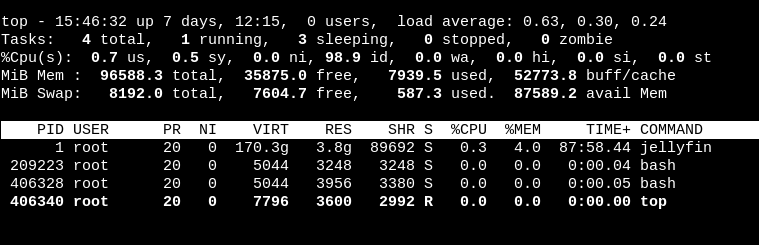
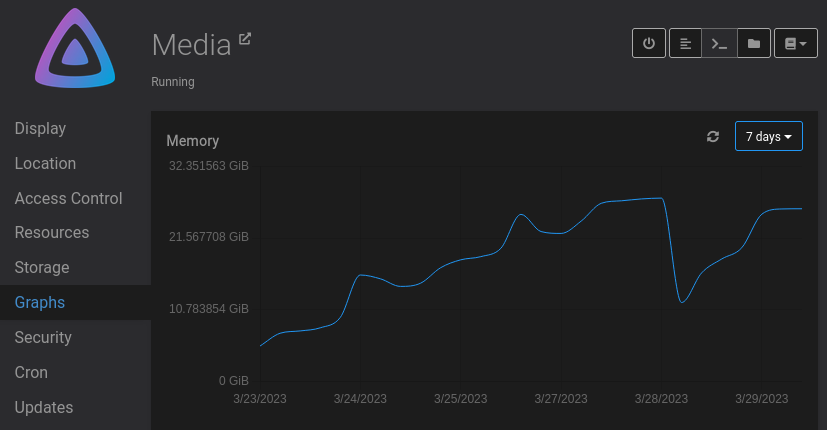
@girish I'll send in a ticket through the cloudron dashboard.
N
natzilla
@natzilla
Posts
-
Login does not work anymore - White page -
Login does not work anymore - White page -
Login does not work anymore - White page -
Login does not work anymore - White pageI get the white page while it attempts something, and then I get hit with the page
status "Internal Server Error"
message "Issuer.discover() failed.\n RequestError: connect ECONNREFUSED x.x.x.x:443\n RequestError: connect ECONNREFUSED x.x.x.x:443" -
Blocking Email Spam -
Blocking Email Spam@ccfu Ok, I've just trying to be proactive but if it's not such a bad thing currently then that is fine with me. I run one for a relative and I don't want them to freak out about spam emails if it happens to come in. haha
Ideally I would just block everything out of country since nothing will be applicable for the email I am in charge of. Don't know if that is possible or not.
-
Blocking Email SpamHi
I've been seeing these coming in for a while now, and I have put in rules to block these from coming in, but I think my wildcards are not working. Is there a better way to do this?
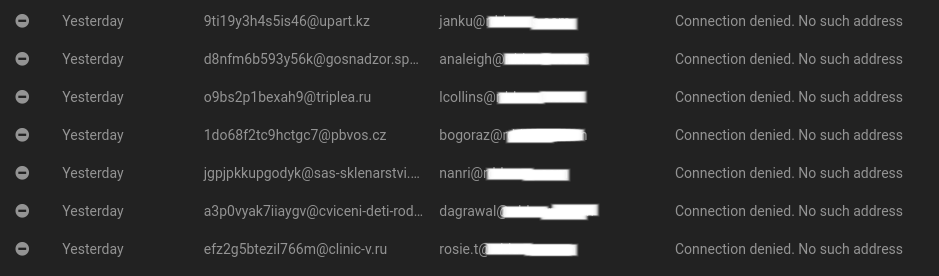 file:///home/pfs/Pictures/Screenshot%20from%202023-05-30%2011-19-17.png
-
Any way to check in the app what is using all this ram? -
Any way to check in the app what is using all this ram? -
Any way to check in the app what is using all this ram? -
Any way to check in the app what is using all this ram? -
Any way to check in the app what is using all this ram?@girish as requested
{"BlockIO":"171GB / 83.4GB","CPUPerc":"0.14%","Container":"2058a37598b0","ID":"2058a37598b013a36a5a3d05a362e96dc4ad212dec1d5db162e372979bc47c38","MemPerc":"84.77%","MemUsage":"24.68GiB / 29.12GiB","Name":"7d771f27-4c9e-48ff-b0ff-3c742305adb3","NetIO":"1.27GB / 410GB","PIDs":"57"}
-
Any way to check in the app what is using all this ram? -
Any way to check in the app what is using all this ram? -
Any way to check in the app what is using all this ram?@jdaviescoates Jellyfin has cron jobs to remove transcoded cache or recently activity that is no longer used. I don't believe it has to do with the media, but I feel it will be hard to locate the problem.
-
Any way to check in the app what is using all this ram? -
Any way to check in the app what is using all this ram? -
Any way to check in the app what is using all this ram?A week or so will go by and my ram usage will increase to this large amount, and it doesn't seem to help the app as it starts to hang, or not be very responsive.
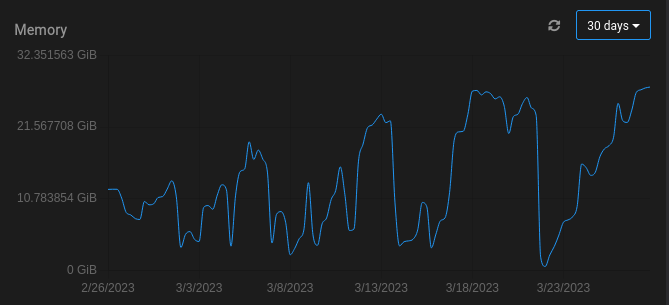
Restarts of the app corrects the usage.
-
CUDA not permitted -
CUDA not permitted