Cloudron makes it easy to run web apps like WordPress, Nextcloud, GitLab on your server. Find out more or install now.


Skip to content

Paperless-ngx

65 Topics 550 Posts
  • Paperless-ngx - Package Updates

    Pinned Locked
    163
    0 Votes
    163 Posts
    98k Views
    Package UpdatesP
    [1.52.0] Update gotenberg to 8.32.0 Full Changelog Reverted SSRF defaults (breaking vs 8.31.0). 8.31.0 blocked private-IP destinations by default, which broke deployments running Gotenberg inside a private network. 8.32.0 restores the 8.30.x permissive defaults. Operators with internet-facing APIs opt into the strict posture via the new flags below. Rejected file:// at /forms/chromium/convert/url. Submitting url=file:///tmp/... used to let an unauthenticated caller enumerate the request working directory and read other in-flight uploads as rendered PDFs. The route now returns HTTP 400 for any file:// URL. Required uploaded file for image / pdf stamp and watermark sources. Twelve callsites accepted stampSource=pdf or watermarkSource=pdf with an expression pointing at any path the Gotenberg process could open, even when no file was uploaded. Handlers now return HTTP 400 unless the caller uploaded a matching file. Scoped file:// sub-resources to the request working directory. Crafted HTML could reference another request's file:///tmp/<reqdir>/.... The CDP request handler now restricts file:// sub-resources to the current request's directory. /convert/url and /screenshot/url reject every file:// sub-resource outright. Hardened Chromium against DNS rebinding. A short-TTL DNS authority could return a public IP at validation and a private IP at connect. A loopback HTTP / CONNECT proxy now sits between Chromium and the network, resolves DNS once, and pins the dial to the resolved IP. Skipped when --chromium-proxy-server or --chromium-host-resolver-rules is set. Filtered LibreOffice outbound fetches through a proxy. Uploaded OOXML, RTF, and ODF files can embed external URLs that LibreOffice's libcurl resolves below every Go-side SSRF filter. LibreOffice now routes every outbound fetch through an in-process forward proxy on the same gotenberg.DecideOutbound path Chromium and webhook delivery use. See the four new flags below. Recovered webhook async panics. High-concurrency webhooks could panic the async goroutine and crash the whole process. The goroutine now snapshots the request context and recovers any future panic through the existing error path. LibreOffice outbound URL filtering. Four flags mirror the Chromium and webhook layout: --libreoffice-allow-list, --libreoffice-deny-list, --libreoffice-deny-private-ips, --libreoffice-deny-public-ips. All default permissive. IP-class filtering on four modules. chromium, webhook, api-download-from, and libreoffice each accept matching deny-private-ips and deny-public-ips flags. All default to false. Charts print as blank rectangles (#1531, #1532, #1534, #1535 chromedp v0.15.0 suspended the BeginFrame-driven callback dispatch loop under emulatedMediaType=print. requestAnimationFrame, ResizeObserver, IntersectionObserver, CSS transitionend, and CSS animationend all stopped firing. Pinning chromedp back to v0.14.2 restores native dispatch.
  • gotenberg process failing to start in paperless container

    Moved Solved
    4
    0 Votes
    4 Posts
    820 Views
    nebulonN
    This should be fixed now with latest package.
  • Access consume folder from scanner/network

    8
    0 Votes
    8 Posts
    2k Views
    nebulonN
    So using a volume with a folder for consumption is supported. Basically add the volume (in my case extradisk) to the app. This would mount it to /media/extradisk then I created a folder called consume/ in that disk and you have to give it read/write permissions for all users (so chmod it). After this adjust the corresponding env var in the paperless.conf in /app/data. In my case PAPERLESS_CONSUMPTION_DIR=/media/extradisk/consume then restart the app. Also note the volume in Cloudron has to be read/write mounted! If paperless cannot write to it (for document deletion) it would simply not even attempt to consume documents.
  • installed paperless-ngx with Cloudron user management but it is not working

    Solved
    3
    1 Votes
    3 Posts
    1k Views
    jamesJ
    Closed due to inactivity
  • Export / Import

    2
    1 Votes
    2 Posts
    609 Views
    J
    Maybe obvious but I don't have experience with the app. What do you mean by "configuration like paths" ? What does document links have to do with these paths?
  • Import of documents with ASN failed

    4
    1 Votes
    4 Posts
    1k Views
    hpz24H
    No, there is no special plugin. I justed added (or uncomment) the specific options in the paperless.conf. I checked my installation: The app had already 4GB, I changed to 6 and tried it again. Works. So maybe the solution was really "Add more RAM if problem exists" Thx
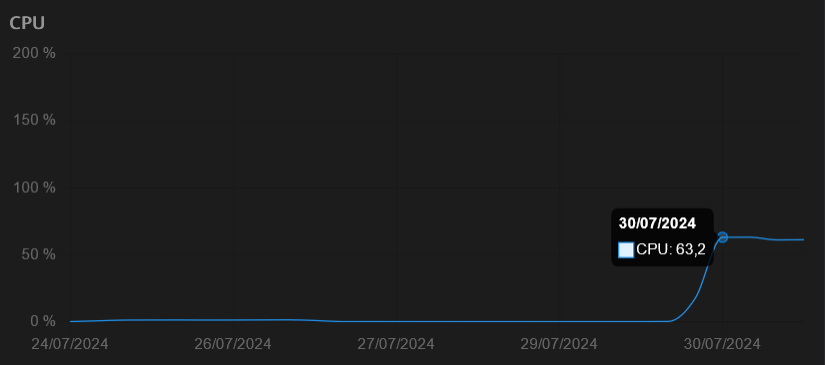
  • High cpu utilization since update 1.25.1

    Solved
    42
    1
    1 Votes
    42 Posts
    15k Views
    perelinP
    Yup, its up again. Took 1 day. Maybe cron/automating the deletion of the .db.db file is something that I will try.
  • Gotenberg Permission Issue and large log volume

    Solved
    14
    1 Votes
    14 Posts
    4k Views
    robiR
    @nebulon perhaps pasting the code into one of the AIs can help spot the problem
  • Quick fix for sudden stops in document classification

    1
    2 Votes
    1 Posts
    730 Views
    No one has replied
  • 400 Bad Request error when trying to access documents vie GUI

    Solved
    6
    0 Votes
    6 Posts
    2k Views
    nebulonN
    Glad it worked out in the end though!
  • Swift Paperless iOS app

    3
    3 Votes
    3 Posts
    2k Views
    imc67I
    Since the availability of the app on Cloudron I found this iOS app and it’s perfect for me! https://apps.apple.com/nl/app/paperparrot/id1663665267
  • Import via Web UI (Ghostscript rasterizing) failed

    7
    0 Votes
    7 Posts
    3k Views
    andreasduerenA
    @nebulon I have not yet. I need to troubleshoot this further but I haven't had the time yet.
  • Add Apache Tika to Paperless-ngx package.

    Solved
    9
    4 Votes
    9 Posts
    5k Views
    scookeS
    @nebulon This is super Nebulon. There are so many apps Cloudron has made available. But adding "small" requests like this to existing apps makes Cloudron all that more appealing. You've just saved me the cost of a separate VPS on which I had been running Tika and Gotenburg! Has there been a better improvement of any app than this?! Thank you! PAPERLESS_TIKA_ENABLED=true PAPERLESS_TIKA_ENDPOINT=http://localhost:9998 PAPERLESS_TIKA_GOTENBERG_ENDPOINT=http://localhost:3000

  • 0 Votes
    3 Posts
    1k Views
    S
    Hipp Hipp Hooray for the community, I did restart last night, but that didn't work. Now it works! Thanks Stephan and greetings to the fat B.
  • Gotenberg fails not start

    Solved
    3
    0 Votes
    3 Posts
    2k Views
    nebulonN
    Should be fixed with latest package version
  • Increase recommended default RAM

    1
    1 Votes
    1 Posts
    345 Views
    No one has replied
  • Config User rights Paperless

    Solved
    2
    0 Votes
    2 Posts
    1k Views
    nebulonN
    Yes unfortunately the upstream project decided to keep it this way. We had a discussion at https://github.com/paperless-ngx/paperless-ngx/discussions/7032 but apparently they do not want to change this. So after first login via the UI it will fail like this. Then an admin has to give the missing permissions to that user, then it works
  • Get API key for Paperles-NGX

    2
    1
    1 Votes
    2 Posts
    2k Views
    luckowL
    Have you tried if creating a token via the Django admin interface works? admin -> settings -> Django-Adminpanel [image: 1728130465641-ff8759bf-2b05-4a68-b727-fff78cb04600-image-resized.png]
  • Paperless doesn't fetch mail anymore

    Solved
    5
    0 Votes
    5 Posts
    2k Views
    nebulonN
    Ok, I will close this one then. We really have to get down to that other issue again.
  • DB write errors with recent paperless version

    Locked
    2
    1
    0 Votes
    2 Posts
    714 Views
    nebulonN
    This seems to be the same as https://forum.cloudron.io/topic/12412/celery-stuck-in-restarting-loop/2 and https://forum.cloudron.io/topic/12195/high-cpu-utilization-since-update-1-25-1/18 I will lock this in favor of the others.