Cloudron makes it easy to run web apps like WordPress, Nextcloud, GitLab on your server. Find out more or install now.


Skip to content

WordPress (Developer)

227 Topics 1.8k Posts
  • WordPress (Developer) - Package Updates

    Pinned Locked
    96
    1 Votes
    96 Posts
    64k Views
    Package UpdatesP
    [3.15.4] Update WordPress to 7.0.3 Full Changelog
  • 0 Votes
    4 Posts
    63 Views
    girishG
    The Cloudron 10 update will reconfigure all the redis and the apps that have that field with get redis configured appropriately. In essence, it will get fixed automatically and doesn't require user intervention.
  • Bulk WordPress Updates

    Moved
    6
    1
    2 Votes
    6 Posts
    328 Views
    ChristopherMagC
    @imatbagjagumilar If you still want to try this, the easiest way I can think of to accomplish these steps are as follows: In the cloudron portal navigate to System > Updates Now you should see the current update schedule and an edit hyperlink on the right to make changes to it Click Edit Take note of what your settings are currently as you will likely want to change them back after your app has been fully updated Make a change, like adding an additional hour of the day, but don't click save Press F12 to open the developer tools of your browser (I used a chrome based browser) Navigate to the network tab on in the developer tools Go back to the page and click Save Go back to Developer Tools network tab and you will now see two requests that have a name that starts with autoupdate_config Right click on the first one (it is the one that did a POST request), Navigate in the menu to Copy, and then click Copy as fetch Now in the developer tools click on the console tab and Paste in what you copied You should now have something like the following fetch("https://SomeDomain.com/api/v1/updater/autoupdate_config?access_token=SomeToken", { "headers": { "accept": "*/*", "accept-language": "en-US,en;q=0.9", "cache-control": "no-cache", "content-type": "application/json", "pragma": "no-cache", "priority": "u=1, i", "sec-ch-ua": "\"Not;A=Brand\";v=\"8\", \"Chromium\";v=\"150\", \"Microsoft Edge\";v=\"150\"", "sec-ch-ua-mobile": "?0", "sec-ch-ua-platform": "\"Windows\"", "sec-fetch-dest": "empty", "sec-fetch-mode": "cors", "sec-fetch-site": "same-origin" }, "referrer": "https://SomeDomain.com/", "body": "{\"schedule\":\"00 00 0,1,5,6,7,20,21,2 * * *\",\"policy\":\"platform_and_apps\"}", "method": "POST", "mode": "cors", "credentials": "include" }); Edit the line "body": "{\"schedule\":\"00 00 0,1,5,6,7,20,21,2 * * *\",\"policy\":\"platform_and_apps\"}", to be "body": "{\"schedule\":\"*/1 * * * *\",\"policy\":\"platform_and_apps\"}", In the console go to the end of what you pasted and press enter to run it Now if you look at the Updates cloudron page it should say it is doing updates Every day @ hourly which is the fastest that it can recognize but in reality it will be running every minute After your fully updated, go back to the Updates screen and change it back to whatever update schedule you want.

  • 1 Votes
    6 Posts
    312 Views
    D
    @james awesome! I can't take most of the credit here. Claude did most of the work, but I am glad it was useful.
  • MYSQL Updraft question

    3
    1 Votes
    3 Posts
    455 Views
    M
    @joseph Thank you for this clear information.
  • Editing AVIF Images in WordPress Media Library Produces 0 KB File

    3
    2
    0 Votes
    3 Posts
    736 Views
    girishG
    Right, ubuntu will upgrade imagemagik to 7 in ubuntu 26.04 (April 23, 2026) . We actually make our own IM builds in discourse app, but in this specific case, let's just wait for ubuntu 26.04.
  • Urgent Security update for OIDC plugin Wordpress

    Moved wordpress oidc security
    17
    3 Votes
    17 Posts
    3k Views
    d19dotcaD
    @girish I see it now, that’s great, thank you!
  • 2 Votes
    17 Posts
    4k Views
    imc67I
    @luckow the past 2 days I rented a VPS, installed Bunkerweb and played with it but its way to much and way too complicated! I created this https://forum.cloudron.io/topic/14982/feature-request-simple-per-app-waf-with-templates-kiss and hope the @girish and @nebulon will have a look at it?
  • wp db import : file missing or not readable

    Solved
    11
    0 Votes
    11 Posts
    2k Views
    P
    @sebastienserre @james
  • WordPress App Stuck on “Starting” After Migration (Crashing)

    Moved Solved
    6
    3
    1 Votes
    6 Posts
    2k Views
    A
    I built a new website on a subdomain, then later moved it to the root domain. After the move, problems started. To get the site online, I deactivated plugins, but every time I tried to set up the www redirect or increase the memory limit, the app would get stuck on “Starting.” In the end, the issue was caused by the SSO plugin. I restored a fresh installation from backup, increased the memory limit to 512M in wp-config.php, and fixed the SSO plugin by changing Requires Plugins: openid-connect-generic to Requires Plugins: daggerhart-openid-connect-generic. After that, everything worked normally. Thanks, everyone for the help. [image: 1766486826632-ishot_2025-12-21_11.07.40-resized.jpg]
  • 1 Votes
    7 Posts
    829 Views
    girishG
    Right.. thanks for reporting @fbartels . cc @vladimir.d
  • 2 Votes
    8 Posts
    3k Views
    d19dotcaD
    @girish Totally understandable. Thank you for the workaround.
  • How To Enable SSO On WordPress (Developer)

    Solved
    2
    0 Votes
    2 Posts
    440 Views
    I
    I already found the way; I just copied and pasted the Redirect URI from the plugin notes into Cloudron OpenID.
  • How to set Redis eviction policy (e.g. allkeys-lru) for WordPress app

    5
    2 Votes
    5 Posts
    2k Views
    B
    That would indeed be useful.
  • Restrict login to OIDC possible?

    2
    1
    0 Votes
    2 Posts
    373 Views
    J
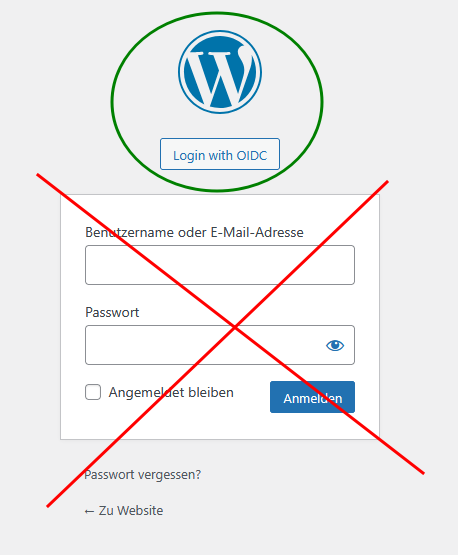
    If you are feeling brave I found https://wordpress.stackexchange.com/questions/121687/wordpress-hide-the-username-password-fields-in-login-page But I think the feature you want is essentially https://github.com/oidc-wp/openid-connect-generic/issues/477 . There's a PR at https://github.com/oidc-wp/openid-connect-generic/pull/478 which hasn't been merged.
  • 3 Votes
    2 Posts
    697 Views
    J
    Thanks for the heads up. It seems the fork is by the same author. Wonder what gives.
  • Wordpress stuck at starting

    Moved
    2
    1 Votes
    2 Posts
    885 Views
    J
    @Miroo said in Wordpress stuck at starting: But how can I disable the sso plugins without running to these issues again? The sso mode is set/unset at installation time. This cannot be changed later. What you can do is something like this: Take back up of app . Download the backup configuration Install an empty WP instance. When installing, choose "Leave user management to the app" Then, App -> Backups -> Import . Use config from step 1. If things work out, you can delete the original app and move this new instance into www .
  • Wordpress - Unable to restore from backup

    Moved restore
    5
    2 Votes
    5 Posts
    1k Views
    jamesJ
    Hello @jamie.mckenzie @jamie.mckenzie said in Wordpress - Unable to restore from backup: Does the automated backup not include files outside of the data folder? The Cloudron backup only includes the database and files in /app/data/ @jamie.mckenzie said in Wordpress - Unable to restore from backup: It doesn't get to restore the key files like wp-config.php - and these files are missing at the backup location (s3) This is indeed strange. For the WordPress Developer app the file wp-config.php is located in /app/data/public/wp-config.php, so it should be included in the backup. @jamie.mckenzie said in Wordpress - Unable to restore from backup: There is no memory issues as the server has plenty of available memory for restore. That the server itself has enough memory is not the point. The point made was that you might need to increase the apps memory limit. @jamie.mckenzie said in Wordpress - Unable to restore from backup: I have tried clearing down the cached files in the backup storage down to the bare minimum yet it still fails. I would strongly advise against tinkering with anything inside the backup. In Cloudron 9 backup integrity checks are added which will fail if you delete files by hand. @jamie.mckenzie said in Wordpress - Unable to restore from backup: Also is there a way to alter the back configuration so more than 10 files are downloaded concurrently Indeed, should we make this configurable @staff? @jamie.mckenzie Could you please share more details about your S3 provider?
  • Migrating WordPress to cloudron from managed vps

    2
    1 Votes
    2 Posts
    689 Views
    jamesJ
    Hello @Miroo and welcome to the Cloudron forum @Miroo said in Migrating WordPress to cloudron from managed vps: Is WordPress app on cloudron only with Apache? The WordPress app is running Apache 2 inside with MPM. But above all apps is running NGINX handling traffic. @Miroo said in Migrating WordPress to cloudron from managed vps: Is there any way to use nginx web server? No, and with Cloudron you don't need to worry about that. The WordPress Apps Apache 2 can also be tweaked to your liking. On that note. Cloudron offers the WordPress App as a Managed and Developer version. Docs here: https://docs.cloudron.io/packages/wordpress-managed/ https://docs.cloudron.io/packages/wordpress-developer/ @Miroo said in Migrating WordPress to cloudron from managed vps: Can I choose php version for my WordPress installation? I have an app connected to the Vps that requires a specific php version. The WordPress app is using PHP version 8.3.6 and can't be changed. The LAMP app offers PHP Version selection so if this is a must-have, you might need to install WordPress inside the LAMP app yourself. But, if your WordPress requires a very specific PHP version, why is that? Outdated custom code? Outdated plugins? I recommend getting rid of this limitation since it also blocking PHP security updates for you. @Miroo said in Migrating WordPress to cloudron from managed vps: I saw the WordPress installation has a redis configuration, do i need to install a new plugin and connect it to that config or is it pre-configured in the WordPress itself? Cloudron takes care of this, you don't need to configure that. @Miroo said in Migrating WordPress to cloudron from managed vps: Since I'm migrating wp, I'm gonna use updraftplus and it's gonna replace everything with my previous wp instance. Would this be safe or will it break some pre-configured stuff on cloudron? I can't write a definite answer to that. It seems other people might have had issues, but you can only know by trying. For other posts regarding updraftplus see https://forum.cloudron.io/search?term=updraftplus&in=titlesposts @Miroo said in Migrating WordPress to Cloudron from managed vps: What are some advantages/disadvantages of installing wp app directly VS using LAMP? One advantage of the LAMP app I already mentioned, the selection of the PHP version. But the disadvantage is that you will need to take care of every WordPress update yourself. Also, you will miss the app isolation and sandboxing of WordPress, meaning you have more responsibility to make sure your WordPress stays secure. I would recommend trying the migration first with the managed WordPress app and see if issues arise. While doing that, you can create a Post in the @wordpress-managed category and while doing that writing a blog style post. This way, if issues arise, people here can follow your steps and help very fast. If you have any more questions, please don't hesitate and keep asking. We are always happy to help.
  • Automated backup not backing up all files, so a restore fails

    5
    3
    0 Votes
    5 Posts
    2k Views
    matix131997M
    @girish Yes, rsync. Provider is Hetzner Storage Box