
SSH key Redmine
-
su - cloudron
ssh-keygen # generates keys under ~/.ssh. keys are part of the backupHello, I am creating an SSH key in redmine. But I can’t understand how I can add it to the application.
Can you tell me the sequence of actions or am I doing something wrong?
Thank.~nano /home/cloudron/.ssh/authorized_keys
Unable to create directory /home/cloudron/.local/share/nano/: No such file or directory
It is required for saving/loading search history or cursor positions. -
Hm looks like the nano editor is not working well on those images, however I've just tried it and that appears to only be a warning. Good thing, our next release will contain a webbased fileeditor for such use-cases.
For SSH keys we have some brief info at https://cloudron.io/documentation/apps/redmine/#ssh-keys
-
Hm looks like the nano editor is not working well on those images, however I've just tried it and that appears to only be a warning. Good thing, our next release will contain a webbased fileeditor for such use-cases.
For SSH keys we have some brief info at https://cloudron.io/documentation/apps/redmine/#ssh-keys
@nebulon
I tried to install the key. But the server rejects it. Maybe SSH needs to be turned on somewhere else?
(Test server)
Thanks.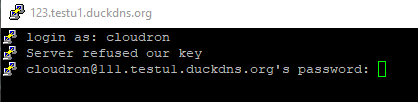
root@648fb8c3-7036-4791-91df-ded72cac86d9:/app/code# su - cloudron
cloudron@648fb8c3-7036-4791-91df-ded72cac86d9:~$ ssh-keygen
Generating public/private rsa key pair.
Enter file in which to save the key (/home/cloudron/.ssh/id_rsa): /home/cloudron/.ssh/id_rsa
Enter passphrase (empty for no passphrase):
Enter same passphrase again:
Your identification has been saved in /home/cloudron/.ssh/id_rsa.
Your public key has been saved in /home/cloudron/.ssh/id_rsa.pub.
The key fingerprint is:
SHA256:RKlm+iSN2csiHmH4wy04jvVyDRrTmr2VghiPIYbLu4o cloudron@648fb8c3-7036-4791-91df-ded72cac86d9
The key's randomart image is:
+---[RSA 2048]----+
| .. |
| .. |
| .. |
|.. +. |
|.o. O S |
|+%o+B +. |
|.XBoBo. |
|+oB=+o= |
|E=o+oo |
+----[SHA256]-----+
cloudron@648fb8c3-7036-4791-91df-ded72cac86d9:~$ ssh-copy-id cloudron@111.testu1.duckdns.org
/usr/bin/ssh-copy-id: INFO: Source of key(s) to be installed: "/home/cloudron/.ssh/id_rsa.pub"
The authenticity of host '111.testu1.duckdns.org (93.127.3.75)' can't be established.
RSA key fingerprint is SHA256:dkZf4Sb4x9pbvAFEG5f5M0ReNPGjSv6oUmz11gZJ0Fo.
Are you sure you want to continue connecting (yes/no)? yes
/usr/bin/ssh-copy-id: INFO: attempting to log in with the new key(s), to filter out any that are already installed
/usr/bin/ssh-copy-id: INFO: 1 key(s) remain to be installed -- if you are prompted now it is to install the new keys
cloudron@111.testu1.duckdns.org's password:
Received disconnect from 93.127.3.75 port 22:11: auth timeout
Disconnected from 93.127.3.75 port 22
cloudron@648fb8c3-7036-4791-91df-ded72cac86d9:~$ ssh cloudron@111.testu1.duckdns.org
cloudron@111.testu1.duckdns.org's password:
Permission denied, please try again.
cloudron@111.testu1.duckdns.org's password: -


Hello! It looks like you're interested in this conversation, but you don't have an account yet.
Getting fed up of having to scroll through the same posts each visit? When you register for an account, you'll always come back to exactly where you were before, and choose to be notified of new replies (either via email, or push notification). You'll also be able to save bookmarks and upvote posts to show your appreciation to other community members.
With your input, this post could be even better 💗
Register Login