
Need help connecting to Bedrock on LAN

-
I've just done a fresh install of MC Bedrock and configured with default settings. But I can not seems to connect with it from the iPad app while connected on the same network/subnet.
App Title and Version: Minecraft Bedrock 1.21.80.3
App ID: 613cef5b-96ff-489d-a8bf-c1f9c07cd4b4
Package Version: net.minecraft.bedrock.cloudronapp@2.35.5
Installed At: 3:59 PM
Last Updated: NeverMC Bedrock Server console shows:
IPv4 supported, port: 19132: Used for gameplay and LAN discovery
IPv6 supported, port: 19133: Used for gameplay
Server started.
Scaning the server & port from my computer:
benneic@MacBookPro ~ % nmap -p 19132 192.168.1.100
Starting Nmap 7.95 ( https://nmap.org ) at 2025-05-15 16:38 AEST
Nmap scan report for # (192.168.1.100)
Host is up (0.012s latency).

PORT      STATE  SERVICE
19132/tcp closed unknown

Nmap done: 1 IP address (1 host up) scanned in 0.11 seconds
Scaning listening ports on my server host (192.168.1.100):
benneic@chopsticks:~$ sudo netstat -l -p --numeric-ports | grep 19132
tcp        0      0 0.0.0.0:19132           0.0.0.0:*               LISTEN      847/dockerd
tcp6       0      0 [::]:19132              [::]:*                  LISTEN      847/dockerd
udp        0      0 0.0.0.0:19132           0.0.0.0:*                           847/dockerd
udp6       0      0 [::]:19132              [::]:*                              847/dockerd
Scanning listening ports inside the MC Bedrock docker container:
root@613cef5b-96ff-489d-a8bf-c1f9c07cd4b4:/app/pkg# sudo netstat -l -p --numeric-ports | grep 19132
udp        0      0 0.0.0.0:19132           0.0.0.0:*                           -
I am surprised there is not a tcp socket listening inside the docker host.
As far as the server console and logs are concerned it looks like it is running:
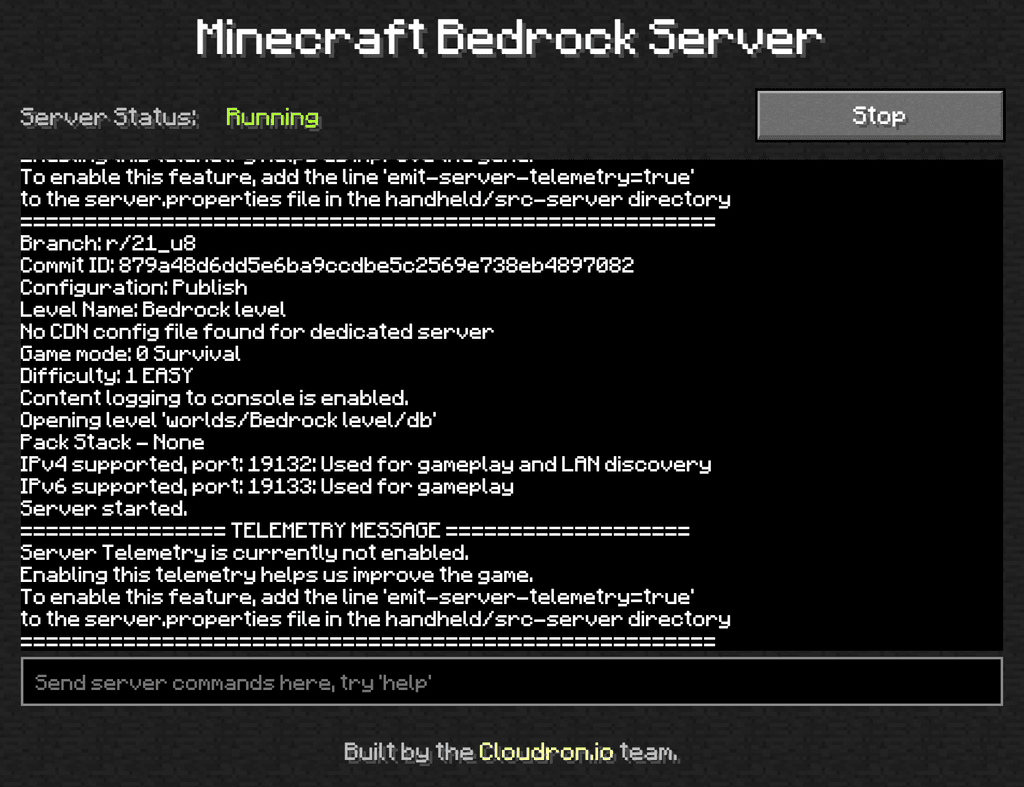
What am I missing here?
-
@benneic BDS uses UDP and not TCP . The TCP configuration in package is misleading - https://git.cloudron.io/packages/minecraft-bedrock-app/-/merge_requests/23 removes it.
Try udp scan -
$ sudo nmap -sU -p 19132 116.203.196.36 Starting Nmap 7.94SVN ( https://nmap.org ) at 2025-05-15 13:02 CEST Nmap scan report for static.36.196.203.116.clients.your-server.de (116.203.196.36) Host is up (0.031s latency). PORT STATE SERVICE 19132/udp open|filtered unknown Nmap done: 1 IP address (1 host up) scanned in 0.65 seconds -
Solution was to connect from iPad to server using the FQDN pointing to the public IP of Cloudron.
Unclear why I couldnt connect via private IP, but I was using local DNS pointing the FQDN to the private IP, so I switched that to the public ip. I think that is what fixed it.
@girish thanks for the tip on the UDP scan, port was open via UDP on private IP.
benneic@MacBookPro ~ % sudo nmap -sU -Pn -p 19132 192.168.1.100 Starting Nmap 7.95 ( https://nmap.org ) at 2025-05-17 08:37 AEST Nmap scan report for # (192.168.1.100) Host is up (0.0025s latency). PORT STATE SERVICE 19132/udp open|filtered unknown Nmap done: 1 IP address (1 host up) scanned in 0.32 seconds -
 N nebulon marked this topic as a question on
-
N nebulon has marked this topic as solved on

Hello! It looks like you're interested in this conversation, but you don't have an account yet.
Getting fed up of having to scroll through the same posts each visit? When you register for an account, you'll always come back to exactly where you were before, and choose to be notified of new replies (either via email, or push notification). You'll also be able to save bookmarks and upvote posts to show your appreciation to other community members.
With your input, this post could be even better 💗
Register Login