Cloudron makes it easy to run web apps like WordPress, Nextcloud, GitLab on your server. Find out more or install now.


Skip to content
  • Categories
  • Recent
  • Tags
  • Popular
  • Bookmarks
  • Search
Skins
  • Light
  • Brite
  • Cerulean
  • Cosmo
  • Flatly
  • Journal
  • Litera
  • Lumen
  • Lux
  • Materia
  • Minty
  • Morph
  • Pulse
  • Sandstone
  • Simplex
  • Sketchy
  • Spacelab
  • United
  • Yeti
  • Zephyr
  • Dark
  • Cyborg
  • Darkly
  • Quartz
  • Slate
  • Solar
  • Superhero
  • Vapor

  • Default (No Skin)
  • No Skin
Collapse
Brand Logo

Cloudron Forum

Apps - Status | Demo | Docs | Install
  1. Cloudron Forum
  2. FreshRSS
  3. Suggest to enable SFTP access on FressRSS

Suggest to enable SFTP access on FressRSS

Scheduled Pinned Locked Moved FreshRSS
6 Posts 3 Posters 676 Views 3 Watching
  • Oldest to Newest
  • Newest to Oldest
  • Most Votes
Reply
  • Reply as topic
Log in to reply
This topic has been deleted. Only users with topic management privileges can see it.
  • F Offline
    F Offline
    fengchang
    translator
    wrote on last edited by
    #1

    Hi there,

    I am developing FreshRSS extension and I found the management of extension requires upload folder to /app/data/extensions. Currently there is no easy way to upload folder in Web UI. Please consider to enable SFTP access, it will make it much easier to use customized extension.

    Thank you!

    1 Reply Last reply
    1
    • jamesJ Offline
      jamesJ Offline
      james
      Staff
      wrote on last edited by
      #2

      Hello @fengchang

      We will look into it.

      In the meanwhile, you could use the cloudron cli with the push paramater:

      cloudron push --help
      Usage: cloudron push [options] <local> <remote>
      
      push a single local file or directory to a remote directory
      
      Options:
        --app <id/location>  App id or location
        -h, --help           display help for command
      
        Examples:
      
          $ cloudron push --app myapp file.txt /app/data/file.txt # pushes file.txt
          $ cloudron push --app myapp file.txt /app/data/         # pushes file.txt. trailing slash is important
          $ cloudron push --app myapp dir /app/data               # pushes dir/* as /app/data/dir/*
          $ cloudron push --app myapp dir/. /app/data             # pushes dir/* as /app/data/*
          $ cloudron push --app myapp dir/subdir /app/data        # pushes dir/subdir/* as /app/data/subdir/*
          $ cloudron push --app myapp . /app/data                 # pushes .* as /app/data/*
      
      1 Reply Last reply
      0
      • nebulonN Offline
        nebulonN Offline
        nebulon
        Staff
        wrote on last edited by
        #3

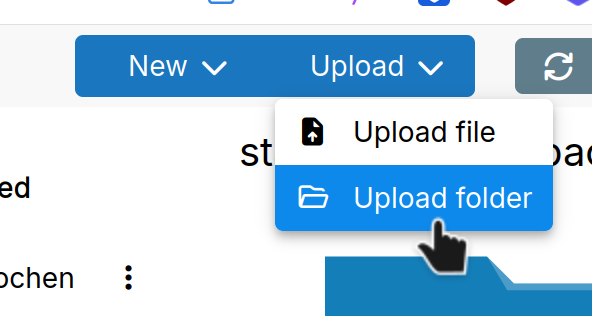
        @fengchang besides using the cli, the filemanager actually has an "Upload Folder" option:

        image.png

        Does that not work in your case?

        1 Reply Last reply
        1
        • F Offline
          F Offline
          fengchang
          translator
          wrote on last edited by
          #4

          @james thank you, will try.
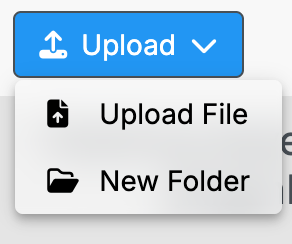
          @nebulon somehow this button is "New folder" on my Cloudron. My Cloudron is v8.3.2

          Screenshot 2025-10-30 at 12.32.59 PM.png

          1 Reply Last reply
          0
          • nebulonN Offline
            nebulonN Offline
            nebulon
            Staff
            wrote on last edited by
            #5

            Ah yes we had a translation string bug in that menu. This is fixed in Cloudron 9 but the item should still work as "upload folder"

            1 Reply Last reply
            0
            • F Offline
              F Offline
              fengchang
              translator
              wrote on last edited by
              #6

              Thank you. I have done my work with cloudron CLI.

              1 Reply Last reply
              1

              Hello! It looks like you're interested in this conversation, but you don't have an account yet.

              Getting fed up of having to scroll through the same posts each visit? When you register for an account, you'll always come back to exactly where you were before, and choose to be notified of new replies (either via email, or push notification). You'll also be able to save bookmarks and upvote posts to show your appreciation to other community members.

              With your input, this post could be even better 💗

              Register Login
              Reply
              • Reply as topic
              Log in to reply
              • Oldest to Newest
              • Newest to Oldest
              • Most Votes


              • Login

              • Don't have an account? Register

              • Login or register to search.
              • First post
                Last post
              0
              • Categories
              • Recent
              • Tags
              • Popular
              • Bookmarks
              • Search