
How to stop "TURN" service
-
-
How I can stop TURN service?
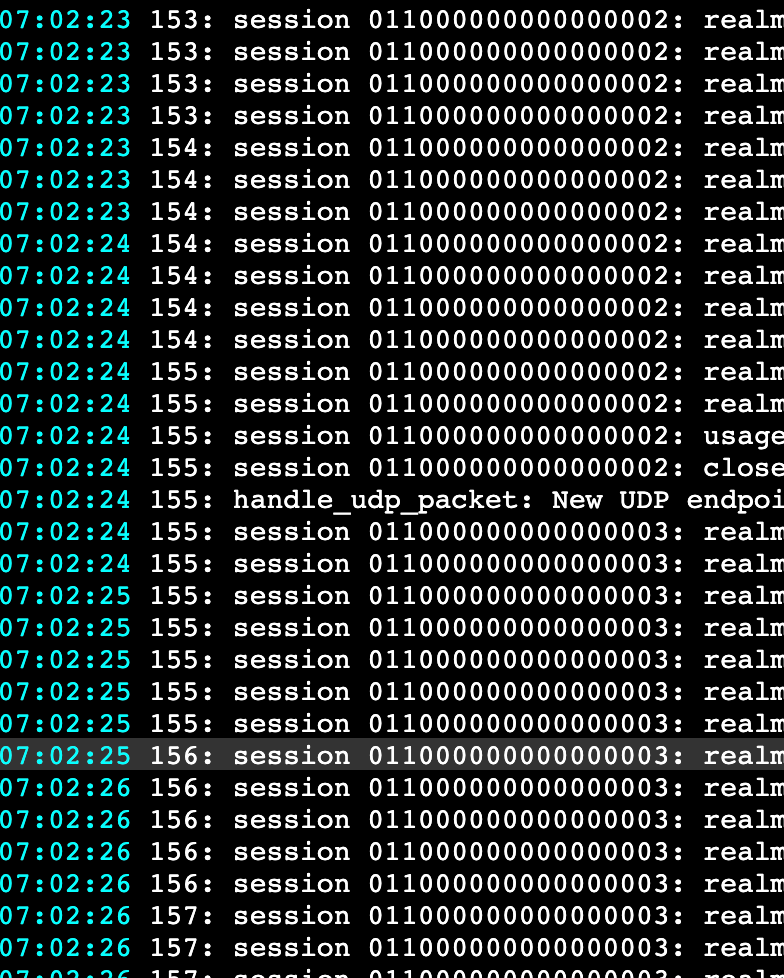
It seems that someone is trying to attach to that listening ports and using a lot of resources.
I'm not using any voip at all.
Thank's
@p44 generally there is no way to permanently stop a service at the moment. You can manually
docker stop turnvia SSH however it will be eventually restarted again by the platform on for example an update.The coturn server as such is protected by an auth secret anyways. Also note that it may be used for anything webrtc related, not just voip. One example is p2p file sharing, like the filepizza app provides.
-
@p44 generally there is no way to permanently stop a service at the moment. You can manually
docker stop turnvia SSH however it will be eventually restarted again by the platform on for example an update.The coturn server as such is protected by an auth secret anyways. Also note that it may be used for anything webrtc related, not just voip. One example is p2p file sharing, like the filepizza app provides.
-
@nebulon Thank's nebulon, but I want to stop it because someone toke as target and service run out of memory. I don't have any application using it so I think it is better to stop.
Do you plan to add feature to stop manually, even at reboot?
-
-
You can
docker stop turnthat will stop the service if you don't use it. But you have to do this on every server reboot. -
@nebulon @girish @d19dotca Thank's a lot @d19dotca ! For me is a little bit complex append that command in cronjob and I don't know if Cloudron make some integrity test at boot time to try to check if turn is on or off.
Another solution is to use VPS provided firewall to lock that doors... But as @nebulon wrote, one improvement could be add rate-limiting and/or start that services on demand.
Thank's all for your answer

-
@girish @nebulon @james I am seeing a flood of unauthorized attempts to connect to the TURN server on each Cloudron. I have no apps installed that are using TURN. It seems like a potential security vulnerability and certainly a waste of CPU/RAM (256MB Cloudron min)/Disk resources. One TURN log was already up to 50MB! In the absence of a "switch" in Cloudron to disable this, I wanted some advice on two temporary solutions:
(1) docker stop turn coupled with docker update --restart=no turn
(2) Adding a crontab entry: @reboot /usr/bin/docker stop turn
Option 1 prevents the container from starting. Option 2 allows it to start, but stops it when rebooting. @d19dotca Thanks for starting my thinking on this!
Option 1 seems better, but I wanted an expert opinion on the consequences of using either.
Lastly, I guess I will need to be aware that installing any apps that require the TURN service could fail (unless I enable the TURN container once again). If I forget and install an app like Jitsi, will Cloudron restart the TURN container and revert the --restart=no option?
-
256MB is the max limit and when not in use linux will just swap it out. As for the logs in the big scheme of things, 50MB is not much.
That is not to say this is not a problem. @crazybrad what kind of log messages are you seeing? It's the nature of the internet that publicly exposed services can be accessed. The TURN server is public and has to be. Do you have a firewall? It's easiest to just block it there if it bothers you. The ports to block are:
TURN_PORT: 3478, // tcp and udp TURN_TLS_PORT: 5349, // tcp and udp TURN_UDP_PORT_START: 50000, TURN_UDP_PORT_END: 50100, -
@joseph What I see appears to be "normal" attempts to connect to a TURN server. The problem is that there is no application "publishing" my TURN server to make it usable by potential WebRTC connections. So these are people trying to leverage a misconfigured TURN server or a software vulnerability. In my mind, it's no different than people probing to SSH to a server - hence the reason to use Fail2Ban and other tools to restrict this.
Since Cloudron manages "allowed ports" internally, I think that TURN server ports should be added to that list as follows:
(1) If an app requires TURN server access (it should be declared in the app manifest), then TURN ports should be opened)
(2) If no apps use TURN, then those ports should be closed by CLoudron automatically. -
-
@joseph is this a security enhancement that the Cloudron team can add to a future maintenance release? I would prefer to have Cloudron maintain control of the TURN service so it could enable it based on installed dependencies or leave it off if there are none. Much safer and won't create support issues if someone has disabled TURN ports themselves and then forgets to manage this properly externally.
-
-
We're seeing a similar issue and our server was even temporarily blocked by our hosting provider. I agree with @crazybrad that it would be preferrable if Cloudron would maintain control of the TURN service, based on the actual needs of installed apps.
-
-
J joseph marked this topic as a question on
-
J joseph has marked this topic as solved on
-
Link to feature request . Thanks @crazybrad



Hello! It looks like you're interested in this conversation, but you don't have an account yet.
Getting fed up of having to scroll through the same posts each visit? When you register for an account, you'll always come back to exactly where you were before, and choose to be notified of new replies (either via email, or push notification). You'll also be able to save bookmarks and upvote posts to show your appreciation to other community members.
With your input, this post could be even better 💗
Register Login