
How to use Playwright in n8n?
-
Hello @odie
The best way to install community nodes for N8N is with the UI.
In your case you want to install https://www.npmjs.com/package/n8n-nodes-playwright I assume
In your N8N UI go toSettings>Community nodesclickInstall a community nodeand pasten8n-nodes-playwrightand it will install the community node.But while testing this I noticed that the Cloudron N8N app does not have chromium installed, so the playwright nodes can't be used at the moment.
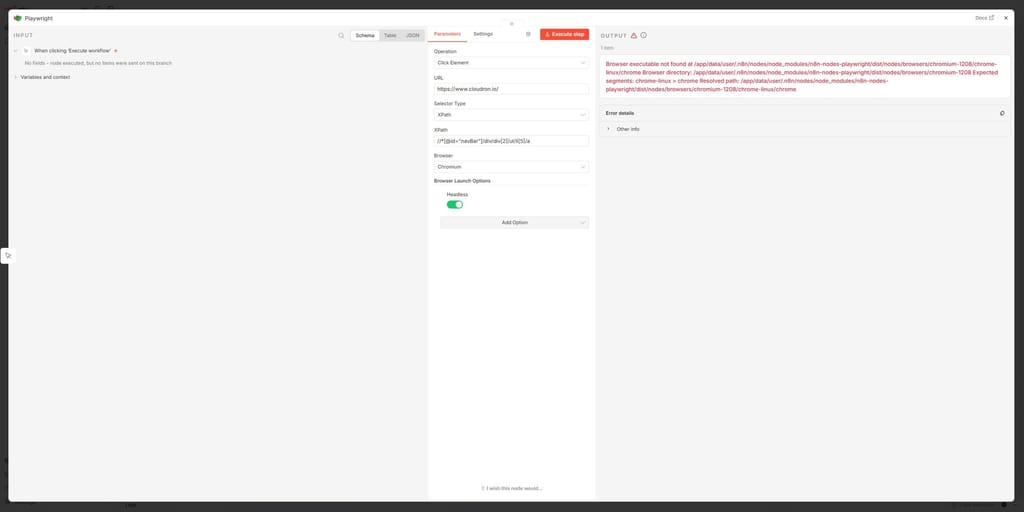
So we might have to add chromium to the N8N app.
-
Hello @odie
The best way to install community nodes for N8N is with the UI.
In your case you want to install https://www.npmjs.com/package/n8n-nodes-playwright I assume
In your N8N UI go toSettings>Community nodesclickInstall a community nodeand pasten8n-nodes-playwrightand it will install the community node.But while testing this I noticed that the Cloudron N8N app does not have chromium installed, so the playwright nodes can't be used at the moment.
So we might have to add chromium to the N8N app.
@james Thank you @james! I was under the (wrong) impression that it was already installed (due to it being listed in /app/code/node_modules, thank you so much for clarifying.
Having chromium (for eg. playwright) would probably be a good thing. I can imagine several use cases where a headless web browser could be useful.
-
Hello @odie
We have discussed adding chrome or similar to the N8N app and decided against it since it would increase the maintenance scope.Instead, we have packaged Browserless as a Cloudron app that can be used by other apps as well.
For example, N8N can use the https://github.com/minhlucvan/n8n-nodes-browserless community node to connect to the Cloudron Browserless app.
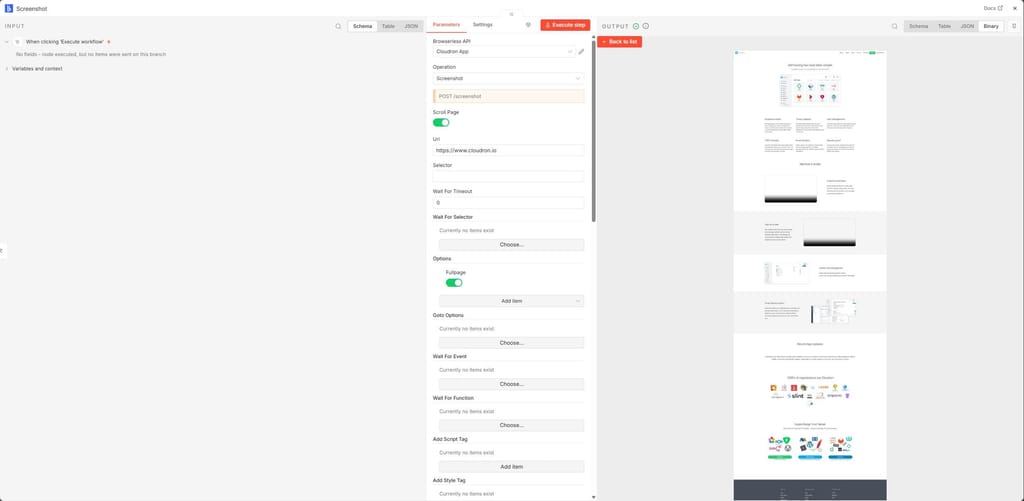
The Browserless app is currently only a community app located here https://git.cloudron.io/playground/browserless-cloudron-app and can be installed with the CloudronVersions.json.
We plan to move this to the Cloudron appstore tho. -
Hello @odie
We have discussed adding chrome or similar to the N8N app and decided against it since it would increase the maintenance scope.Instead, we have packaged Browserless as a Cloudron app that can be used by other apps as well.
For example, N8N can use the https://github.com/minhlucvan/n8n-nodes-browserless community node to connect to the Cloudron Browserless app.
The Browserless app is currently only a community app located here https://git.cloudron.io/playground/browserless-cloudron-app and can be installed with the CloudronVersions.json.
We plan to move this to the Cloudron appstore tho.@james Installing n8n-nodes-browserless from Settings > Community nodes, clicking Install a community node and pasting n8n-nodes-browserless works fine.
However, when I try to install Playwright the same way (n8n-nodes-playwright), the installation just hangs and n8n stops responding. The only way to get it back to working again, is to restore from backup.
This is what the Cloudron log window shows:
Mar 28 13:54:12 2026-03-28T12:54:12Z
Mar 28 13:54:12 Current working directory: /run/n8n/custom-node-modules
Mar 28 13:54:12 Installing Playwright system dependencies...
Mar 28 13:54:12 Node version: v24.13.1
Mar 28 13:54:12 Operating System: linux
Mar 28 13:54:12 Starting browser setup...
Mar 28 13:54:12 ⚠️ Not running as root. Attempting to install dependencies with sudo...
Mar 28 13:54:12 🐧 Linux detected - checking system dependencies...
Mar 28 13:54:13 playwright@1.58.2
Mar 28 13:54:13 ⠙⠹⠸⠼⠴⠦⠧⠇Need to install the following packages:
Mar 28 13:54:27 => Healthcheck error: AbortError: The operation was aborted
Mar 28 13:54:37 => Healthcheck error: AbortError: The operation was aborted
Mar 28 13:54:47 => Healthcheck error: AbortError: The operation was aborted
Mar 28 13:54:57 => Healthcheck error: AbortError: The operation was aborted
Mar 28 13:55:07 => Healthcheck error: AbortError: The operation was aborted
Mar 28 13:55:17 => Healthcheck error: AbortError: The operation was aborted
Mar 28 13:55:27 => Healthcheck error: AbortError: The operation was aborted
Mar 28 13:55:37 => Healthcheck error: AbortError: The operation was aborted
Mar 28 13:55:47 => Healthcheck error: AbortError: The operation was aborted
Mar 28 13:55:57 => Healthcheck error: AbortError: The operation was aborted
Mar 28 13:56:07 => Healthcheck error: AbortError: The operation was aborted
Mar 28 13:56:17 => Healthcheck error: AbortError: The operation was aborted
Mar 28 13:56:27 => Healthcheck error: AbortError: The operation was aborted
Mar 28 13:56:37 => Healthcheck error: AbortError: The operation was aborted
Mar 28 13:56:47 => Healthcheck error: AbortError: The operation was aborted
Mar 28 13:56:57 => Healthcheck error: AbortError: The operation was aborted
Mar 28 13:57:07 => Healthcheck error: AbortError: The operation was aborted
Mar 28 13:57:17 => Healthcheck error: AbortError: The operation was aborted
Mar 28 13:57:27 => Healthcheck error: AbortError: The operation was aborted
Mar 28 13:57:37 => Healthcheck error: AbortError: The operation was aborted
Mar 28 13:57:47 => Healthcheck error: AbortError: The operation was aborted
Mar 28 13:57:57 => Healthcheck error: AbortError: The operation was aborted
Mar 28 13:58:07 => Healthcheck error: AbortError: The operation was aborted
Mar 28 13:58:17 => Healthcheck error: AbortError: The operation was aborted
Mar 28 13:58:27 => Healthcheck error: AbortError: The operation was aborted
Mar 28 13:58:37 => Healthcheck error: AbortError: The operation was aborted
Mar 28 13:58:47 => Healthcheck error: AbortError: The operation was aborted
Mar 28 13:58:57 => Healthcheck error: AbortError: The operation was aborted
Mar 28 13:59:07 => Healthcheck error: AbortError: The operation was aborted
Mar 28 13:59:17 => Healthcheck error: AbortError: The operation was aborted
Mar 28 13:59:27 => Healthcheck error: AbortError: The operation was aborted
Mar 28 13:59:37 => Healthcheck error: AbortError: The operation was aborted
Mar 28 13:59:47 => Healthcheck error: AbortError: The operation was aborted
Mar 28 13:59:57 => Healthcheck error: AbortError: The operation was aborted
Mar 28 14:00:07 => Healthcheck error: AbortError: The operation was aborted
Mar 28 14:00:17 => Healthcheck error: AbortError: The operation was aborted
Mar 28 14:00:27 => Healthcheck error: AbortError: The operation was aborted
Mar 28 14:00:37 => Healthcheck error: AbortError: The operation was aborted
Mar 28 14:00:47 => Healthcheck error: AbortError: The operation was aborted
Mar 28 14:00:57 => Healthcheck error: AbortError: The operation was aborted
Mar 28 14:01:07 => Healthcheck error: AbortError: The operation was aborted
Mar 28 14:01:17 => Healthcheck error: AbortError: The operation was aborted
Mar 28 14:01:27 => Healthcheck error: AbortError: The operation was aborted
Mar 28 14:01:37 => Healthcheck error: AbortError: The operation was aborted
Mar 28 14:01:47 => Healthcheck error: AbortError: The operation was aborted
Mar 28 14:01:57 => Healthcheck error: AbortError: The operation was aborted
Mar 28 14:02:07 => Healthcheck error: AbortError: The operation was aborted
Mar 28 14:02:07 pipeFileToRequest: piped /home/yellowtent/appsdata/4f8054d1-098f-425f-b14d-74e47a9bc4eb/dump.rdb, waiting for response
Mar 28 14:02:07 pipeFileToRequest: piped /home/yellowtent/appsdata/4f8054d1-098f-425f-b14d-74e47a9bc4eb/postgresqldump, waiting for response
Mar 28 14:02:07 pipeFileToRequest: piping /home/yellowtent/appsdata/4f8054d1-098f-425f-b14d-74e47a9bc4eb/dump.rdb
Mar 28 14:02:07 pipeFileToRequest: piping /home/yellowtent/appsdata/4f8054d1-098f-425f-b14d-74e47a9bc4eb/postgresqldump
Mar 28 14:02:07 pipeFileToRequest: response status code 200
Mar 28 14:02:07 pipeFileToRequest: response status code 200
Mar 28 14:02:07 pipeFileToRequest: success
Mar 28 14:02:07 pipeFileToRequest: success
Mar 28 14:02:17 => Healthcheck error: AbortError: The operation was aborted
Mar 28 14:02:27 => Healthcheck error: AbortError: The operation was aborted
Mar 28 14:02:37 => Healthcheck error: AbortError: The operation was aborted
Mar 28 14:02:47 => Healthcheck error: AbortError: The operation was aborted


Hello! It looks like you're interested in this conversation, but you don't have an account yet.
Getting fed up of having to scroll through the same posts each visit? When you register for an account, you'll always come back to exactly where you were before, and choose to be notified of new replies (either via email, or push notification). You'll also be able to save bookmarks and upvote posts to show your appreciation to other community members.
With your input, this post could be even better 💗
Register Login