Cloudron makes it easy to run web apps like WordPress, Nextcloud, GitLab on your server. Find out more or install now.


Skip to content
  • Categories
  • Recent
  • Tags
  • Popular
  • Bookmarks
  • Search
Skins
  • Light
  • Brite
  • Cerulean
  • Cosmo
  • Flatly
  • Journal
  • Litera
  • Lumen
  • Lux
  • Materia
  • Minty
  • Morph
  • Pulse
  • Sandstone
  • Simplex
  • Sketchy
  • Spacelab
  • United
  • Yeti
  • Zephyr
  • Dark
  • Cyborg
  • Darkly
  • Quartz
  • Slate
  • Solar
  • Superhero
  • Vapor

  • Default (No Skin)
  • No Skin
Collapse
Brand Logo

Cloudron Forum

Apps - Status | Demo | Docs | Install
  1. Cloudron Forum
  2. Discuss
  3. Memory Usage Cloudron vs VPS Panel

Memory Usage Cloudron vs VPS Panel

Scheduled Pinned Locked Moved Discuss
4 Posts 2 Posters 84 Views 2 Watching
  • Oldest to Newest
  • Newest to Oldest
  • Most Votes
Reply
  • Reply as topic
Log in to reply
This topic has been deleted. Only users with topic management privileges can see it.
  • I Offline
    I Offline
    IniBudi
    translator
    wrote last edited by
    #1

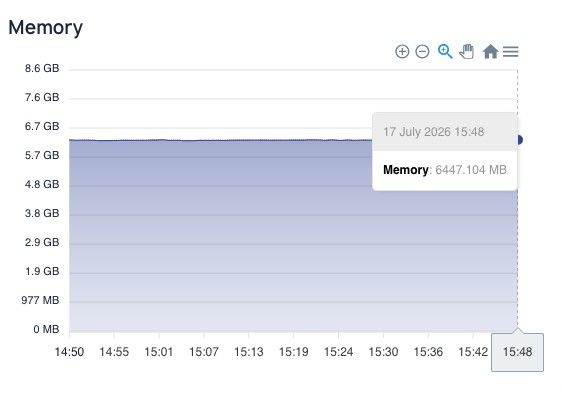
    Hi, I just noticed that there's discrepancy report between memory usage on the Cloudron vs VPS Panel.

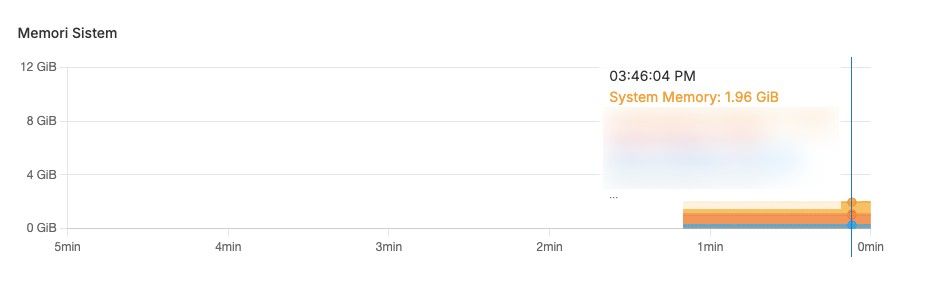
    This is the memory usage report from Cloudron:
    eb20614c-e6a4-4304-b4b5-e5b40e37921a-image.jpeg

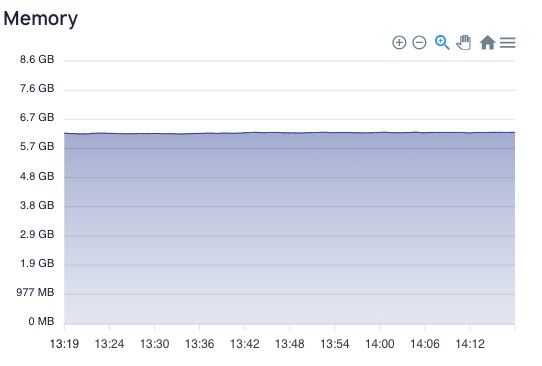
    And this is from my VPS panel:
    ab6a9aa2-9b95-41af-9bc8-27391973f810-image.jpeg

    Is it something normal or unusual?
    Thank you.

    1 Reply Last reply
    0
    • jamesJ Offline
      jamesJ Offline
      james
      Staff
      wrote last edited by
      #2

      Hello @inibudi
      Without the legend of the memory graph it is difficult to distinguish which line is what.
      I just did a quick check.
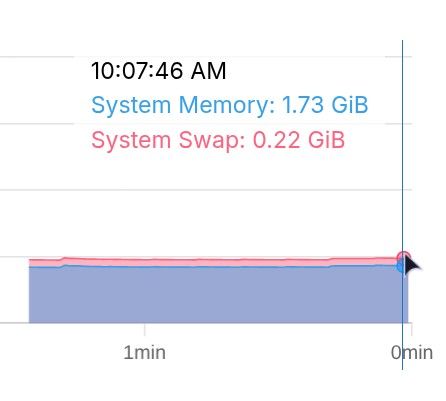
      e5f209db-5df4-4883-a8e1-7d2abe8648be-image.jpeg

      free -h
      total        used        free      shared  buff/cache   available
      Mem:           3.8Gi       1.6Gi       874Mi        49Mi       1.5Gi       2.2Gi
      Swap:          3.8Gi       228Mi       3.6Gi
      

      which is pretty accurate.

      I 1 Reply Last reply
      2
      • jamesJ james

        Hello @inibudi
        Without the legend of the memory graph it is difficult to distinguish which line is what.
        I just did a quick check.

        e5f209db-5df4-4883-a8e1-7d2abe8648be-image.jpeg

        free -h
        total        used        free      shared  buff/cache   available
        Mem:           3.8Gi       1.6Gi       874Mi        49Mi       1.5Gi       2.2Gi
        Swap:          3.8Gi       228Mi       3.6Gi
        

        which is pretty accurate.

        I Offline
        I Offline
        IniBudi
        translator
        wrote last edited by
        #3

        @james hmm here's the line.

        The memory server usage is mostly full, report from VPS Panel.
        abcd010e-5f2b-48fd-9b95-b4666063f92d-image.jpeg

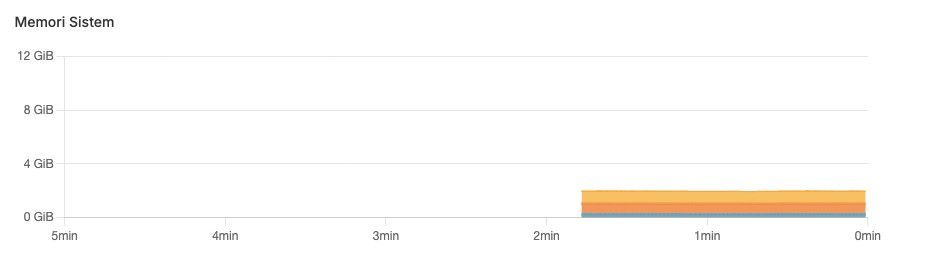
        But on Cloudron panel, it has more space.
        d78d2162-9bb4-4651-be15-daf05d3becc6-image.jpeg

        1 Reply Last reply
        0
        • jamesJ Offline
          jamesJ Offline
          james
          Staff
          wrote last edited by
          #4

          Hello @inibudi
          I am not sure what your VPS provider is even displaying with this graph.
          It is just labeled Memory and has no other indication.
          Is it whole system memory, memory used, memory and swap combined?

          When you connect to your server and run free -h you can see the memory values.
          Maybe compare that to Cloudron and your VPS to figure out what the VPS graph is trying to show.


          We took this topic as feedback to improve our graph for memory.
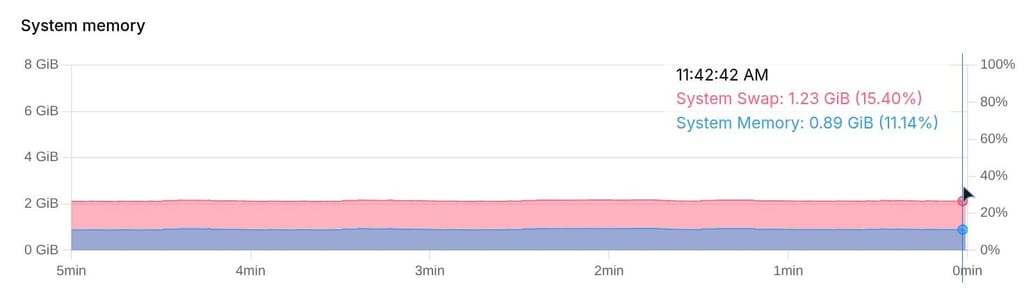
          The graph is showing memory used.
          We now added a % scale to the right Y-axis and to the tooltip.
          Note that the lines are stacked, so they align in addition of each other.
          1cf5350a-5181-444f-a589-96d58a457278-image.jpeg

          In this screenshot 1.23 GiB + 0.89 GiB = 2.12 GiB at the left Y-axis and 15.40 % + 11.14 % = 26.54 % at the right Y-axis.

          1 Reply Last reply
          2

          Hello! It looks like you're interested in this conversation, but you don't have an account yet.

          Getting fed up of having to scroll through the same posts each visit? When you register for an account, you'll always come back to exactly where you were before, and choose to be notified of new replies (either via email, or push notification). You'll also be able to save bookmarks and upvote posts to show your appreciation to other community members.

          With your input, this post could be even better 💗

          Register Login
          Reply
          • Reply as topic
          Log in to reply
          • Oldest to Newest
          • Newest to Oldest
          • Most Votes


          • Login

          • Don't have an account? Register

          • Login or register to search.
          • First post
            Last post
          0
          • Categories
          • Recent
          • Tags
          • Popular
          • Bookmarks
          • Search