
Broken Update n8n to 2.36.8
-
https://forum.cloudron.io/post/128802
Offline
Package Updates
wrote about 13 hours ago
last edited by
#491
[4.40.0]Update n8n to 2.36.8
Full Changelog
core: Allow a domain-restricted credential to work in its own node (#37248 )
API: Adapt binary data endpoint (#36994 )
API: Remove offset query param from list workflow history endpoint (#36952 )
core: Normalize env values before schema-based parsing (#36731 )
core: Avoid restarting task runners that are only slow (#36609 )
Google Ads Node: Migrate from sunset v21 API to v25 (#36255 )
core: Deprecate Array.merge from expressions, and add Array.mergeIntoObject (#36161 )
core: Make n8n User Auth (OAuth2) generally available (#35900 )
Schedule Trigger Node: Add "If Execution Is Missed" option (#35626 )
Discord Node: Add member moderation actions (#33486 )this update is breaking the application

@DualOSWinWiz
Facing the same issue.Unable to provide corresponding logs atm. Had to do a quick rollback to the last version.
-
-
-
-
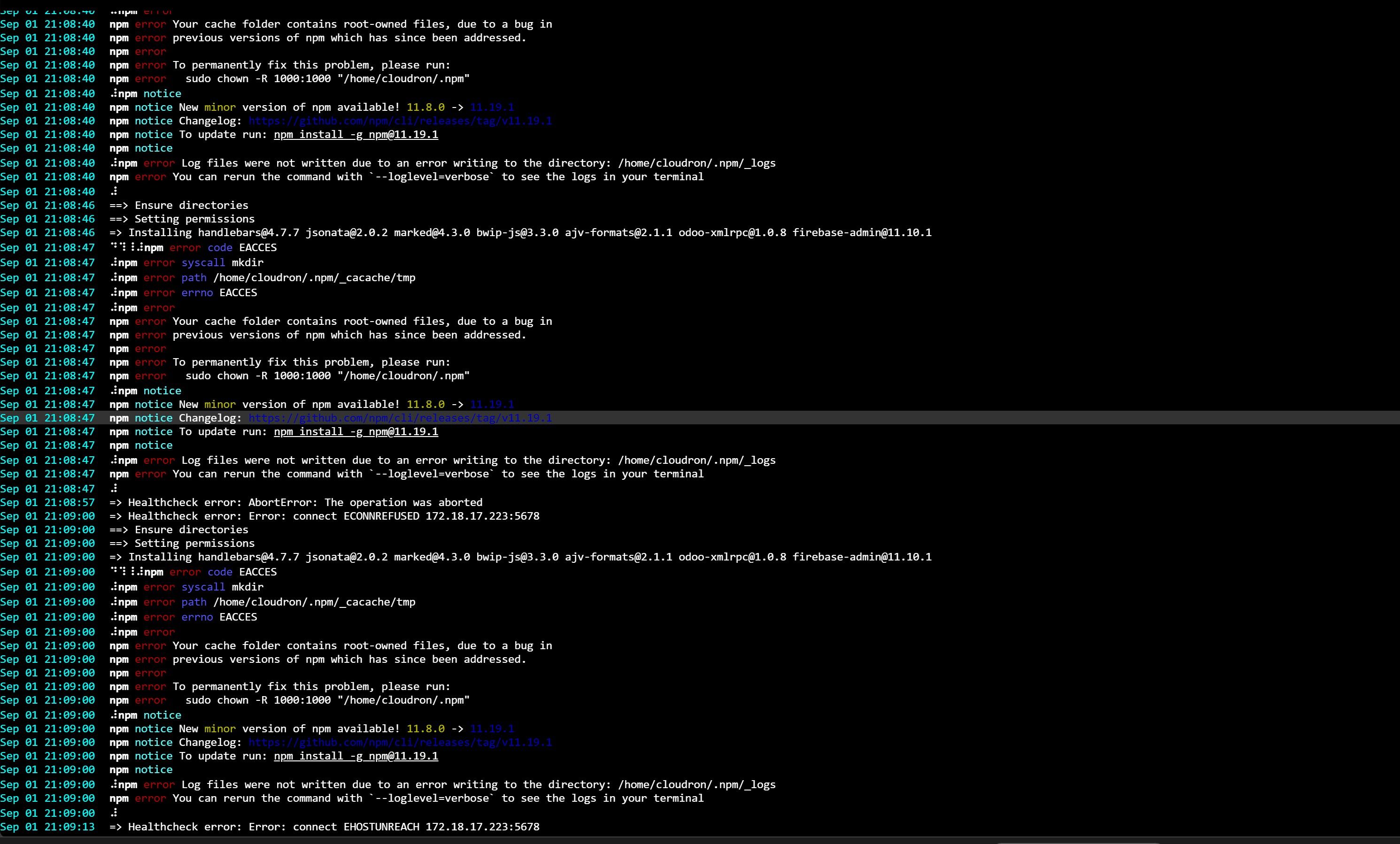
The app is stuck in a permanent restart loop. On every boot, the EXTRA_NODE_MODULES install step fails with:
npm error code EACCES
npm error syscall mkdir
npm error path /home/cloudron/.npm/_cacache/tmp
npm error Your cache folder contains root-owned files
Because that install never completes, n8n never binds to port 5678, so the healthcheck fails with ECONNREFUSED/EHOSTUNREACH and the container restarts, repeating the same failure every 15 to 20 seconds.
So the directory can't be fixed from outside the app either. This looks like the same class of issue reported in older threads about handlebars and community node installs, where /home/cloudron/.npm sits on a read-only filesystem and npm's default cache path can't be written to.
Packages configured: handlebars, jsonata, marked, bwip-js, ajv-formats, odoo-xmlrpc, firebase-admin.
Is there a supported writable cache path we should be pointing EXTRA_NODE_MODULES at, or is this something that needs a package fix?
//Steph
-
I have revoked the package. @divemasterza can you paste more of the raw logs please? You can put it at https://paste.cloudron.io
-
I have revoked the package. @divemasterza can you paste more of the raw logs please? You can put it at https://paste.cloudron.io
Exiting with code 0 Sep 02 08:39:24 => Installing handlebars@4.7.7 jsonata@2.0.2 marked@4.3.0 bwip-js@3.3.0 ajv-formats@2.1.1 odoo-xmlrpc@1.0.8 firebase-admin@11.10.1 Sep 02 08:39:25 ⠙⠹⠸⠼⠴⠦⠧⠇npm error code EACCES Sep 02 08:39:25 ⠇npm error syscall mkdir Sep 02 08:39:25 ⠇npm error path /home/cloudron/.npm/_cacache/tmp Sep 02 08:39:25 ⠇npm error errno EACCES Sep 02 08:39:25 ⠇npm error Sep 02 08:39:25 npm error Your cache folder contains root-owned files, due to a bug in Sep 02 08:39:25 npm error previous versions of npm which has since been addressed. Sep 02 08:39:25 npm error Sep 02 08:39:25 npm error To permanently fix this problem, please run: Sep 02 08:39:25 npm error sudo chown -R 1000:1000 "/home/cloudron/.npm" Sep 02 08:39:25 ⠇npm notice Sep 02 08:39:25 npm notice New minor version of npm available! 11.8.0 -> 11.19.1 Sep 02 08:39:25 npm notice Changelog: https://github.com/npm/cli/releases/tag/v11.19.1 Sep 02 08:39:25 npm notice To update run: npm install -g npm@11.19.1 Sep 02 08:39:25 npm notice Sep 02 08:39:25 ⠇npm error Log files were not written due to an error writing to the directory: /home/cloudron/.npm/_logs Sep 02 08:39:25 npm error You can rerun the command with `--loglevel=verbose` to see the logs in your terminal Sep 02 08:39:25 ⠇ Sep 02 08:39:26 ==> Ensure directories Sep 02 08:39:26 ==> Setting permissions Sep 02 08:39:27 => Installing handlebars@4.7.7 jsonata@2.0.2 marked@4.3.0 bwip-js@3.3.0 ajv-formats@2.1.1 odoo-xmlrpc@1.0.8 firebase-admin@11.10.1 Sep 02 08:39:27 ⠙⠹⠸⠼npm error code EACCES Sep 02 08:39:27 ⠼npm error syscall mkdir Sep 02 08:39:27 ⠼npm error path /home/cloudron/.npm/_cacache/tmp Sep 02 08:39:27 ⠼npm error errno EACCES Sep 02 08:39:27 ⠼npm error Sep 02 08:39:27 npm error Your cache folder contains root-owned files, due to a bug in Sep 02 08:39:27 npm error previous versions of npm which has since been addressed. Sep 02 08:39:27 npm error Sep 02 08:39:27 npm error To permanently fix this problem, please run: Sep 02 08:39:27 npm error sudo chown -R 1000:1000 "/home/cloudron/.npm" Sep 02 08:39:27 ⠼npm notice Sep 02 08:39:27 npm notice New minor version of npm available! 11.8.0 -> 11.19.1 Sep 02 08:39:27 npm notice Changelog: https://github.com/npm/cli/releases/tag/v11.19.1 Sep 02 08:39:27 npm notice To update run: npm install -g npm@11.19.1 Sep 02 08:39:27 npm notice Sep 02 08:39:27 ⠼npm error Log files were not written due to an error writing to the directory: /home/cloudron/.npm/_logs Sep 02 08:39:27 npm error You can rerun the command with `--loglevel=verbose` to see the logs in your terminal Sep 02 08:39:27 ⠼ Sep 02 08:39:28 ==> Ensure directories Sep 02 08:39:28 ==> Setting permissions Sep 02 08:39:29 => Installing handlebars@4.7.7 jsonata@2.0.2 marked@4.3.0 bwip-js@3.3.0 ajv-formats@2.1.1 odoo-xmlrpc@1.0.8 firebase-admin@11.10.1 Sep 02 08:39:29 ⠙⠹⠸⠼npm error code EACCES Sep 02 08:39:29 ⠼npm error syscall mkdir Sep 02 08:39:29 ⠼npm error path /home/cloudron/.npm/_cacache/tmp Sep 02 08:39:29 ⠼npm error errno EACCES Sep 02 08:39:29 ⠼npm error Sep 02 08:39:29 npm error Your cache folder contains root-owned files, due to a bug in Sep 02 08:39:29 npm error previous versions of npm which has since been addressed. Sep 02 08:39:29 npm error Sep 02 08:39:29 npm error To permanently fix this problem, please run: Sep 02 08:39:29 npm error sudo chown -R 1000:1000 "/home/cloudron/.npm" Sep 02 08:39:29 ⠼npm notice Sep 02 08:39:29 npm notice New minor version of npm available! 11.8.0 -> 11.19.1 Sep 02 08:39:29 npm notice Changelog: https://github.com/npm/cli/releases/tag/v11.19.1 Sep 02 08:39:29 npm notice To update run: npm install -g npm@11.19.1 Sep 02 08:39:29 npm notice Sep 02 08:39:29 ⠼npm error Log files were not written due to an error writing to the directory: /home/cloudron/.npm/_logs Sep 02 08:39:29 npm error You can rerun the command with `--loglevel=verbose` to see the logs in your terminal Sep 02 08:39:29 ⠼ Sep 02 08:39:30 ==> Ensure directories Sep 02 08:39:30 ==> Setting permissions Sep 02 08:39:31 => Healthcheck error: Error: connect ECONNREFUSED 172.18.17.42:5678 Sep 02 08:39:31 => Installing handlebars@4.7.7 jsonata@2.0.2 marked@4.3.0 bwip-js@3.3.0 ajv-formats@2.1.1 odoo-xmlrpc@1.0.8 firebase-admin@11.10.1 Sep 02 08:39:32 ⠙⠹⠸⠼npm error code EACCES Sep 02 08:39:32 ⠼npm error syscall mkdir Sep 02 08:39:32 ⠼npm error path /home/cloudron/.npm/_cacache/tmp Sep 02 08:39:32 ⠼npm error errno EACCES Sep 02 08:39:32 ⠼npm error Sep 02 08:39:32 npm error Your cache folder contains root-owned files, due to a bug in Sep 02 08:39:32 npm error previous versions of npm which has since been addressed. Sep 02 08:39:32 npm error Sep 02 08:39:32 npm error To permanently fix this problem, please run: Sep 02 08:39:32 npm error sudo chown -R 1000:1000 "/home/cloudron/.npm" Sep 02 08:39:32 ⠼npm notice Sep 02 08:39:32 npm notice New minor version of npm available! 11.8.0 -> 11.19.1 Sep 02 08:39:32 npm notice Changelog: https://github.com/npm/cli/releases/tag/v11.19.1 Sep 02 08:39:32 npm notice To update run: npm install -g npm@11.19.1 Sep 02 08:39:32 npm notice Sep 02 08:39:32 ⠼npm error Log files were not written due to an error writing to the directory: /home/cloudron/.npm/_logs Sep 02 08:39:32 npm error You can rerun the command with `--loglevel=verbose` to see the logs in your terminal Sep 02 08:39:32 ⠼ Sep 02 08:39:33 ==> Ensure directories Sep 02 08:39:33 ==> Setting permissions Sep 02 08:39:33 => Installing handlebars@4.7.7 jsonata@2.0.2 marked@4.3.0 bwip-js@3.3.0 ajv-formats@2.1.1 odoo-xmlrpc@1.0.8 firebase-admin@11.10.1 Sep 02 08:39:34 ⠙⠹⠸⠼npm error code EACCES Sep 02 08:39:34 ⠼npm error syscall mkdir Sep 02 08:39:34 ⠼npm error path /home/cloudron/.npm/_cacache/tmp Sep 02 08:39:34 ⠼npm error errno EACCES Sep 02 08:39:34 ⠼npm error Sep 02 08:39:34 npm error Your cache folder contains root-owned files, due to a bug in Sep 02 08:39:34 npm error previous versions of npm which has since been addressed. Sep 02 08:39:34 npm error Sep 02 08:39:34 npm error To permanently fix this problem, please run: Sep 02 08:39:34 npm error sudo chown -R 1000:1000 "/home/cloudron/.npm" Sep 02 08:39:34 ⠼npm notice Sep 02 08:39:34 npm notice New minor version of npm available! 11.8.0 -> 11.19.1 Sep 02 08:39:34 npm notice Changelog: https://github.com/npm/cli/releases/tag/v11.19.1 Sep 02 08:39:34 npm notice To update run: npm install -g npm@11.19.1 Sep 02 08:39:34 npm notice Sep 02 08:39:34 ⠼npm error Log files were not written due to an error writing to the directory: /home/cloudron/.npm/_logs Sep 02 08:39:34 npm error You can rerun the command with `--loglevel=verbose` to see the logs in your terminal Sep 02 08:39:34 ⠼ Sep 02 08:39:36 ==> Ensure directories Sep 02 08:39:36 ==> Setting permissions Sep 02 08:39:37 => Installing handlebars@4.7.7 jsonata@2.0.2 marked@4.3.0 bwip-js@3.3.0 ajv-formats@2.1.1 odoo-xmlrpc@1.0.8 firebase-admin@11.10.1 Sep 02 08:39:37 ⠙⠹⠸⠼npm error code EACCES Sep 02 08:39:37 ⠼npm error syscall mkdir Sep 02 08:39:37 ⠼npm error path /home/cloudron/.npm/_cacache/tmp Sep 02 08:39:37 ⠼npm error errno EACCES Sep 02 08:39:37 ⠼npm error Sep 02 08:39:37 npm error Your cache folder contains root-owned files, due to a bug in Sep 02 08:39:37 npm error previous versions of npm which has since been addressed. Sep 02 08:39:37 npm error Sep 02 08:39:37 npm error To permanently fix this problem, please run: Sep 02 08:39:37 npm error sudo chown -R 1000:1000 "/home/cloudron/.npm" Sep 02 08:39:37 ⠼npm notice Sep 02 08:39:37 npm notice New minor version of npm available! 11.8.0 -> 11.19.1 Sep 02 08:39:37 npm notice Changelog: https://github.com/npm/cli/releases/tag/v11.19.1 Sep 02 08:39:37 npm notice To update run: npm install -g npm@11.19.1 Sep 02 08:39:37 npm notice Sep 02 08:39:37 ⠼npm error Log files were not written due to an error writing to the directory: /home/cloudron/.npm/_logs Sep 02 08:39:37 npm error You can rerun the command with `--loglevel=verbose` to see the logs in your terminal Sep 02 08:39:38 ⠼ Sep 02 08:39:41 ==> Ensure directories Sep 02 08:39:41 ==> Setting permissions Sep 02 08:39:42 => Healthcheck error: Error: connect ECONNREFUSED 172.18.17.42:5678 Sep 02 08:39:42 => Installing handlebars@4.7.7 jsonata@2.0.2 marked@4.3.0 bwip-js@3.3.0 ajv-formats@2.1.1 odoo-xmlrpc@1.0.8 firebase-admin@11.10.1 Sep 02 08:39:42 ⠙⠹⠸⠼npm error code EACCES Sep 02 08:39:42 ⠼npm error syscall mkdir Sep 02 08:39:42 ⠼npm error path /home/cloudron/.npm/_cacache/tmp Sep 02 08:39:42 ⠼npm error errno EACCES Sep 02 08:39:42 ⠼npm error Sep 02 08:39:42 npm error Your cache folder contains root-owned files, due to a bug in Sep 02 08:39:42 npm error previous versions of npm which has since been addressed. Sep 02 08:39:42 npm error Sep 02 08:39:42 npm error To permanently fix this problem, please run: Sep 02 08:39:42 npm error sudo chown -R 1000:1000 "/home/cloudron/.npm" Sep 02 08:39:42 ⠼npm notice Sep 02 08:39:42 npm notice New minor version of npm available! 11.8.0 -> 11.19.1 Sep 02 08:39:42 npm notice Changelog: https://github.com/npm/cli/releases/tag/v11.19.1 Sep 02 08:39:42 npm notice To update run: npm install -g npm@11.19.1 Sep 02 08:39:42 npm notice Sep 02 08:39:42 ⠼npm error Log files were not written due to an error writing to the directory: /home/cloudron/.npm/_logs Sep 02 08:39:42 npm error You can rerun the command with `--loglevel=verbose` to see the logs in your terminal Sep 02 08:39:43 ⠼ Sep 02 08:39:49 ==> Ensure directories Sep 02 08:39:49 ==> Setting permissions Sep 02 08:39:50 => Healthcheck error: Error: connect ECONNREFUSED 172.18.17.42:5678 Sep 02 08:39:50 => Installing handlebars@4.7.7 jsonata@2.0.2 marked@4.3.0 bwip-js@3.3.0 ajv-formats@2.1.1 odoo-xmlrpc@1.0.8 firebase-admin@11.10.1 Sep 02 08:39:51 ⠙⠹⠸⠼npm error code EACCES Sep 02 08:39:51 ⠼npm error syscall mkdir Sep 02 08:39:51 ⠼npm error path /home/cloudron/.npm/_cacache/tmp Sep 02 08:39:51 ⠼npm error errno EACCES Sep 02 08:39:51 ⠼npm error Sep 02 08:39:51 npm error Your cache folder contains root-owned files, due to a bug in Sep 02 08:39:51 npm error previous versions of npm which has since been addressed. Sep 02 08:39:51 npm error Sep 02 08:39:51 npm error To permanently fix this problem, please run: Sep 02 08:39:51 npm error sudo chown -R 1000:1000 "/home/cloudron/.npm" Sep 02 08:39:51 ⠼npm notice Sep 02 08:39:51 npm notice New minor version of npm available! 11.8.0 -> 11.19.1 Sep 02 08:39:51 npm notice Changelog: https://github.com/npm/cli/releases/tag/v11.19.1 Sep 02 08:39:51 npm notice To update run: npm install -g npm@11.19.1 Sep 02 08:39:51 npm notice Sep 02 08:39:51 ⠼npm error Log files were not written due to an error writing to the directory: /home/cloudron/.npm/_logs Sep 02 08:39:51 npm error You can rerun the command with `--loglevel=verbose` to see the logs in your terminal -
I debugged this on my instance with Claude Code and found what looks like the actual root cause, sharing here in case it helps.
Root cause (confirmed via docker exec):
/home/cloudron inside the container is owned by 998:998 with mode 750:$ docker exec <cid> ls -lan /home/ drwxr-xr-x 1 998 998 4096 Aug 7 14:46 . drwxr-x--- 1 998 998 4096 Sep 1 10:59 cloudronBut
start.shrunsgosu cloudron:cloudron npm install ...and that user isuid=1000(cloudron)gid=1000(cloudron). Since998:998isn't in that user's groups and the dir is750, UID1000has zero traversal access to/home/cloudron- it fails on the very first path component, not just on_cacacheownership. That's also why thechown -R 1000:1000 ~/.npmsuggestion in the npm error message doesn't actually help here.On top of that,
/home/cloudronis baked into a read-only image layer: chown as root inside the running container fails with "Read-only file system" on every file under it. So it can't be patched at runtime - it needs a fix in the image build (chown /home/cloudron to 1000:1000at build time, or align the cloudron user's UID/GID with998).Workaround that avoids touching /home/cloudron entirely, added to env.sh:
export NPM_CONFIG_CACHE="/run/n8n/custom-node-modules/.npm-cache"This redirects npm's cache to a path start.sh already chowns to cloudron:cloudron before running the install step. Confirmed working on my instance - install succeeds and n8n starts normally with this in place.
Hope this saves someone some time, happy for the team to take it from here.
-
 G girish referenced this topic on
-
-
-
-
@girish its working thank you
-
-
D Divemasterza referenced this topic on
-
-
-
-
We are looking into this again @locutus , thanks for reporting. Meanwhile, I have revoked the release.



Hello! It looks like you're interested in this conversation, but you don't have an account yet.
Getting fed up of having to scroll through the same posts each visit? When you register for an account, you'll always come back to exactly where you were before, and choose to be notified of new replies (either via email, or push notification). You'll also be able to save bookmarks and upvote posts to show your appreciation to other community members.
With your input, this post could be even better 💗
Register Login