Cloudron makes it easy to run web apps like WordPress, Nextcloud, GitLab on your server. Find out more or install now.


Skip to content
  • Categories
  • Recent
  • Tags
  • Popular
  • Bookmarks
  • Search
Skins
  • Light
  • Brite
  • Cerulean
  • Cosmo
  • Flatly
  • Journal
  • Litera
  • Lumen
  • Lux
  • Materia
  • Minty
  • Morph
  • Pulse
  • Sandstone
  • Simplex
  • Sketchy
  • Spacelab
  • United
  • Yeti
  • Zephyr
  • Dark
  • Cyborg
  • Darkly
  • Quartz
  • Slate
  • Solar
  • Superhero
  • Vapor

  • Default (No Skin)
  • No Skin
Collapse
Brand Logo

Cloudron Forum

Offical apps | Community apps | Demo | Docs | Install
  1. Cloudron Forum
  2. CryptPad
  3. Restricting guest access

Restricting guest access

Scheduled Pinned Locked Moved CryptPad
6 Posts 4 Posters 1.9k Views 5 Watching
  • Oldest to Newest
  • Newest to Oldest
  • Most Votes
Reply
  • Reply as topic
Log in to reply
This topic has been deleted. Only users with topic management privileges can see it.
  • mgn841M
    mgn841M
    mgn841
    wrote on last edited by
    #1

    Hi! Has anyone successfully restricted guest access to the CryptPad? I tried to follow the documentation and adding this line: AppConfig.registeredOnlyTypes = AppConfig.availablePadTypes; I tried both to add it in config.js file, and to create a file in the customize folder, as explained in the documentation of CryptPad. But nothing works. So I guess I'm doing something wrong 🙂

    1 Reply Last reply
    0
    • girishG
      girishG
      girish
      Staff
      wrote on last edited by girish
      #2

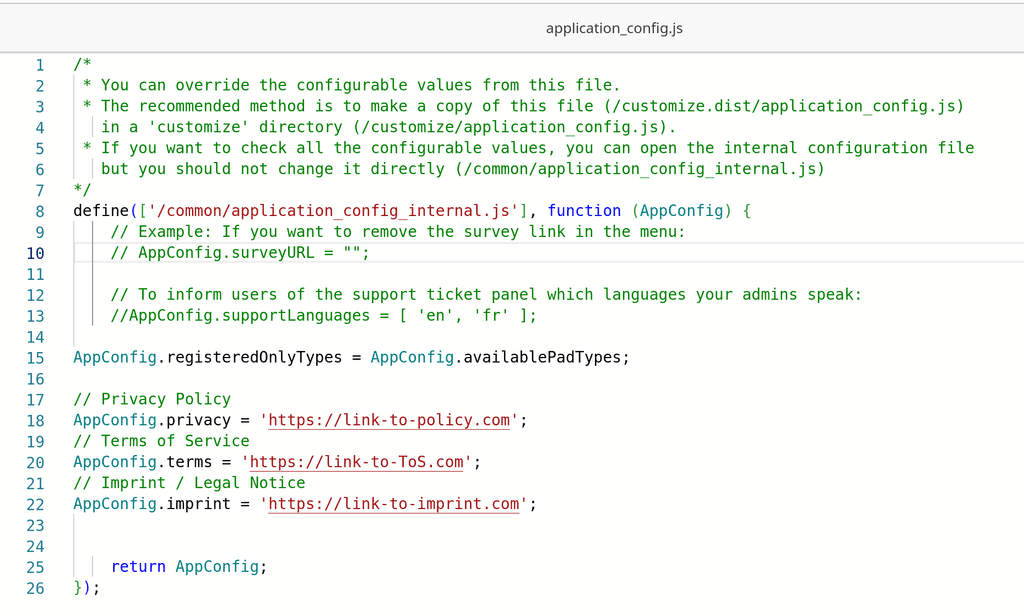
      @mgn841 You have to create it in /app/data/customize/application_config.js as specified in https://docs.cryptpad.org/en/admin_guide/customization.html#restricting-guest-access. Like:

      image.png

      1 Reply Last reply
      2
      • mgn841M
        mgn841M
        mgn841
        wrote on last edited by mgn841
        #3

        I was using the File manager, and I did not understand the documentation very well. In case anyone has trouble doing this, use the terminal for CryptPad and copy the necessary file using:

        cp /app/code/www/common/application_config_internal.js /app/data/customize/application_config.js
        

        Then you can use the File manager to edit the application_config.js file. It is in the customize folder when you open the File manager 👍

        1 Reply Last reply
        4
        • B
          B
          bwag
          wrote last edited by
          #4

          I am trying to restrict guest access with Cloudron 10.0.4 and Cryptpad 2026.5.1. I cannot follow the Cryptpad instructions from @girish 's link above because they refer to the files customize.dist/application_config.js and www/common/application_config_internal.js but neither of these seem to exist, nor their directories:

          $ ls app/
          blob  block  config.js  customize  data  datastore  sso.js
          $ cd app/ && find . -name "*application_config*"
          <no output>
          

          Can anyone help me here?

          1 Reply Last reply
          0
          • jamesJ
            jamesJ
            james
            Staff
            wrote last edited by james
            #5

            Hello @bwag

            I will update our documentation to include a guide for this.

            Edit:
            Here is the documentation:
            https://docs.cloudron.io/packages/cryptpad/#restricting-guest-access---docscryptpadorg

            1 Reply Last reply
            2
            • B
              B
              bwag
              wrote last edited by bwag
              #6

              Thank you! FWIW, my issue was caused by using ssh to navigate the app's data directory on my server, when I needed to be using the Web Terminal.

              I added all three of these lines:

              AppConfig.registeredOnlyTypes = AppConfig.availablePadTypes;
              AppConfig.disableAnonymousPadCreation = true;
              AppConfig.disableAnonymousStore = true;

              
              1 Reply Last reply
              1

              Hello! It looks like you're interested in this conversation, but you don't have an account yet.

              Getting fed up of having to scroll through the same posts each visit? When you register for an account, you'll always come back to exactly where you were before, and choose to be notified of new replies (either via email, or push notification). You'll also be able to save bookmarks and upvote posts to show your appreciation to other community members.

              With your input, this post could be even better 💗

              Register Login
              Reply
              • Reply as topic
              Log in to reply
              • Oldest to Newest
              • Newest to Oldest
              • Most Votes


              • Login

              • Don't have an account? Register

              • Login or register to search.
              • First post
                Last post
              0
              • Categories
              • Recent
              • Tags
              • Popular
              • Bookmarks
              • Search