
Cloudron makes it easy to run web apps like WordPress, Nextcloud, GitLab on your server. Find out more or install now.


Skip to content
  • Categories
  • Recent
  • Tags
  • Popular
  • Bookmarks
  • Search
Skins
  • Light
  • Brite
  • Cerulean
  • Cosmo
  • Flatly
  • Journal
  • Litera
  • Lumen
  • Lux
  • Materia
  • Minty
  • Morph
  • Pulse
  • Sandstone
  • Simplex
  • Sketchy
  • Spacelab
  • United
  • Yeti
  • Zephyr
  • Dark
  • Cyborg
  • Darkly
  • Quartz
  • Slate
  • Solar
  • Superhero
  • Vapor

  • Default (No Skin)
  • No Skin
Collapse
Brand Logo

Cloudron Forum

Apps - Status | Demo | Docs | Install
  1. Cloudron Forum
  2. Moodle
  3. App update to latest version failed with ERROR

App update to latest version failed with ERROR
Scheduled Pinned Locked Moved Moodle
13 Posts 3 Posters 4.6k Views 3 Watching
  • Oldest to Newest
  • Newest to Oldest
  • Most Votes
Reply
  • Reply as topic
Log in to reply
This topic has been deleted. Only users with topic management privileges can see it.
  • imc67I imc67

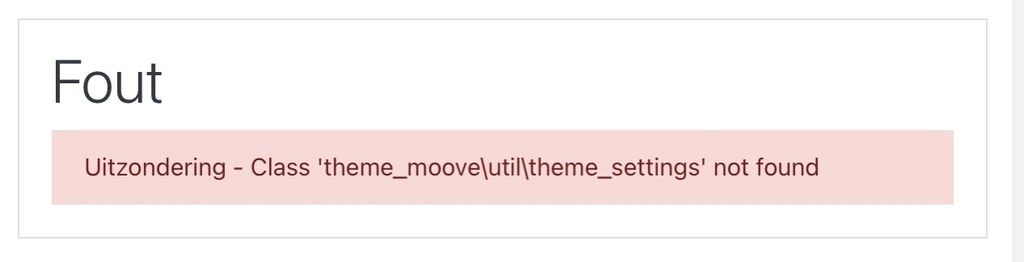
    I just tried to update Moodle to the latest version and it ended up in a broke site and the app status in "starting", error message at front end app URL:
    813049AD-EBC7-4203-844E-0B84C55C4990_4_5005_c.jpeg

    (Fout = ERROR and Uitzondering = Exception)

    As you see I use the Moove theme (very nice BTW).

    I restored it quickly to the latest backup.

    What can I do to make the update successful?

    girishG Offline
    girishG Offline
    girish
    Staff
    wrote on last edited by
    #2

    @imc67 Is that theme part of standard moodle?

    imc67I 1 Reply Last reply
    0
    • girishG Offline
      girishG Offline
      girish
      Staff
      wrote on last edited by
      #3

      I have revoked the latest release, until we get this sorted out.

      1 Reply Last reply
      0
      • girishG girish

        @imc67 Is that theme part of standard moodle?

        imc67I Offline
        imc67I Offline
        imc67
        translator
        wrote on last edited by
        #4

        @girish said in App update to latest version failed with ERROR:

        @imc67 Is that theme part of standard moodle?

        No this is by far the most used theme from the Moodle Themes: https://moodle.org/plugins/theme_moove

        girishG 1 Reply Last reply
        0
        • imc67I imc67

          @girish said in App update to latest version failed with ERROR:

          @imc67 Is that theme part of standard moodle?

          No this is by far the most used theme from the Moodle Themes: https://moodle.org/plugins/theme_moove

          girishG Offline
          girishG Offline
          girish
          Staff
          wrote on last edited by
          #5

          @imc67 I have fixed the bug in the new package. Can you check? (1.1.2-1)

          imc67I 1 Reply Last reply
          0
          • girishG girish

            @imc67 I have fixed the bug in the new package. Can you check? (1.1.2-1)

            imc67I Offline
            imc67I Offline
            imc67
            translator
            wrote on last edited by
            #6

            @girish after update it doesn’t start and in the logs it says:

            ==> Creating symlinks for temp files
            Mar 09 07:39:57 /app/pkg/start.sh: line 16: /usr/bin/rm: Argument list too long

            luckowL 1 Reply Last reply
            1
            • imc67I imc67

              @girish after update it doesn’t start and in the logs it says:

              ==> Creating symlinks for temp files
              Mar 09 07:39:57 /app/pkg/start.sh: line 16: /usr/bin/rm: Argument list too long

              luckowL Offline
              luckowL Offline
              luckow
              translator
              wrote on last edited by luckow
              #7

              @imc67 my workaround:
              from inside the terminal change directory to /app/data/moodledata/sessions/ and rm -rf * Restart the app and the update magic will happen.

              Why rm -rf /app/data/moodledata/sessions/* quits with an Argument list too long error? I don't know.

              Pronouns: he/him | Primary language: German

              girishG 1 Reply Last reply
              1
              • luckowL luckow

                @imc67 my workaround:
                from inside the terminal change directory to /app/data/moodledata/sessions/ and rm -rf * Restart the app and the update magic will happen.

                Why rm -rf /app/data/moodledata/sessions/* quits with an Argument list too long error? I don't know.

                girishG Offline
                girishG Offline
                girish
                Staff
                wrote on last edited by
                #8

                @luckow Indeed, that seems to be the issue, thanks for debugging! Making a new package.

                1 Reply Last reply
                1
                • girishG Offline
                  girishG Offline
                  girish
                  Staff
                  wrote on last edited by
                  #9

                  @imc67 pushed a new package now.

                  imc67I 1 Reply Last reply
                  0
                  • girishG girish

                    @imc67 pushed a new package now.

                    imc67I Offline
                    imc67I Offline
                    imc67
                    translator
                    wrote on last edited by
                    #10

                    @girish said in App update to latest version failed with ERROR:

                    @imc67 pushed a new package now.

                    Is there a way to force update to Version 1.1.2-2 as now the suggested app update is Version 1.1.2-1

                    imc67I 1 Reply Last reply
                    0
                    • imc67I imc67

                      @girish said in App update to latest version failed with ERROR:

                      @imc67 pushed a new package now.

                      Is there a way to force update to Version 1.1.2-2 as now the suggested app update is Version 1.1.2-1

                      imc67I Offline
                      imc67I Offline
                      imc67
                      translator
                      wrote on last edited by
                      #11

                      @girish got it, went to Cloudron - settings - updates - check updates

                      girishG 1 Reply Last reply
                      1
                      • imc67I imc67

                        @girish got it, went to Cloudron - settings - updates - check updates

                        girishG Offline
                        girishG Offline
                        girish
                        Staff
                        wrote on last edited by girish
                        #12

                        @imc67 Yes, correct. That "refreshes" the updates by fetching latest from server.

                        🤞 about the update. I did test the update manually with the moove plugin. But the rm logic was wrong, I guess you do have a lot of session files.


                        imc67I 1 Reply Last reply
                        0
                        • girishG girish

                          @imc67 Yes, correct. That "refreshes" the updates by fetching latest from server.

                          🤞 about the update. I did test the update manually with the moove plugin. But the rm logic was wrong, I guess you do have a lot of session files.

                          imc67I Offline
                          imc67I Offline
                          imc67
                          translator
                          wrote on last edited by
                          #13

                          @girish update went fine!!! Thanks!

                          Indeed there where 40K+ session files, they are all gone now.

                          I do see a new folder “Moodle-prev-do-not-touch” 🙂

                          1 Reply Last reply
                          1

                          Hello! It looks like you're interested in this conversation, but you don't have an account yet.

                          Getting fed up of having to scroll through the same posts each visit? When you register for an account, you'll always come back to exactly where you were before, and choose to be notified of new replies (either via email, or push notification). You'll also be able to save bookmarks and upvote posts to show your appreciation to other community members.

                          With your input, this post could be even better đź’—

                          Register Login
                          Reply
                          • Reply as topic
                          Log in to reply
                          • Oldest to Newest
                          • Newest to Oldest
                          • Most Votes


                          • Login

                          • Don't have an account? Register

                          • Login or register to search.
                          • First post
                            Last post
                          0
                          • Categories
                          • Recent
                          • Tags
                          • Popular
                          • Bookmarks
                          • Search