Cloudron makes it easy to run web apps like WordPress, Nextcloud, GitLab on your server. Find out more or install now.


Skip to content
  • Categories
  • Recent
  • Tags
  • Popular
  • Bookmarks
  • Search
Skins
  • Light
  • Brite
  • Cerulean
  • Cosmo
  • Flatly
  • Journal
  • Litera
  • Lumen
  • Lux
  • Materia
  • Minty
  • Morph
  • Pulse
  • Sandstone
  • Simplex
  • Sketchy
  • Spacelab
  • United
  • Yeti
  • Zephyr
  • Dark
  • Cyborg
  • Darkly
  • Quartz
  • Slate
  • Solar
  • Superhero
  • Vapor

  • Default (No Skin)
  • No Skin
Collapse
Brand Logo

Cloudron Forum

Apps - Status | Demo | Docs | Install
  1. Cloudron Forum
  2. Invoice Ninja
  3. VAT calculation not exact

VAT calculation not exact
Scheduled Pinned Locked Moved Invoice Ninja
3 Posts 2 Posters 1.3k Views 2 Watching
  • Oldest to Newest
  • Newest to Oldest
  • Most Votes
Reply
  • Reply as topic
Log in to reply
This topic has been deleted. Only users with topic management privileges can see it.
  • martinkbsM Offline
    martinkbsM Offline
    martinkbs
    wrote on last edited by
    #1

    Hi guys,

    I think Invoice Ninja is having trouble rounding VAT amounts.

    Suppose I want to sell a product for 10€ VAT included (21%)

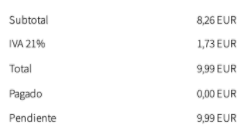
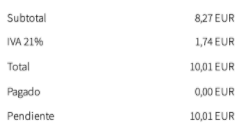
    Invoice Ninja only allows the following combinations:

    • 8,26 + 1,73 = 9,99€
    • 8,27 + 1,74 = 10,01€

    826c7e4e-3262-4e1e-85ad-6b9c6273cf16-image.png
    b79cc96d-b518-4b4d-bb36-8cfc664c54eb-image.png

    This happens in both exclusive and inclusive tax methods.

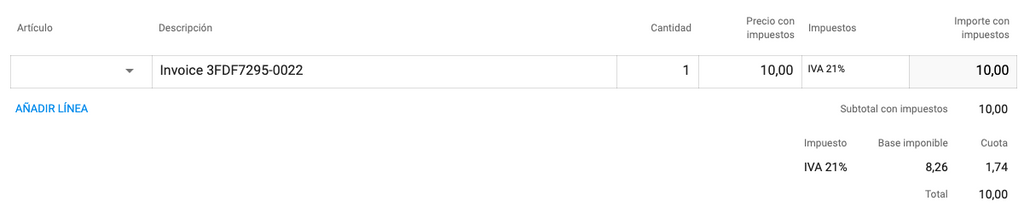
    In another accounting SAAS, the invoice is as follows:

    • Subtotal: 8,26€
    • VAT: 1,74€
    • Total: 10,00€

    92b54996-4277-4e02-be26-f0ada56317bf-image.png

    But right now, in Invoice Ninja there is no way to put a total of 10€ that contains 21% VAT.

    Is there any way to solve it?

    Thanks!

    fbartelsF 1 Reply Last reply
    0
    • martinkbsM martinkbs

      Hi guys,

      I think Invoice Ninja is having trouble rounding VAT amounts.

      Suppose I want to sell a product for 10€ VAT included (21%)

      Invoice Ninja only allows the following combinations:

      • 8,26 + 1,73 = 9,99€
      • 8,27 + 1,74 = 10,01€

      826c7e4e-3262-4e1e-85ad-6b9c6273cf16-image.png
      b79cc96d-b518-4b4d-bb36-8cfc664c54eb-image.png

      This happens in both exclusive and inclusive tax methods.

      In another accounting SAAS, the invoice is as follows:

      • Subtotal: 8,26€
      • VAT: 1,74€
      • Total: 10,00€

      92b54996-4277-4e02-be26-f0ada56317bf-image.png

      But right now, in Invoice Ninja there is no way to put a total of 10€ that contains 21% VAT.

      Is there any way to solve it?

      Thanks!

      fbartelsF Offline
      fbartelsF Offline
      fbartels
      App Dev
      wrote on last edited by
      #2

      Hi @martinkbs,

      this sounds like something that is better suited for the invoice ninja developers directly. https://forum.invoiceninja.com/

      martinkbsM 1 Reply Last reply
      1
      • fbartelsF fbartels

        Hi @martinkbs,

        this sounds like something that is better suited for the invoice ninja developers directly. https://forum.invoiceninja.com/

        martinkbsM Offline
        martinkbsM Offline
        martinkbs
        wrote on last edited by martinkbs
        #3

        Hi @fbartels,

        Yes, it is actually a fairly frequent question that remains unsolved since Invoice Ninja version 4.X. They promised to fix this bug in version 5.X, but it still remains unsolved (https://forum.invoiceninja.com/t/invoice-rounding-amounts-not-limited-to-2-decimal-places/3978)

        I have posted it here, in case someone in the community had the same thing and had found a way to solve it. Surely you have to touch some .php file that controls the rounding of taxes, but they are not accessible in the Cloudron package.

        For example:

        /tests/acceptance/TaxRatesCest.php

               $total = $itemCost;
               $total += round($itemCost * $invoiceTaxRate / 100, 2);
        

        /app/Models/Invoice.php

               /**
                    * @param $invoiceItem
                    * @param $invoiceTotal
                    *
                    * @return float|int
                    */
                   public function getItemTaxable($invoiceItem, $invoiceTotal)
                   {
                       $total = $invoiceItem->qty * $invoiceItem->cost;
               
                       if ($this->discount != 0) {
                           if ($this->is_amount_discount) {
                               if ($invoiceTotal + $this->discount != 0) {
                                   $total -= $invoiceTotal ? ($total / ($invoiceTotal + $this->discount) * $this->discount) : 0;
                               }
                           } else {
                               $total *= (100 - $this->discount) / 100;
                           }
                       }
               
                       if ($invoiceItem->discount != 0) {
                           if ($this->is_amount_discount) {
                               $total -= $invoiceItem->discount;
                           } else {
                               $total -= $total * $invoiceItem->discount / 100;
                           }
                       }
               
                       return round($total, 2);
                   }
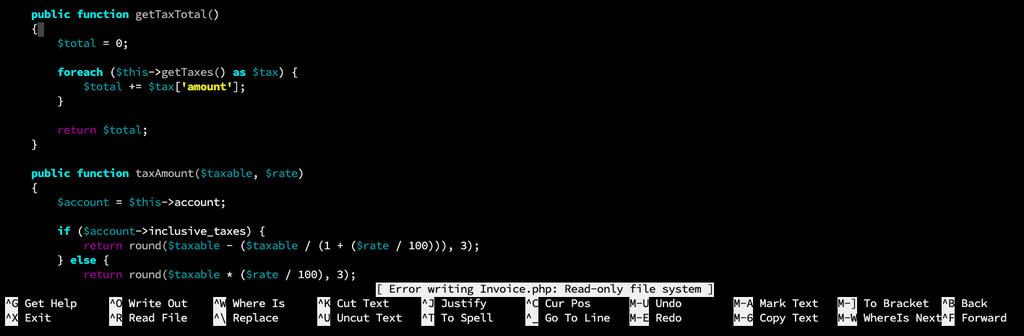
        

        5abc0208-75ae-47c4-a6ea-1ad887501672-image.png

        If someone has found how to solve it ... 🙏

        1 Reply Last reply
        2

        Hello! It looks like you're interested in this conversation, but you don't have an account yet.

        Getting fed up of having to scroll through the same posts each visit? When you register for an account, you'll always come back to exactly where you were before, and choose to be notified of new replies (either via email, or push notification). You'll also be able to save bookmarks and upvote posts to show your appreciation to other community members.

        With your input, this post could be even better 💗

        Register Login
        Reply
        • Reply as topic
        Log in to reply
        • Oldest to Newest
        • Newest to Oldest
        • Most Votes


        • Login

        • Don't have an account? Register

        • Login or register to search.
        • First post
          Last post
        0
        • Categories
        • Recent
        • Tags
        • Popular
        • Bookmarks
        • Search