
Unable to use API for firefly-iii
-
Hi,
I recently installed firefly-iii from cloudron marketplace. While the application itself is working nicely, I needed to write a custom importer and for that wanted to hit the REST API.
The API is supposed to be present at
/api/v1/...but I am always getting the login HTTP page back. I was thinking there is some issue with my code, request headers, etc. But I tried changing the url fromhttps://<my-website>/api/v1/transactionstohttps://demo.firefly-iii.org/api/v1/transactions(firefly's demo server) and the same requests are working.Is this related to how cloudron is setting up firefly-iii? I also checked firefly-iii configuration and there was no way to enable/disable REST API.
Can I get some help here?
-
Hi,
I recently installed firefly-iii from cloudron marketplace. While the application itself is working nicely, I needed to write a custom importer and for that wanted to hit the REST API.
The API is supposed to be present at
/api/v1/...but I am always getting the login HTTP page back. I was thinking there is some issue with my code, request headers, etc. But I tried changing the url fromhttps://<my-website>/api/v1/transactionstohttps://demo.firefly-iii.org/api/v1/transactions(firefly's demo server) and the same requests are working.Is this related to how cloudron is setting up firefly-iii? I also checked firefly-iii configuration and there was no way to enable/disable REST API.
Can I get some help here?
-
I misunderstood what 'Command line token' means. I thought this was the API token. It isn't. It's actually the token for running cron jobs over the web - https://docs.firefly-iii.org/firefly-iii/advanced-installation/cron/#request-a-page-over-the-web
-
Indeed, one must create a Personal Access Token from the OAuth page.
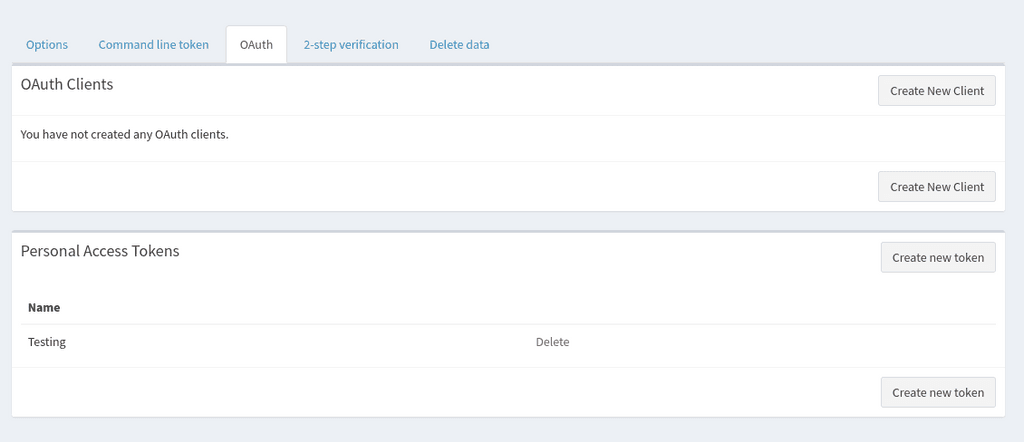
$ curl -LX GET 'https://ff3.example.com/api/v1/about'  -H 'accept: application/vnd.api+json' -H 'Authorization: Bearer xx'   -H 'Content-Type: application/json'
{"data":{"version":"5.7.10","api_version":"1.5.6","php_version":"8.0.21","os":"Linux","driver":"pgsql"}}
The above works without proxyAuth. Will now test with proxyAuth enabled.


Hello! It looks like you're interested in this conversation, but you don't have an account yet.
Getting fed up of having to scroll through the same posts each visit? When you register for an account, you'll always come back to exactly where you were before, and choose to be notified of new replies (either via email, or push notification). You'll also be able to save bookmarks and upvote posts to show your appreciation to other community members.
With your input, this post could be even better 💗
Register Login