
Hide "Stopped" apps by default
-
What are the chances of having "Stopped" apps hidden by default on the main App page, please?
I have a LOT more stopped apps, than I do "Running", and the default view is just cluttered by those.
Maybe I could move them to another instance, but time.
More I look at it, more I think this would make sense for most.
Maybe just a checkbox for "Hide Stopped", ticked by default, or a toggle switch?
@nebulon UI/UX is your thing here? Quick win?
Anyone else have this pet-peeve?
-
-
The existing set "state" persists after a browser restart for me. Is that not the case for you?
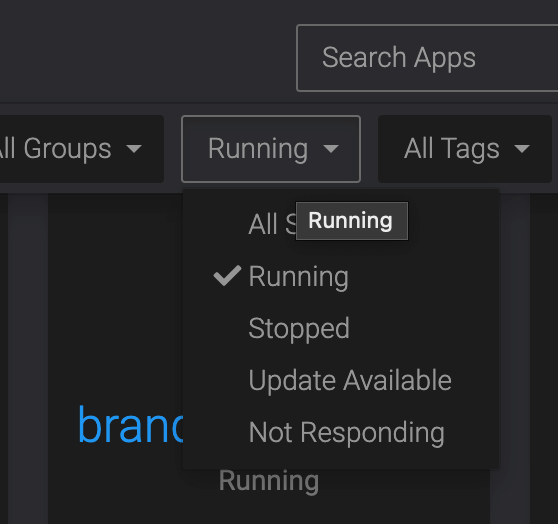
Setting it to "Running" instead of "All States" should do the trick, I believe.

@humptydumpty Interesting, didn't try that

It's kinda flawed tho, as apps that are "Updating" disappear from view then.
So it either needs to be multi-select, or "Running" changed to "Active" and include both "Running" and "Not Responding" / "Updating" / "Unavailable".
-
True, it's only single-select. I think someone (was it @timconsidine) mentioned a dashboard app that offers a plethora of customization options, but I can't find it after a quick search.
-
-
So I manually updated Ghost and the app disappeared from my dashboard. My heart dropped! Then, I realized I had left the state set at “running” from yesterday
 Don't grow old.
@humptydumpty Did the same with the milk the other day, after a long exasperating hunt, found in the cereal cupboard!


Hello! It looks like you're interested in this conversation, but you don't have an account yet.
Getting fed up of having to scroll through the same posts each visit? When you register for an account, you'll always come back to exactly where you were before, and choose to be notified of new replies (either via email, or push notification). You'll also be able to save bookmarks and upvote posts to show your appreciation to other community members.
With your input, this post could be even better 💗
Register Login